

Every great recipe starts with the right ingredients. Skip one and you’ll get uneven results (or even something RAW—rushed, ambiguous, and wasteful).
The same goes for AI prompts. In this story we’ll share our not-so-secret prompt recipes, plus three new feature tips that we’ve pulled out of the Copilot oven—still warm!—that can save you time and money.
Ready? Get set… cook!

Note:
Feature availability may vary. If you don’t see a specific feature in Copilot yet, it’s either still baking or could be included in a different license.
A prompt recipe that helps prevent ‘soggy bottoms’
Prep your station
Your goal: What are you making?
Who’s coming to dinner?
Your audience: Say who you’re cooking for.
Sweet or savory?
Your tone: Playful, formal, spicy, no-nonsense, etc.
Pull from the pantry
Your sources to reference: PowerPoint deck, notes, etc.
Cupcakes or wedding cake?
Your format: Five bullets? A table? A page? Describe what “done” looks like.
Here are a few examples:
- A half-baked prompt: “Summarize this for the team.”
- A nicely baked prompt: “Summarize this doc for our sales leads, who haven’t read it and have five minutes to prep. Use the attached deck and last week’s notes. Use plain language and no jargon. Provide five bullets and one recommended next step.”
RAW: Rushed, Ambiguous, Wasteful
A RAW prompt can leave you adding a dash of this and a pinch of that until you get the result you want. But with AI, every little addition costs you. Cook it right the first time.
Tip 1: Share your best recipes
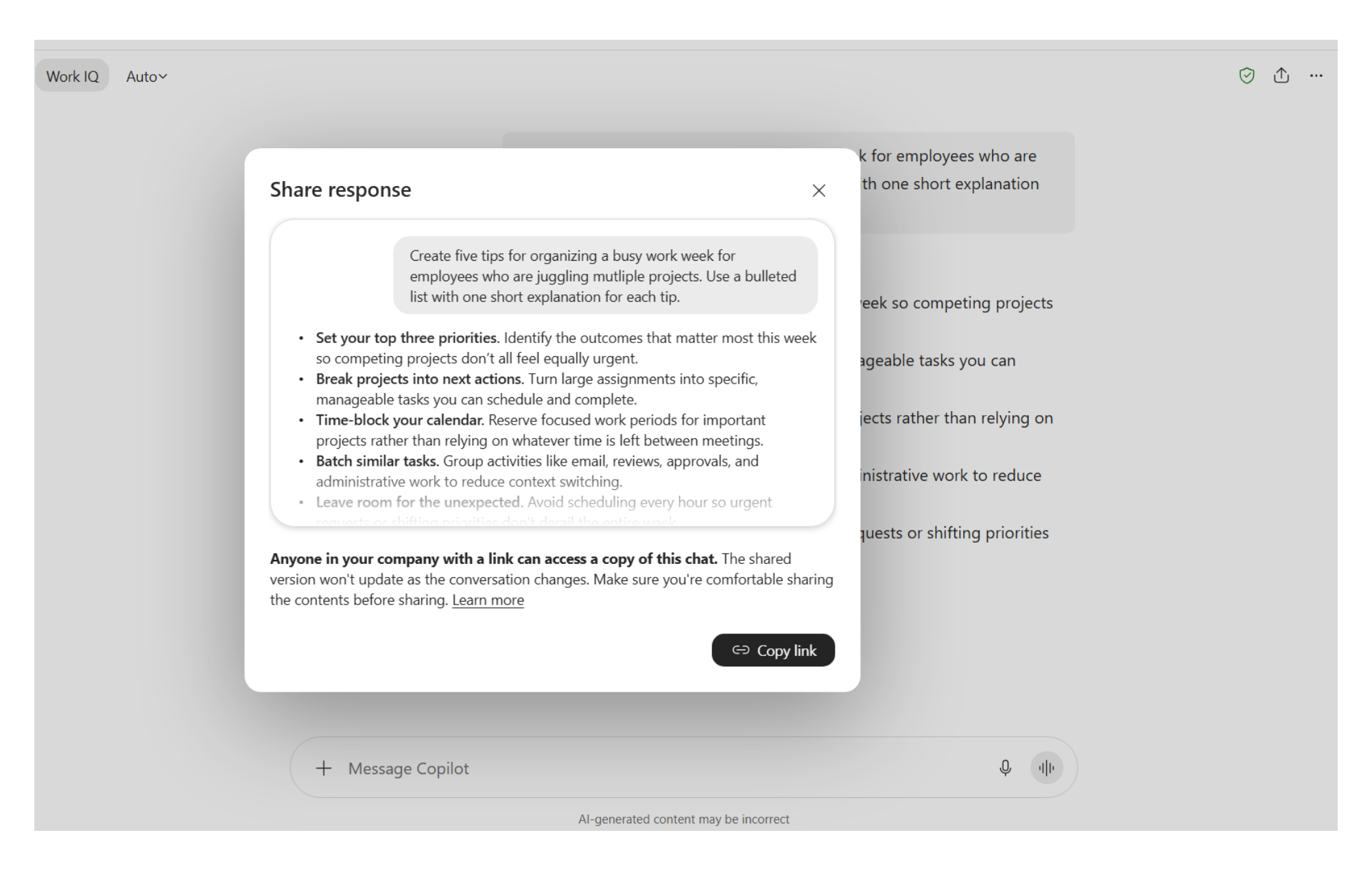
Full chats and individual responses are now shareable straight from Copilot. Whoever has the link can pick up the conversation like it was their own. Yum!
How to: Share a full chat by selecting the Share icon in the top right corner of the Copilot chat window, then click Share chat. To share an individual response, select the three dots at the end and then click Share response. A window will pop up that gives you a preview of what will be shared before you select Copy link.
Tip 2: Pick the right model to cook with
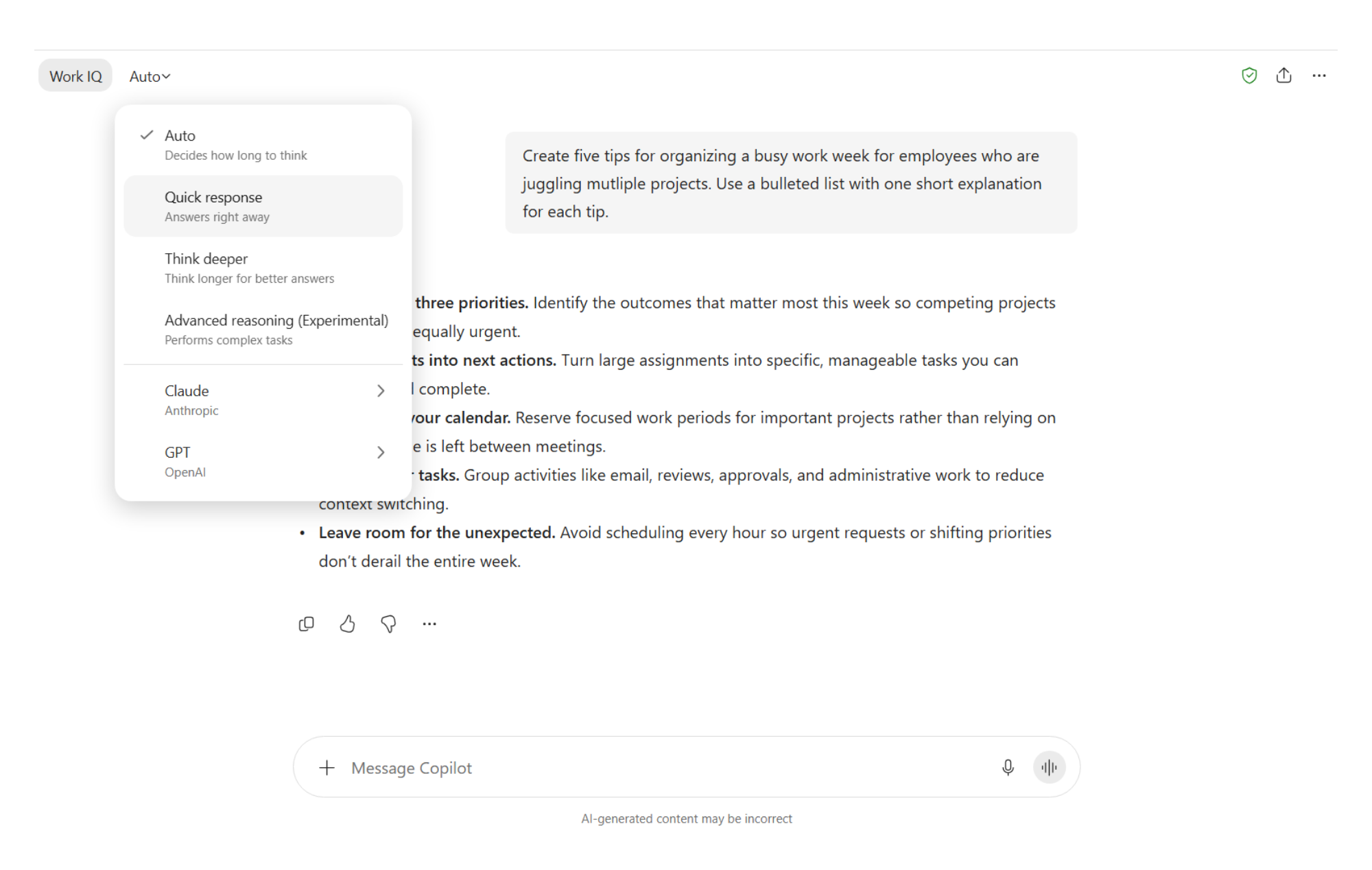
Now we’re cooking with gas! Leaving your model picker on Auto lets Copilot choose the best model for the task at hand. This means your chats will bake faster and you can reduce the number of tokens needed.
But sometimes you may want to try a different model—especially if your responses are coming out flat.
In Copilot Chat
How to: If you don’t like the taste of what Copilot has cooked up on your first try, simply go to the model picker dropdown menu and select a different one. Much faster than throwing out the cake and starting over!
In Cowork
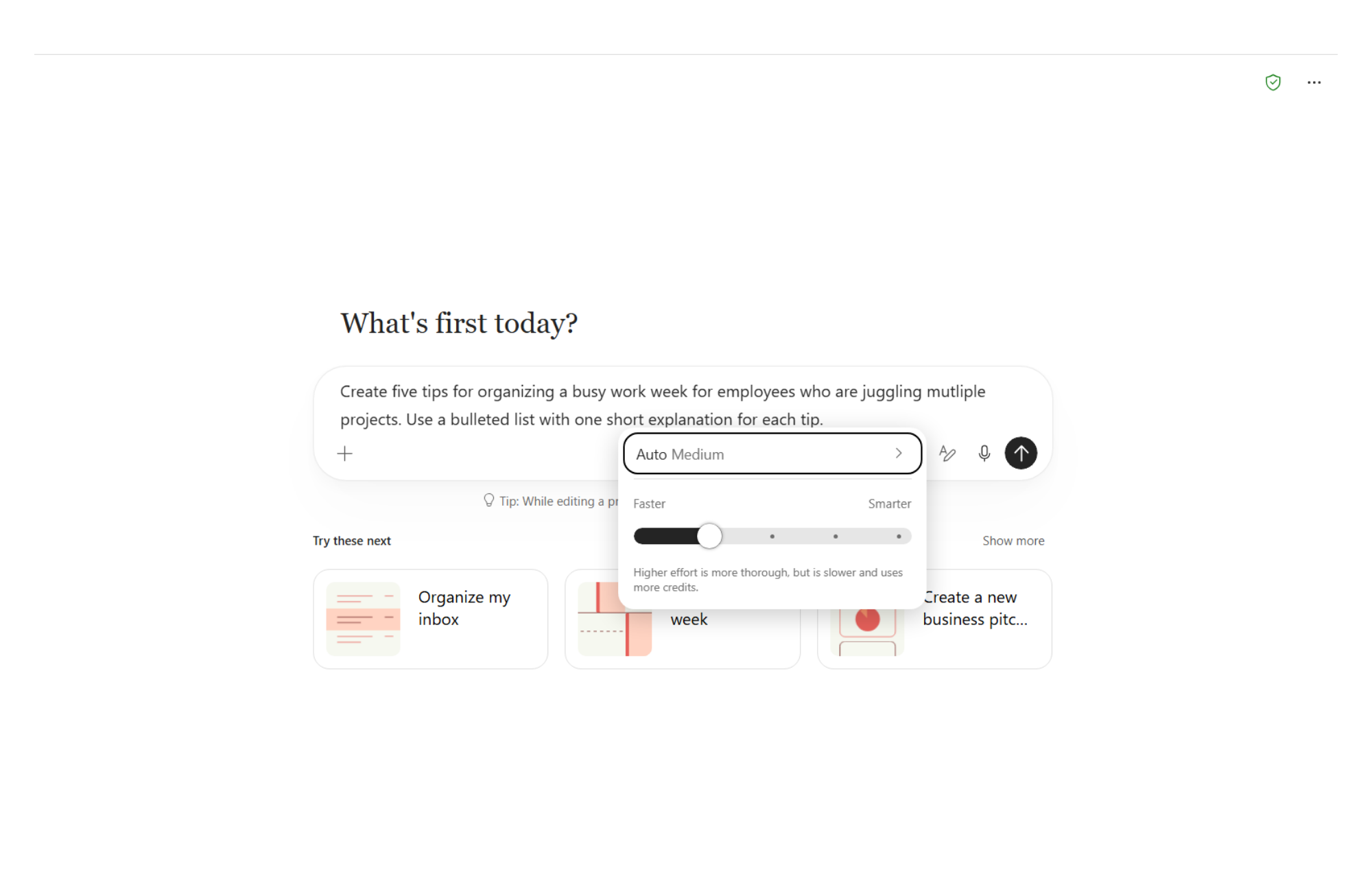
In Cowork, you can now select the right temperature needed for your task.
How to: In the Cowork prompt box, slide the Effort scale to the setting you want before you run your prompt: Light, Medium, High, Extra High, or Max. Medium is the default, and the best one to use most of the time. A higher setting will take longer and use more credits—and could leave you with an overdone dish.
Tip 3: Save and share your signature prompts as skills
You know that favorite recipe, the one you’ve made so many times you’ve practically memorized it? Creating a skill is like saving that recipe for Copilot.
Give Copilot the ingredients, instructions, and all the little details that will make it come out right. Then you can summon the skill again and again, and Copilot follows the recipe to a T for you every time.
Remember, good recipes are meant to be shared. Send the skill to someone else and they can add it to their own Copilot collection.
How to: In Copilot Chat, describe what you want the skill to do and ask Copilot to package it as a ZIP file. You’ll get a folder that includes a markdown (.md) file. That’s your skill all written down. Select the Save skill button to keep it.
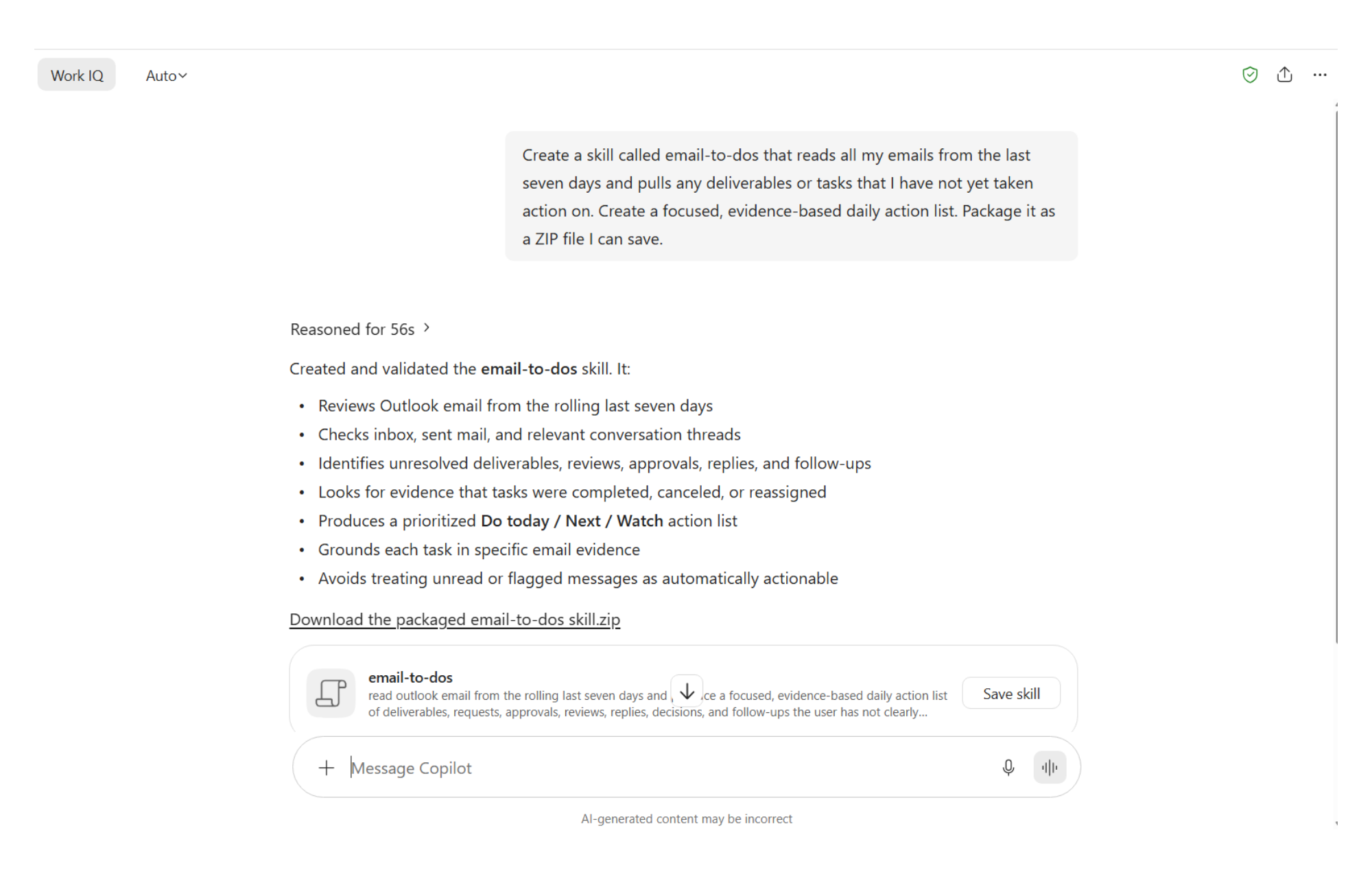
Sharing your new skill with others is even easier. At the end of the response, select the three dots and choose Share response. When you share the link, recipients will get the ZIP file with the skill, just as if they created it on their own!
After you’ve added and published your skill to Copilot, look for Agents and Skills in the left-hand navigation pane in Copilot Chat. You’ll see a list of all the agents and skills you’ve installed (including your new skills), all in one place (hit More if you only see a few). To use your new skill, select it from the list, or type a forward slash (/) in the prompt box of Copilot or Cowork and choose from there.
Look at you, a star chef!
Not every Copilot task requires a full kitchen
Which type of cooking method should you use?
- Easy-to-make dish: Create, brainstorm, and execute simple tasks—that’s Copilot Chat.
- One-pot wonder: Word, Excel, PowerPoint, and Teams all have Copilot inside. If it lives in the spreadsheet, cook it up in the spreadsheet.
- The oven: If it’s a long, multi-step process using several sources, you’ll have to let it bake for a while—that’s Cowork.
- Microwave: Copilot on your phone is great for fast results on the go.
Now grab your knives and get cooking! Try these tips for sharper prompts and new skills you can save and share, with nothing half-baked.
Bon appétit.
Key takeaways
If you’re looking to cook up your own delicious Copilot recipes, here are some tips to keep in mind:
- The secret ingredient to better AI “cooking” is a well-crafted prompt. Clearly defining your goal, audience, format, and sources helps Copilot deliver useful responses with less back-and-forth.
- Don’t keep your best recipes to yourself. You can now share entire chats or individual responses so others can build on existing work instead of starting from scratch.
- Choosing the appropriate Copilot experience is like selecting the best kitchen tool for the job. Whether you’re working in Chat, Cowork, Microsoft 365 apps, or on mobile, picking the right experience can help you work more efficiently.
- The right model can help your AI output rise to the occasion. Copilot can automatically select the best model for you, or you can adjust settings to match the task.
- Skills turn your best prompts into repeatable recipes. Save and share proven workflows so others can quickly replicate successful outcomes.
