

At Microsoft, we manage one of the world’s largest global corporate operations. Our operations teams process hundreds of billions in revenue and millions of transactions while adapting to fast-changing business demands. Much of that work flows through Business Process Outsourcing (BPO) operations, where vendors support workflows such as order and agreement processing.
As these processes grew in scale and complexity, it became clear that improving something highly manual and already operating at massive scale would require a fundamentally different approach.
“With BPO, we’re dealing with high-volume, high-touch processes that are core to how the business runs,” says Jonathan d’Orgee, an AI transformation lead for Microsoft Business Operations.
For many organizations, the idea of overhauling a core business process can feel like a daunting step. At Microsoft we act as our own first customer, which gives us a way to test, refine, and de-risk that transformation in our own operations before bringing those proven patterns to customers. We call this approach Customer Zero.
In this case, that meant rethinking how high-volume operations could run better with AI directly embedded into day-to-day tasks, including building solutions using tools like Microsoft Dynamics 365 and Azure AI.

“We looked at manual steps, broken workflows, and disconnected systems as opportunities for AI transformation.”
Jonathan d’Orgee, AI transformation lead, Microsoft Business Operations

Identifying manual inefficiencies
On top of the complexity of handling so many transactions across the globe, Business Operations sometimes experienced periodic surges that could exacerbate inefficiencies. During these surges, the team would see a high volume of complex, time-critical transactions— especially at the end of the month or the quarter—and manual processes were too slow to keep up.
As we reviewed these inefficiencies, we looked for the most impactful use cases—places where we could integrate AI into workflows. To do this, we asked two important questions:
- What types of transactions have the highest volume?
- What parts of the process take the longest time or consume the most resources?
It was a classic case of the 80/20 rule—finding the 20% of the processes that required 80% of the work.
“We looked at manual steps, broken workflows, and disconnected systems as opportunities for AI transformation,” d’Orgee says.
An example might be where we receive an email asking to have a contract updated. In the former process, the email might sit there until a human could review it manually. Then someone would review it, direct it to the right queue, and assign it to the right person.
“With AI in the workflow, emails and attachments are analyzed right when they arrive, and immediately assigned to the right queue and person,” d’Orgee says.
Taking these kinds of steps dramatically increased efficiency and reduced costs overall.

“With deep knowledge of our Business Operations ecosystem, we targeted high-volume, repeatable workflows across globally distributed operations. These were processes where AI could break traditional location and labor constraints, unlocking scalable automation and measurable business impact.”
Shashidhar Lanka Venkata, partner group engineering manager, Business Commerce Platforms
Configuring an AI toolkit
Once we’d identified the areas that were ripe for transformation, we set about developing an AI-driven solution on top of our existing critical workflow systems.
“With deep knowledge of our Business Operations ecosystem, we targeted high-volume, repeatable workflows across globally distributed operations,” says Shashidhar Lanka Venkata, a partner group engineering manager in the Business Commerce Platforms team. “These were processes where AI could break traditional location and labor constraints, unlocking scalable automation and measurable business impact.”
The BPO AI Toolkit is our AI operating system for business process operations. Its job is to help us with decision making. Built on Microsoft Dynamics 365 and Azure AI, it brings process mining, Microsoft 365 Copilot, Windows 365, and the Azure Marketplace together into AI-native workflows that can be reused by different vendors.
The toolkit is built on a handful of capabilities that work together:

Agentic memory turns tribal knowledge into structured operational intelligence that agents can access on demand.

Prebuilt agents provide enterprise-ready capabilities that teams can reuse instead of rebuilding workflows.

An agentic UI reduces context-switching time, helping operators focus on decisions and exceptions.

Digital Twins measures real end-to-end process performance and continuous improvement.

Agent Desktop provides secure access anywhere.
“It’s just part and parcel of working with AI, which is much different than working with more traditional ways of automating,” says d’Orgee.
He explains that because the AI is configurable, our teams are able to move faster. “The lead time is a lot shorter, and we’re able to make changes a lot more quickly.”
At the core of everything during this effort was the drive to constantly assess “the human buy-in:” How are people using this technology in a way that solves real problems at a global scale?
Keeping humans in the loop and measuring AI transformation
Integrating AI into existing workflows and processes isn’t just about the technology—it also should entail a cultural shift within an organization.
We wanted to ensure that our operations team was adopting the AI tools in the right way. That meant understanding which processes must still be human-led, such as areas where the handling of exceptions requires more discernment.
Rather than removing humans from the process, the team redefined the human role. AI now handles tasks such as data validation, case creation, and compliance checks, while our team members focus on judgment, exceptions, and continuous improvement.
“It’s really exciting for us, because operations has always been about trying to be efficient. With AI, it’s allowed for breakthroughs that we haven’t been able to achieve before.”
Jonathan d’Orgee, AI transformation lead, Microsoft Business Operations
That balance helped the team scale automation without losing the oversight and expertise needed to maintain quality.
The impact of this Frontier model has been significant. So far, we’ve been able to transform roughly a quarter of our BPO processes with AI. This has led to an 80% improvement in process quality and a 33% reduction in cost per transaction, d’Orgee says.
More than 75% of the cases our teams work on are processed utilizing the AI toolkit. These gains are measured with Digital Twins, a process-mining model that monitors each workflow live, allowing teams to continuously track and improve. Building on this momentum, the team has plans to transform 80% of the BPO process with AI by fiscal year 2028.
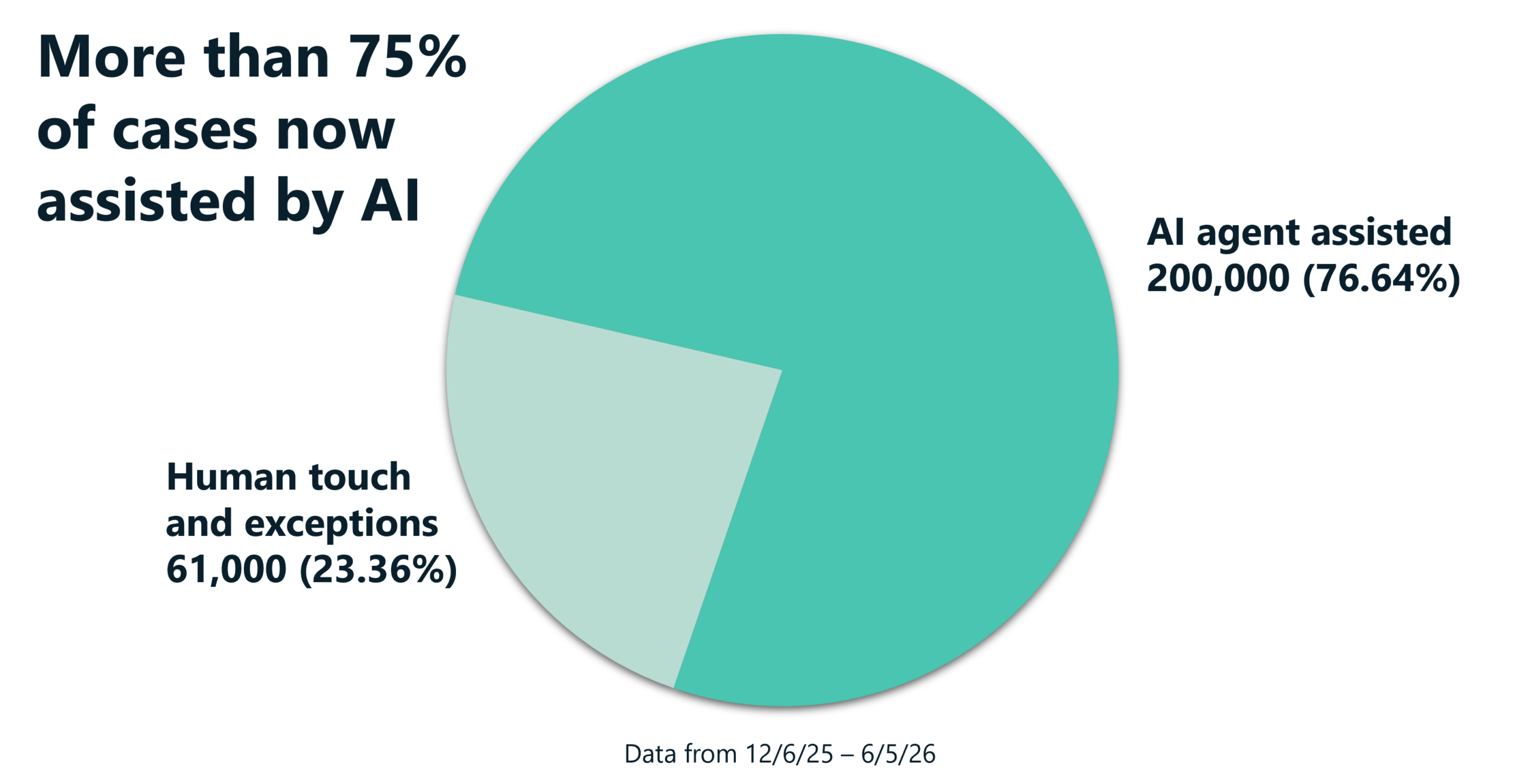
D’Orgee urges organizations that want to apply our Customer Zero learnings to their own workflows to look for high-volume, high-effort, highly manual work. This will lead you to the best opportunities for automating your processes at scale and deliver the most benefit.
From finance to sales operations, teams across Microsoft have turned to the BPO AI toolkit to prove how reusable AI capabilities can drive enterprise-wide transformation.
“It’s really exciting for us, because operations has always been about trying to be efficient,” d’Orgee says. “With AI, it’s allowed for breakthroughs that we haven’t been able to achieve before. I’ve just been thrilled to come to work on that front.”
Key takeaways
You can use these lessons and insights from our AI transformation of BPO to guide your own workflow transformation:
- Identify inefficiencies and find processes with repeatability and scale. Look for highly manual workflows that could benefit from AI integration.
- Use workflow capabilities that can be configured across different scenarios. An AI toolkit that spans multiple stages can form the foundation for significant improvements and time savings.
- Test and iterate, following up on improvements as you learn. This enables adaption of the development process beyond traditional automation.
- Keep humans in the loop and leading the way. Identify workflows where human judgment and handling of edge cases must take precedence.
Try it out
Related links
- Learn how we’re streamlining our finance cash collection at Microsoft with AI.
- Read more about how we are empowering our developers to adopt agentic AI at Microsoft.
- Find out what it means to be Customer Zero at Microsoft in an AI-powered world.
- Get insights from governing AI agents at scale at Microsoft.
