This feature allows users to seamlessly migrate from their portal add-on licenses to the new capacity-based licensing model.
What licensing model i am in?
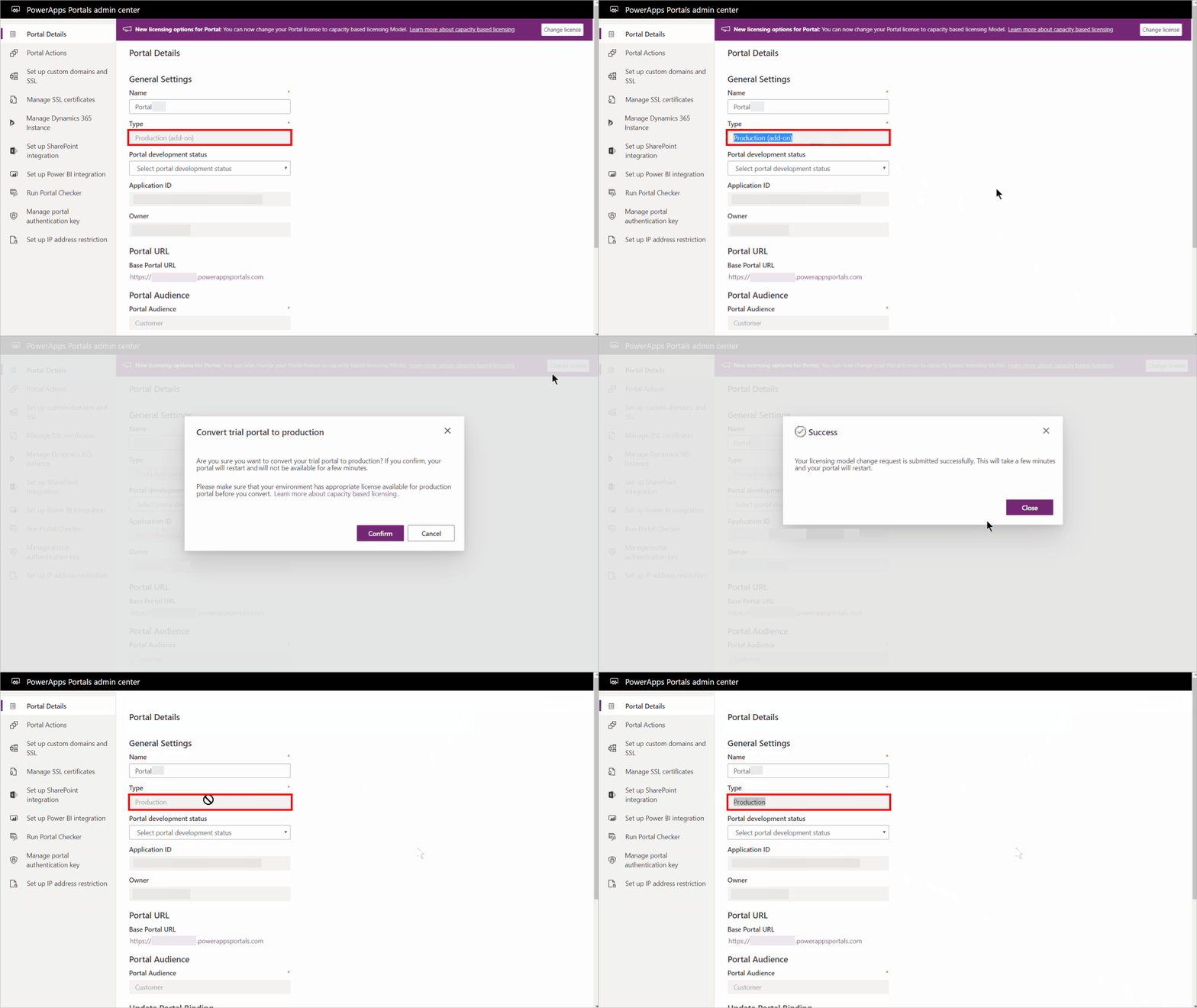
If your portal uses add-on based license, you’ll see “add-on” suffix to your portal type. You can check your portal type from the Portal Details page.

Convert existing portal to capacity-based model
If you’re using capacity-based licensing model, you’ll see “Change License” notification on Portal Details page.
Select “Change License” to convert your licensing model. IMPORTANT: Review the considerations before changing your portal license.

After your portal is successfully converted to the new capacity-based licensing model, the portal type will change to “Production” and the “add-on” suffix will be removed.
You can use this functionality to convert your “Production (add-on)” and “Trial (add-on)” type portal to “Production” capacity-based licensing model.
See documentation here for detailed overview and instructions.
Thank you,
Neeraj Nandwana