
The Dataverse MCP Server now supports custom APIs allowing customers to leverage their existing custom business logic, from their Agents, regardless of where they are hosted.
What is a Custom API?
A Custom API is a Dataverse feature that lets you define your own first-class server-side operation, much like how built-in actions like “Win Opportunity” or “Qualify Lead” work, except you design it.
A Custom API has:
- A unique name and display name, so it’s discoverable like any other Dataverse message.
- A binding type: unbound (global), or bound to an entity or entity collection, depending on whether the operation is a general action or one tied to a specific record type.
- A typed request contract: named, typed input parameters the caller must supply (a Guid, a string, a DateTime, etc.).
- A typed response contract: named, typed output properties the caller gets back.
- A plug-in as its main operation: your C# code that actually runs when the API is called, with full access to the organization service.
In other words, a Custom API turns “a business operation” into “a real Dataverse message”, something you can call with Execute/Web API requests just like Create, Update, or any out-of-the-box action, but that runs your logic, with your inputs and outputs, inside a single Dataverse transaction. That transactional guarantee and the fact that it’s real, typed, discoverable metadata rather than an ad-hoc script is what makes it so useful, and why it’s a natural fit for AI agents that need to invoke business operations reliably.
Note: Custom Actions are not currently supported in Dataverse MCP Server
The Problem: Chat Agents Are Great at Talking, Bad at Transactions
Imagine a support rep typing this into GitHub Copilot Chat:
“Create a high-priority case for Adventure Works because their shipment arrived damaged. Add the customer’s description as a note and schedule a follow-up for Friday afternoon.”
That’s one sentence. But underneath it, Dataverse needs three related writes that all have to succeed together:
- Create the case (
incident) - Attach a note (
annotation) describing the damage - Create a follow-up task (
task) regarding the case
If an agent, or a Power Automate flow, or any orchestration layer performs these as three separate calls, you inherit every problem that comes with multi-step, non-atomic operations:
- Partial failures. The case gets created, but the task creation fails. Now there’s an orphaned case with no follow-up, and nobody notices until a customer complains a second time.
- Compensation logic. You now have to write cleanup code: “if step 3 fails, roll back steps 1 and 2.” That’s real engineering effort spent on something that should be free — a database transaction.
- A leaky, low-level API surface. The agent (or any MCP client) sees three generic, unrelated record-creation calls instead of one meaningful business action. It has to know the business rules connecting them (note must reference the case, task must reference the case, etc.) instead of just invoking “handle a damaged shipment.”
The Fix: Push the Transaction Boundary Into Dataverse
A Dataverse Custom API is a first-class, discoverable operation like the built-in “Win Opportunity” or “Qualify Lead” actions, except you define it. When it’s backed by a plug-in, the entire multi-step operation happens inside a single Dataverse transaction, on the server, as one atomic unit:
- If any step fails, the plug-in throws
InvalidPluginExecutionExceptionand Dataverse rolls back everything, no orphaned case, no dangling note. - The caller (a human, a flow, or an AI agent) sees one operation with a clear contract: specific inputs in, specific outputs out.
- Because it’s registered Dataverse metadata, it’s automatically discoverable by any GA-compliant tooling that can enumerate and describe Dataverse APIs, now including the Dataverse MCP server, which is how an agent like Copilot finds out the operation exists and what parameters it needs, without anyone hand-writing a tool description.
This is the real unlock for agentic scenarios: instead of teaching an LLM your entire data model and hoping it composes the right sequence of calls correctly every time, you teach Dataverse the business rule once, as governed, transactional server logic and the agent just calls it by name.
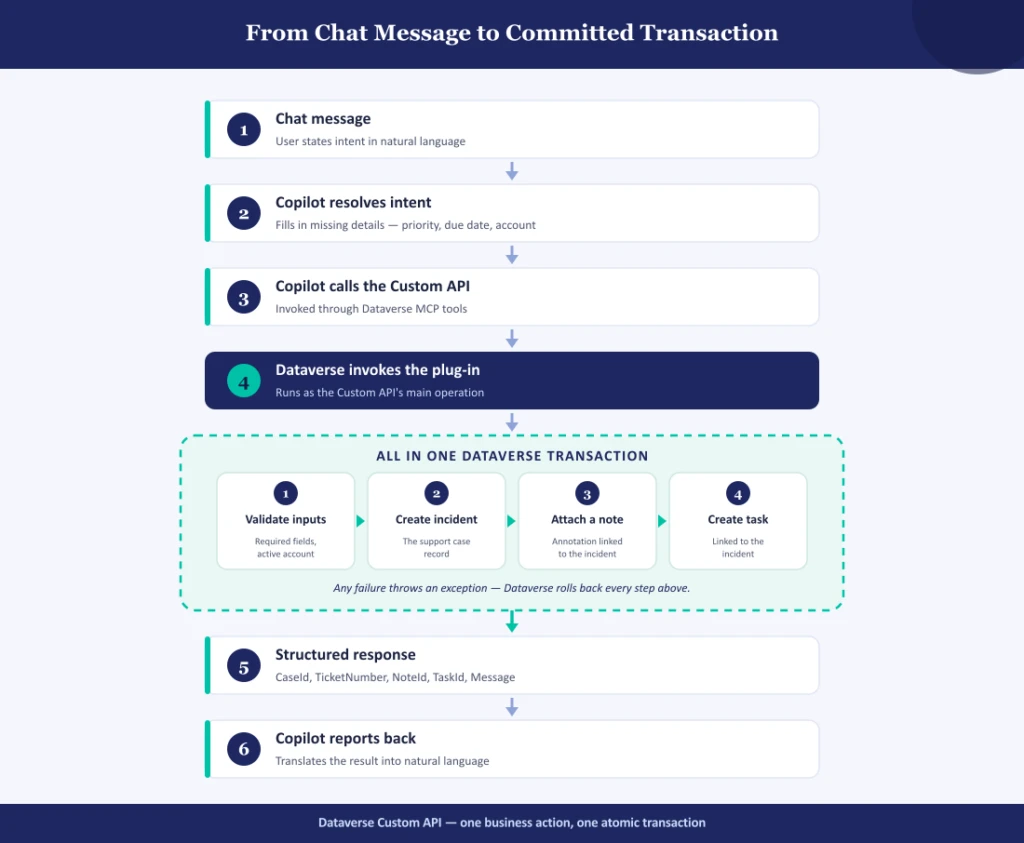
The Fix in practice: each request flows top to bottom through Copilot, MCP, and the Custom API — but everything inside the dashed box (validate, create case, create note, create task) executes as one Dataverse transaction. Fail anywhere in that box, and the whole thing rolls back; succeed, and Copilot reports the result in plain language.
How the MCP Server Discovers and Invokes Your Custom API
This section describes the three distinct MCP tool calls that will lead to your custom API being called. Take the original prompt: “Create a high-priority case for Adventure Works because their shipment arrived damaged. Add the customer’s description as a note and schedule a follow-up for Friday afternoon.”
1. Discovery: search
The agent doesn’t know your Custom API exists yet. It calls the MCP server’s search tool with keywords pulled from the request (“damaged shipment,” “case,” “follow-up”). The Dataverse MCP server indexes Custom APIs alongside tables, skills, and scopes, and returns a filesystem-style path:
api/_CreateCaseWithFollowUp — Create Case With Follow-Up
Notably, the search tool’s own instructions tell the model to check here first: “Before solving a task on your own, first check whether a suitable Custom API exists here; if one does, prefer invoking it over doing the work yourself.”
2. Schema resolution: describe
Finding the API by name isn’t enough to call it safely — the agent still needs the exact parameter contract. It calls describe("api/<prefix>_CreateCaseWithFollowUp") and gets back the full request schema: every input name, its type, whether it’s required, and a plain-language description pulled straight from the Custom API’s own metadata. This is the same metadata you defined when you registered the API:
{
  "apiUniqueName": "_CreateCaseWithFollowUp",
  "description": "Atomically creates a support case, attached note, and follow-up task for a damaged-shipment report.",
  "inputs": [
    { "name": "AccountId", "type": "string", "required": true, "description": "Account reporting the damaged shipment." },
    { "name": "CaseTitle", "type": "string", "required": true, "description": "Short title for the customer support case." },
    { "name": "CaseDescription", "type": "string", "required": true, "description": "Customer description of the damaged shipment." },
    { "name": "Priority", "type": "string", "required": true, "description": "Case priority: High, Normal, or Low." },
    { "name": "CaseOrigin", "type": "string", "required": true, "description": "Case origin: Phone, Email, or Web." },
    { "name": "FollowUpSubject", "type": "string", "required": true, "description": "Subject for the follow-up task." },
    { "name": "FollowUpDueDate", "type": "string", "required": true, "description": "Due date and time for the follow-up task." }
  ]
}
This is why the contract-design step matters so much: every string in that JSON is something the model reads as its only source of truth for how to call your API. Clear names and descriptions produce correct calls; vague ones produce guesses.
3. Invocation: invoke_api
With the schema in hand, the agent resolves the account, maps “high-priority” and “Friday afternoon” into the right values, and calls a single generic invocation tool, invoke_api, passing the Custom API’s unique name and the inputs as a JSON object:
{
  "apiUniqueName": "_CreateCaseWithFollowUp",
  "apiInputs": {
    "AccountId": "",
    "CaseTitle": "Damaged shipment - Adventure Works",
    "CaseDescription": "Customer reports shipment arrived damaged.",
    "Priority": "High",
    "CaseOrigin": "Web",
    "FollowUpSubject": "Call customer about damaged shipment",
    "FollowUpDueDate": "2026-09-20T00:00:00Z"
  }
}
Dataverse runs the plug-in as one transaction and returns the response properties as key/value pairs — this is a real response captured from a live call against the API built for this post:
[
  { "Key": "CaseId", "Value": "bb407637-9baf-f111-aaad-70a8a59b6bea" },
  { "Key": "TicketNumber", "Value": "CAS-01003-R9Q6N9" },
  { "Key": "NoteId", "Value": "c2407637-9baf-f111-aaad-70a8a59b6bea" },
  { "Key": "TaskId", "Value": "5939713d-9baf-f111-aaad-70a8a59b6bea" },
  { "Key": "Message", "Value": "Case CAS-01003-R9Q6N9 was created for Adventure Works with a follow-up task." }
]
The agent doesn’t parse Dataverse internals to build that reply — it already has Message handed to it, plus structured IDs it can reference if the user asks a follow-up question (“what’s the case number again?”).
The pattern generalizes: search to find the operation, describe to learn its contract, invoke_api to run it. No custom tool description, no hand-written wrapper, the MCP server derives all three steps directly from Dataverse metadata you already created when you built the Custom API.
Additional Resources
Here are some additional resources that will help you create your custom API. Once you have this API published, it will be automatically discovered by the Dataverse MCP Server.
Create and use custom APIs (Microsoft Dataverse) conceptual overview: https://learn.microsoft.com/en-us/power-apps/developer/data-platform/custom-api
Create a custom API in Power Apps (maker portal walkthrough) — step-by-step, including plug-in registration: https://learn.microsoft.com/en-us/power-apps/developer/data-platform/create-custom-api-maker-portal