We’re thrilled to announce a new feature under Power Apps Ideas, example to formula or also known as programming by example, is now available in public preview!
We know that manipulating text in a table can sometimes be tedious and heavy as you need to spend time working on which formula to pick, how to write them correctly, and spend hours if not days testing and tuning to get your desired output. Now, with Power Apps Ideas – Programming by example, you can just tell Power Apps what is the desired output and Power Apps will work out the formulas to get you there.
Following gif provides you a quick example. Say I want to change my date to only show month (represented by words). I can simply select my date field, and enter a desired output which is “May”, then I can get a formula in seconds. By applying the formula suggestion I see the full date changed to month only. Furthermore, if I just want to show the first 3 letters of the month, all I need to do is to feed one more example to Power Apps Ideas by clicking “Train with examples”. Once done, I can get a new formula immediately and apply to check the results which perfectly meets my expectation.
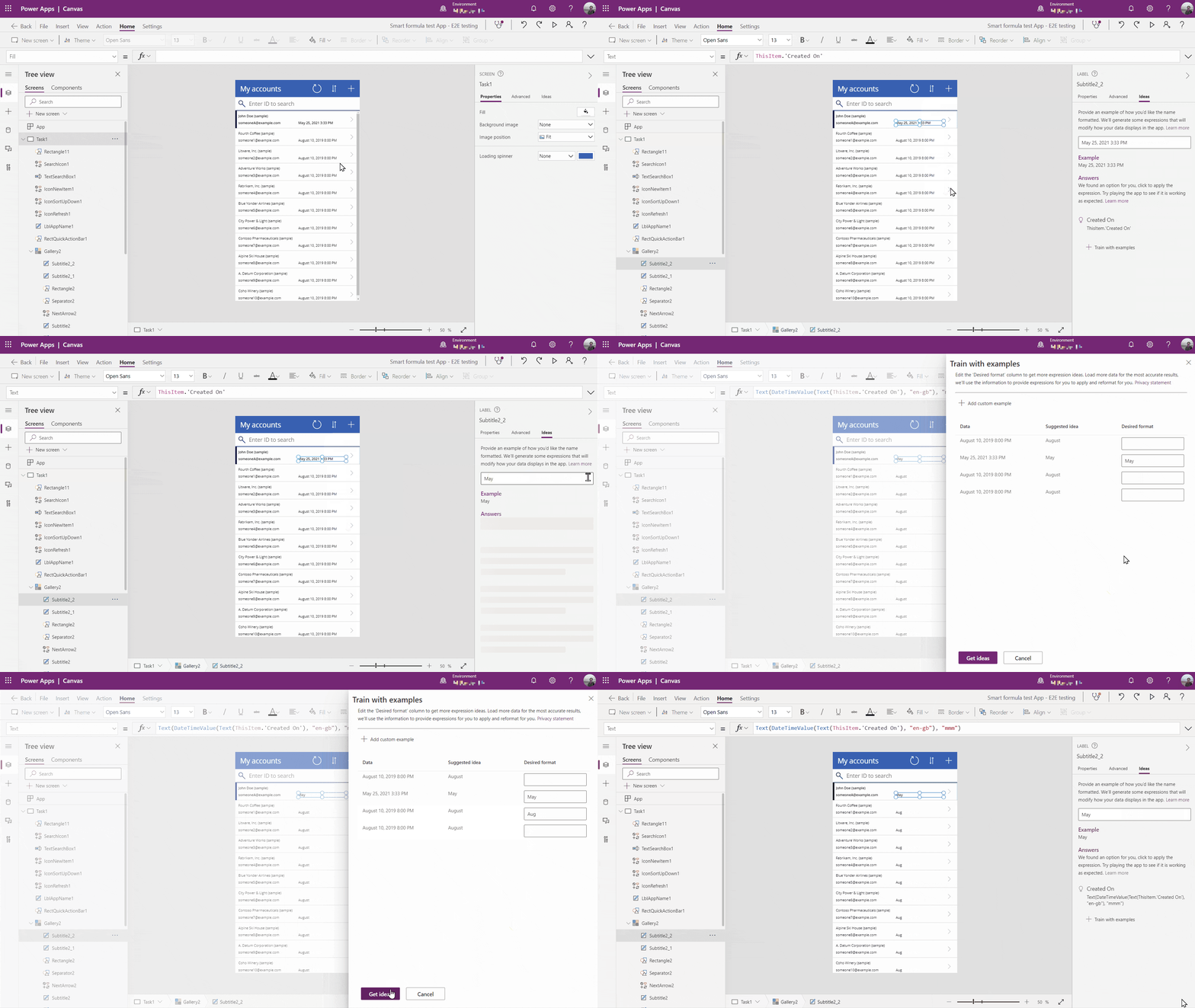
This feature is powered by PROSE (Programming by Examples and Natural Language), researched and developed by the Microsoft PROSE team. And the same technology is already used in other Microsoft products as well, e.g. Flash fill in Excel, Intellicode suggestions in Visual Studio and Table extraction in Power Query, etc. Now it is also available in Power Apps, currently for US region only. Make sure you have turned on the “Enable Ideas panel” flag if you cannot see it in your apps in a US environment.
Before you get too excited, there’re also some limitations. It currently supports label controls within a gallery and works best for dates and strings. You can refer to this document for more details.
As a next step, we plan to expand support to more scenarios and more data types. We look forward to any feedback you have on this feature. Try it out and let us know your feedback and ideas in the Power Apps community forum.