Summary Welcome to the Power Platform monthly feature update! We will use this blog to share news in Power Platform from the last month, so you can find a summary of product, community, and learning updates from Power Platform in one easy place. Now, let’s dive into what’s new in Power Platform:
Get started with the latest updates today!
Jump into Power Apps, Power Automate, and Power Pages to try the latest updates, you can use an existing environment or get started for free using the Developer plan.
Join us at PPCC!
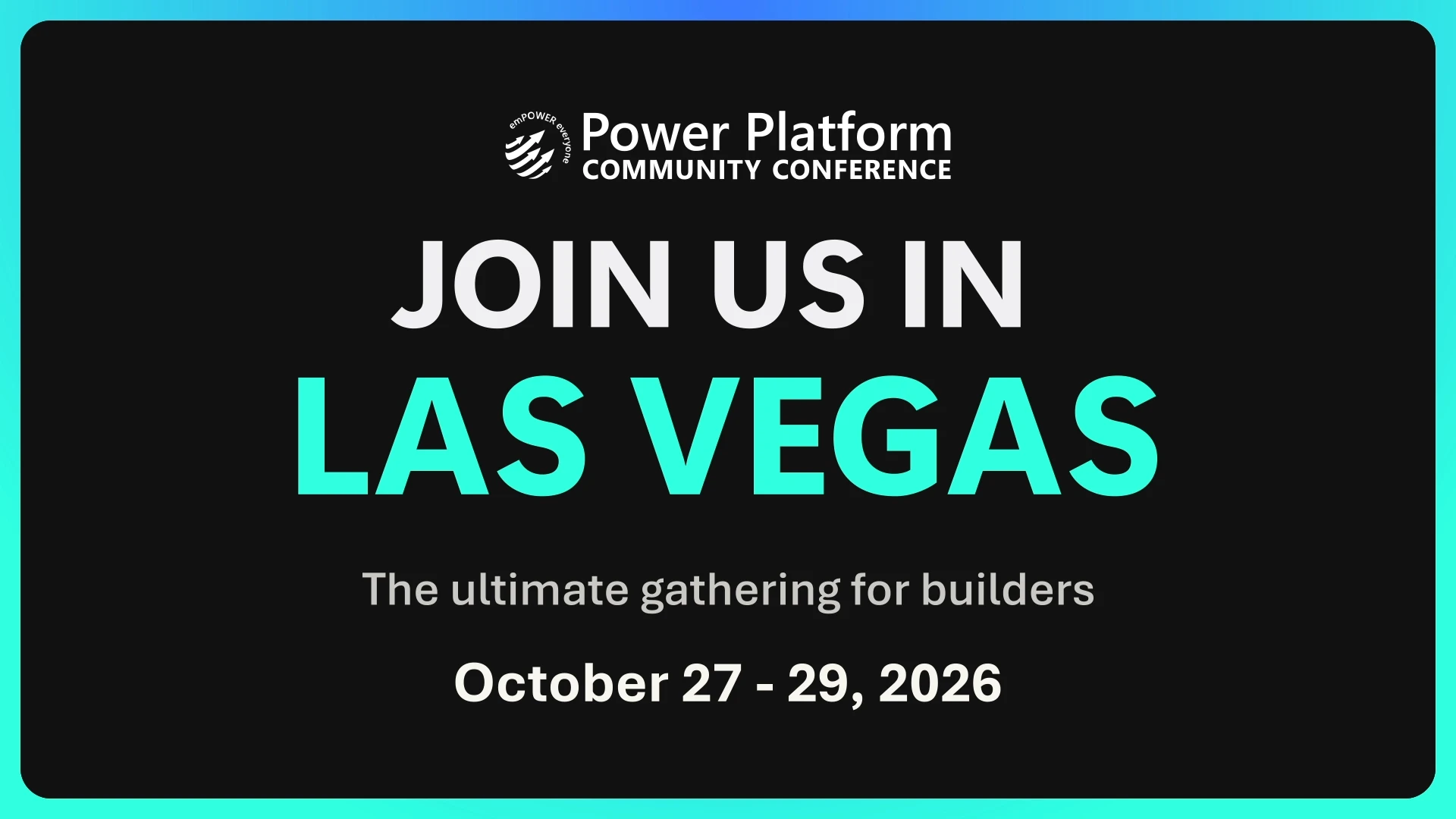
See these updates and more come to life at the Power Platform Community Conference 2026 – Join us October 27-29 at the MGM Grand in Las Vegas to discover how organizations are using agents, apps, and automations to drive business outcomes, build new solutions, and scale innovation. Connect with product experts, industry peers, and the community shaping what’s next.
Power Platform
Build hands-on Power Platform and AI expertise with Power Series
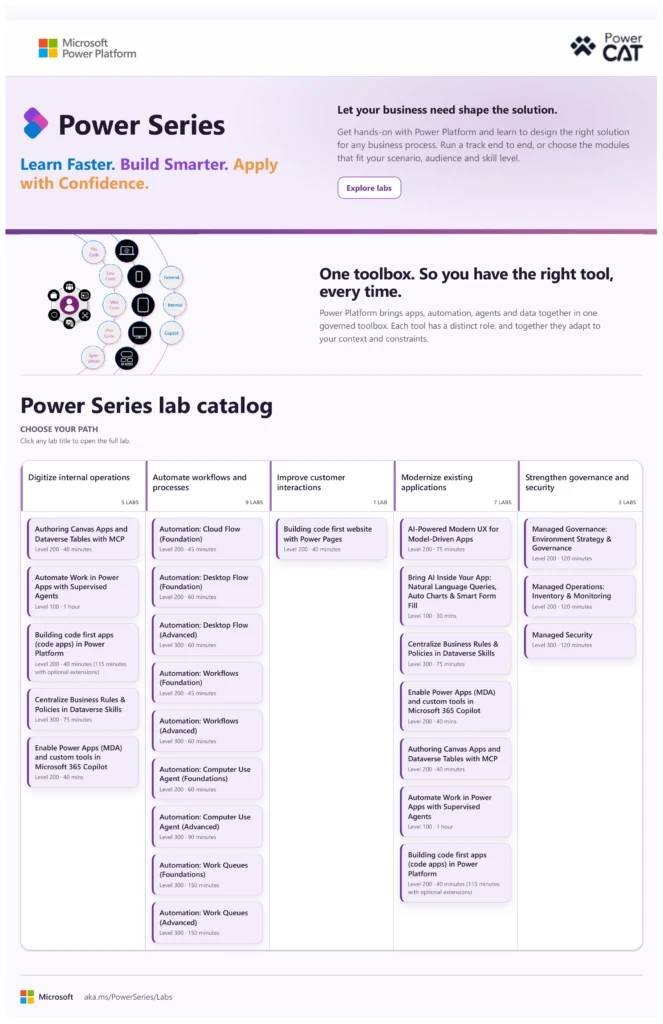
Developed by the Power CAT team, Power Series is now available with 20 hands-on labs that help customers, partners, and field teams build practical Power Platform and AI skills at their own pace. Drawing on the team’s experience delivering enterprise customer workshops, Power Series brings that expertise into a reusable, self-service learning experience.
Learners gain hands-on experience choosing the right capabilities, building working solutions, and making design decisions based on their business needs and solution complexity. The outcome: practical skills and greater confidence to apply Power Platform and AI to real projects, from modernizing applications and automating processes to governing solutions.
Power Apps
Build polished canvas apps faster with fluent screen templates
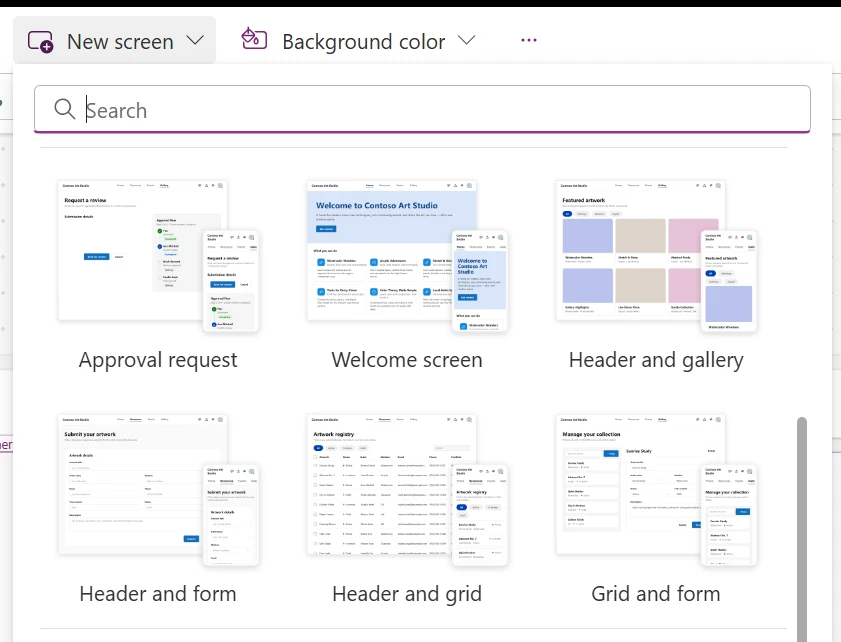
Start new canvas app experiences faster with six additional ready-to-use screen templates based on fluent 2 patterns along with recently shipped 3 fluent templates. These templates give makers responsive layouts, editable controls, and practical starting points for common app scenarios. Add one from the new screen experience, connect your data, and customize the design instead of building every screen from scratch.
These templates are a replacement of previous out of box templates built on classic controls.
Additional improvements to modern controls and update from classic to modern controls
Update controls faster. Makers can now update eligible controls in bulk from the control-update surface instead of repeating the process one control at a time. Update all works on the current screen, can enable the required modern-control settings, and preserves the familiar Studio undo and redo experience. Review affected formulas after updating because property names, enum values, and behaviors may change.
More modern controls and quality improvements. The newly released progress bar supports determinate and indeterminate experiences, Power Fx-driven values, semantic colors, theme-aware styling, and accessible progress semantics. The modern avatar and spinner are also available, with improved interaction and upgrade behavior. Continued quality work makes date picker interactions and reset behavior more reliable and preserves formulas that reference checkbox, rating, and toggle.
Agentic apps
Generally available: refreshed model-driven apps UI, plus display density in public preview
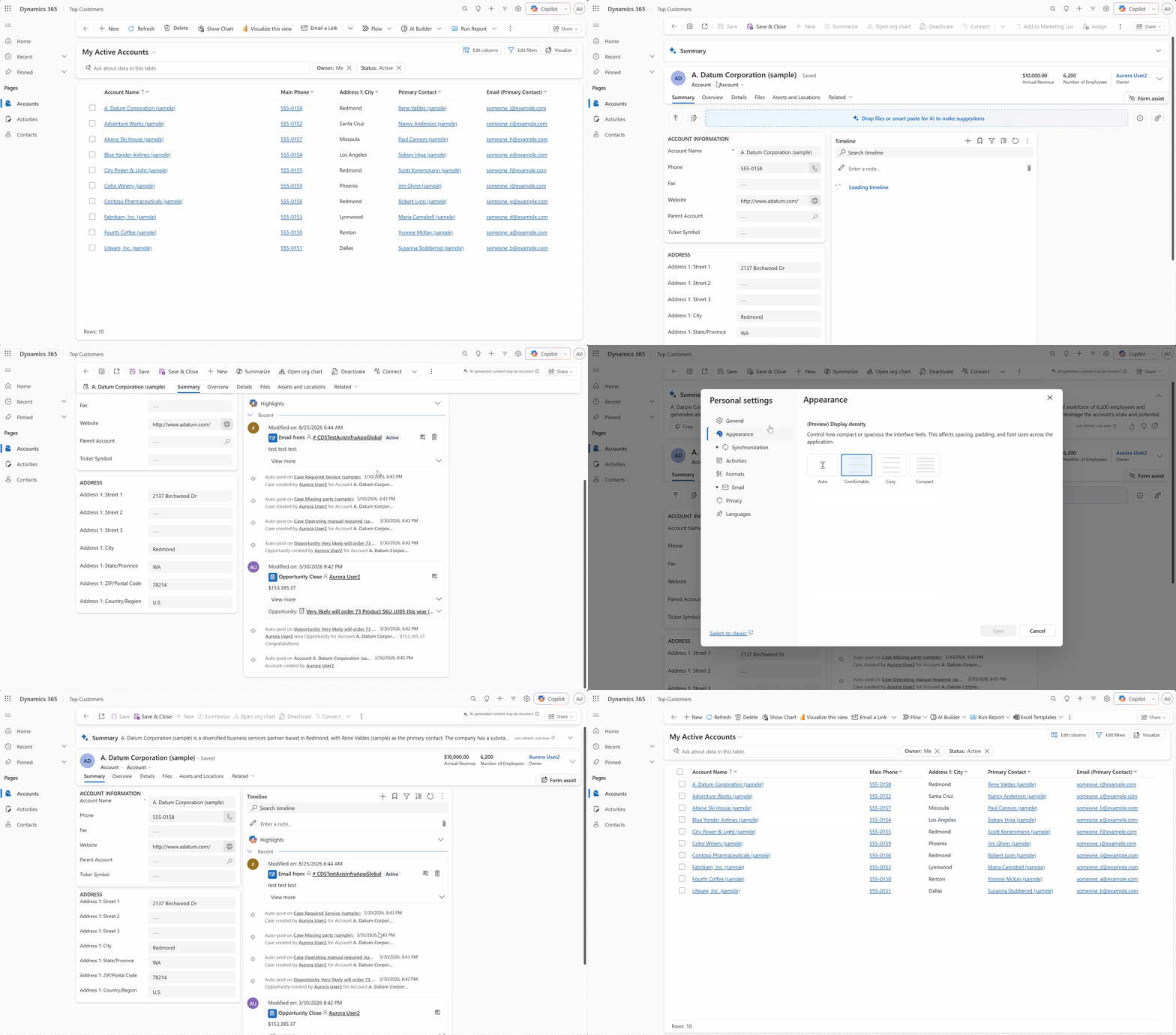
The next wave of UI modernization for model-driven apps arrives with version 2609.1. The header and navigation refresh feature reaches general availability, and the new display density feature enters preview. Together they deliver a cleaner, more efficient layout across the app shell, forms, and views, increasing your working area, reducing the time you spend navigating pages, and aligning the experience with modern Microsoft 365 design patterns.
Header and navigation refresh brings a modern app header with simplified layout and improved spacing, a streamlined sitemap that’s easier to scan, and noticeably more working space on forms. The command bar is now the only element fixed at the top of the page, with the summary area and form header scrolling alongside the rest of the form. Once the form header scrolls out of view, a condensed sticky header attached to the bottom of the command bar is shown. At GA, the experience remains opt-in so makers control adoption. Apps that already have the feature enabled get these enhancements automatically.
Display density (preview) answers a longstanding customer request to fit more content into model-driven app pages. Three levels are available — comfortable (the default), cozy, and compact — so users can tighten the interface to match how they work. An app setting lets customers set the default level for their users or turn the feature off entirely, and users can adjust their own density through personal settings. Display density requires the header and navigation refresh feature and is enabled by default once that feature is on.
AI powered development
Generally available: canvas authoring agent plugin for AI-assisted app building
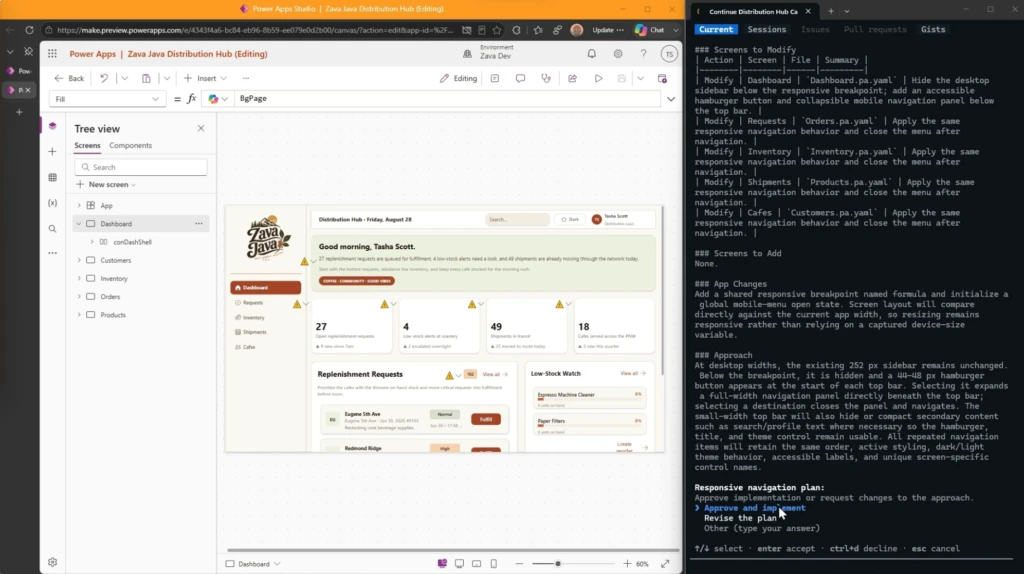
The canvas authoring agent plugin is now generally available, giving makers and developers a new way to work with Power Apps canvas apps using agent-assisted development workflows. With the authoring agent plugin, makers can more easily create, inspect, and update canvas apps through agent-driven interactions with their favorite coding agent, helping accelerate common app-building tasks while keeping makers in control. Learn more about the agent here.
This update is part of our continued investment in making canvas app creation faster, easier, and more approachable. By bringing agentic authoring and MCP support to canvas apps, makers can use modern AI development patterns to move from idea to working app more quickly, iterate on app structure and controls, and streamline parts of the authoring process that previously required more manual effort.
Generally available: vibe code entire model-driven apps with the app-builder skill
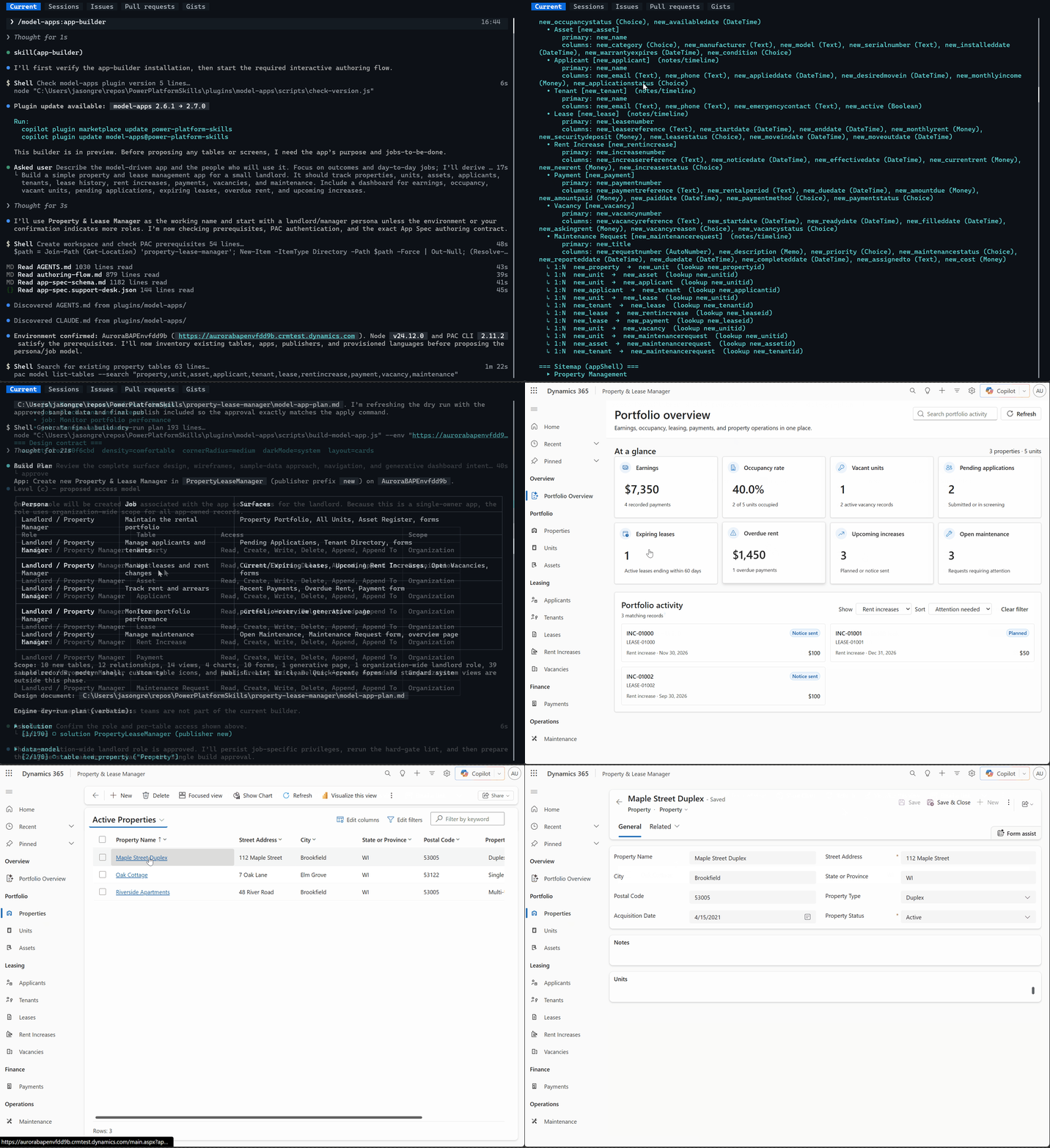
Generative pages gave makers an AI-assisted way to build individual pages in model-driven apps. The new model app-builder skill extends that approach to the whole application, and it’s now generally available. Used with an AI code generation tool such as GitHub Copilot CLI or Claude Code, it builds and edits model-driven apps from natural-language requirements.
You start by describing the business process or app you need. The skill turns your requirements into an application plan that you review before it makes any changes. It starts with user personas and the jobs they need to accomplish, and then extends to cover a growing list of model-driven app artifacts including:
- Tables, columns, relationships, and sample data
- Forms, views, and charts
- Generative pages for experiences that go beyond standard forms and views
- A sitemap with custom icons for each table
- JavaScript validation rules on forms
- Security roles based on the planned personas and data access needs
- Business process flows (recently added)
- Business rules (recently added)
No app artifacts are created until you approve the build plan. The skill also works on editing your existing apps. Everything it produces is a standard Power Apps and Dataverse artifact, so you can keep iterating with the skill or switch to the Power Apps studio designers whenever you prefer.
Embed a generative page directly inside a model-driven app form
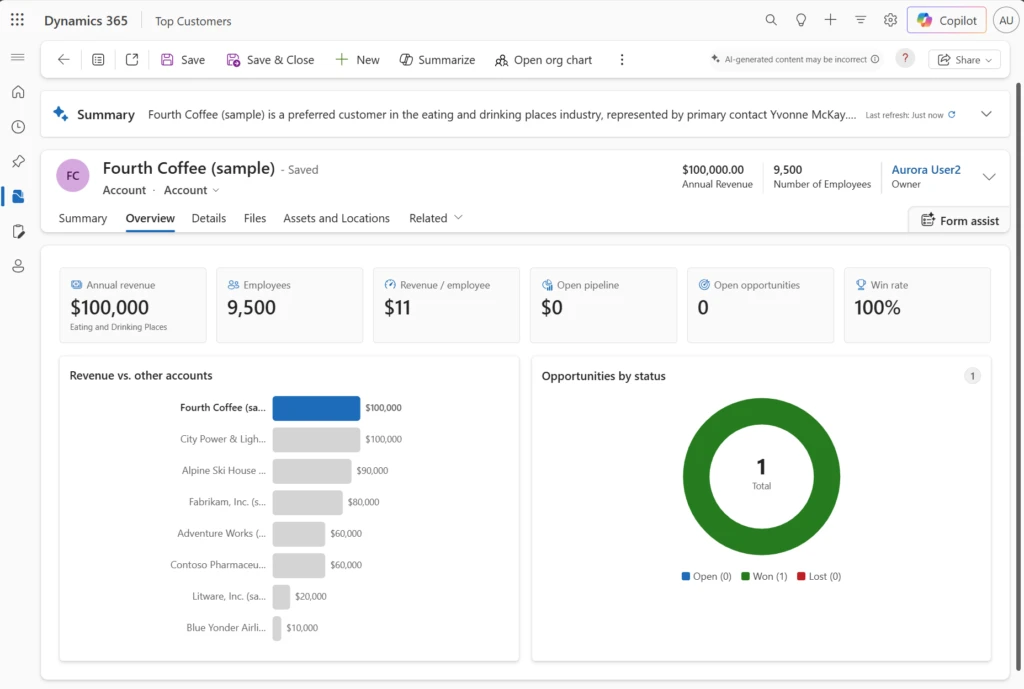
Generative pages are no longer limited to standalone pages in your app’s navigation. You can now add a generative page to a model-driven app form so that it appears within a section or tab, letting an AI-generated experience sit right alongside the standard fields on a record.
Build the generative page to accept the recordId input parameter, and when a user opens a record, the form automatically passes the current record ID to the generative page for you. The page knows which record it’s on from the moment it loads. This unlocks the mixed layouts makers have been asking for, keeping the out-of-box form for structured data entry and dropping in a purpose-built generative page for the part of the record that needs a richer, more tailored view.
Public preview: generative pages can now use data from Power Platform connectors
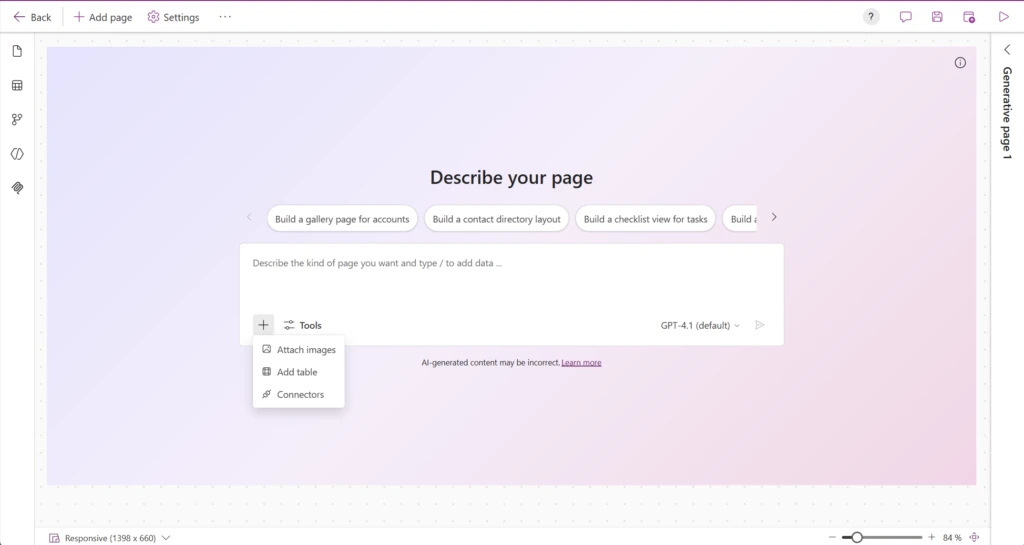
To date, generative pages have been built on Dataverse tables, but now they can reach further. Connector support (preview) lets a generative page use data outside of Dataverse through the Power Platform connector ecosystem. If the data your scenario needs already lives in SharePoint, SQL, or any other connected service, you can build a page against it directly.
Connector support works in both authoring experiences by targeting existing connection references in the environment. In the generative page designer, configured connectors are available through add data > connectors, where you select the connection reference and choose the data the page should use. With AI code generation tools, describe the data you want, and the agent walks you through selecting the right connector and adding the binding so it deploys with the page.
Power Automate
Quick start cards make it easier to begin automating from the Power Automate home page
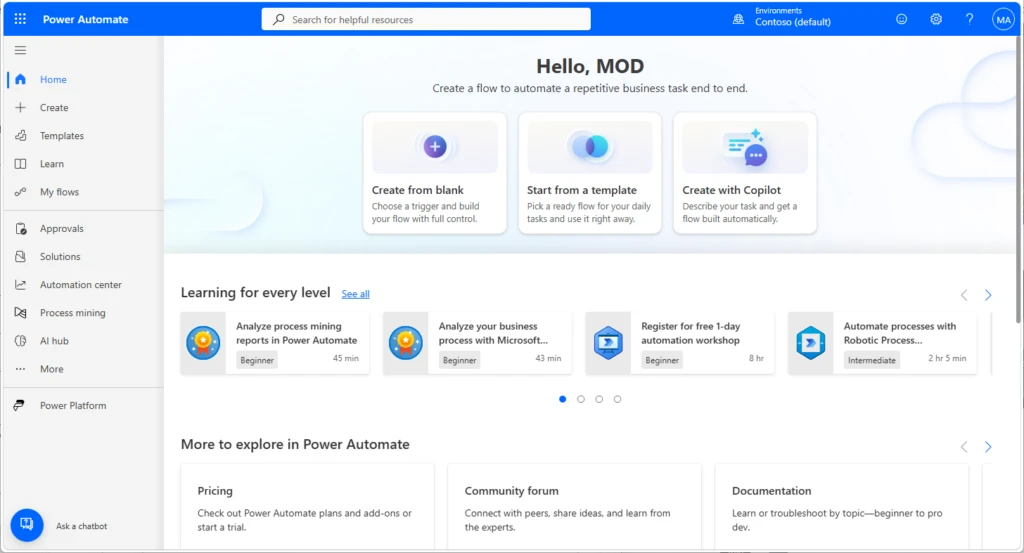
New quick start cards on the Power Automate home page provide clear, actionable entry points for common automation scenarios. Users can move directly into creating a flow without first navigating menus or searching through the template gallery. By bringing relevant starting points to the home page, this experience helps new users discover what they can automate while giving experienced users a faster path from idea to flow.
Server-side search helps users find flows faster
Searching in My Flows is now faster and more reliable with server-side search. Instead of filtering only the flows already loaded in the browser, Power Automate sends the search request to the service and returns matching flows from the complete list of available flows in the current environment. This improvement is especially helpful for users who manage large numbers of flows. It provides more complete results while reducing the time and effort required to locate a specific flow.
Learning updates
Training paths and labs
Updated training
- Application lifecycle management for the Power Platform
- Solution Architect: Design Microsoft Power Platform solutions
Power Apps maker
New
- Build and edit model-driven apps with AI code generation tools (preview)
- Column visualizations for grids in Power Apps
- Convert a vibe app to a code app
- Plan your latency for Link to Fabric
Updated
- About table relationships for Microsoft Dataverse
- Add and configure a subgrid component on a form with Power Apps
- Add and configure controls in canvas apps
- Add the calendar control to tables in model-driven apps with Power Apps
- Add the rich text editor control to a model-driven app with Power Apps
- Add, configure, move, or delete components on a form
- App navigation in model-driven apps with Power Apps
- Avatar Modern Control in Canvas Apps: Properties and Examples
- Azure Synapse Link Advance Configuration
- Azure Synapse Link for Dataverse trouble shooting guide
- Best practices: Collaborating and co-developing apps using Power Apps
- Business skills overview
- Change release channels for model-driven apps
- Checkbox modern control in Power Apps
- Choose finance and operations data in Azure Synapse Link for Dataverse
- Combo box modern control in canvas apps – Power Apps
- Common issues and resolutions for solution checker
- Complex tables requiring Power Apps licenses
- Component library
- Configure a row summary for a model-driven app
- Configure structured content in the rich text editor (preview)
- Configure your environment and link to Microsoft Fabric
- Create and edit canvas apps with AI code generation tools
- Create and edit generative pages with AI code generation tools
- Create and edit virtual tables with Microsoft Dataverse
- Create and use business skills
- Create new data columns in Dataverse
- Create or edit a Power BI embedded system dashboard
- Create or edit filters in model-driven app views
- Create or edit model-driven app main forms in Power Apps
- Create or edit model-driven app quick create forms in Power Apps
- Date picker modern control in canvas apps – Power Apps
- Define and query hierarchical data with Microsoft Dataverse
- Design a custom page for your model-driven app with Power Apps
- Display custom icons alongside values in list views with Power Apps
- Dropdown modern control in canvas apps – Power Apps
- Edit table records directly from another table’s main form with Power Apps
- Example: Create and customize a model-driven app form
- Export Microsoft Dataverse data in Delta Lake format
- FAQ about generative pages in model-driven apps
- FAQ for Power Apps vibe experience (preview)
- Frequently asked questions when transitioning from legacy data integration services to Fabric link and Azure Synapse Link for Dataverse
- Generate a page using natural language with model-driven apps in Power Apps
- Get started with formulas in canvas apps
- How to create performant Power Apps
- Importing and exporting data
- Improve component performance, stability, and reliability with solution checker
- Invoke a function using Power Platform
- Known issues with custom pages in a model-driven app
- Manage data retention policies in Microsoft Dataverse
- Model-driven app form properties in Power Apps
- Model-driven app interface design overview in Power Apps
- Number Input modern control in canvas apps – Power Apps
- Overview of the model-driven app designer
- Overview of the new Power Apps vibe experience
- Productive main form design in model-driven apps
- Progress Bar Modern Control in Canvas Apps: Properties and Examples
- Prompt columns in Microsoft Dataverse
- Receive Azure Synapse Link for Dataverse notifications in Power Apps
- Recent modern control updates in canvas apps – Power Apps
- Release channel for your model-driven app
- Responsive design guidelines in Power Apps
- Sharing a model-driven app – assigning security roles and privileges
- Spinner Modern Control in Canvas Apps: Properties and Examples
- Steps to building a model-driven app
- Tables in Microsoft Dataverse
- Text Input modern control in canvas apps – Power Apps
- Toggle modern control in Power Apps
- Transition from legacy data integration services to Fabric link and Azure Synapse Link for Dataverse
- Troubleshooting common issues with link to Fabric with Microsoft Dataverse
- Use managed identities for Azure with your Azure data lake storage
- Use plans to create AI-Powered business solutions with Copilot
- Use the model-driven app main form and its components in Power Apps
Power Apps user
New
- Enable the modern, refreshed look for model-driven apps on mobile (preview)
- Power Apps native mobile apps overview (preview)
- Quickstart: Your first Power Apps native app
- Troubleshoot issues in the native mobile app (preview)
- Use Power Apps on mobile devices
Updated
- About dialog for model-driven apps
- Advanced find
- Basic navigation in a model-driven app
- Create and manage personal views on a grid page
- Explore data on a grid page
- How do I find and run apps in Power Apps?
- Known issues and limitations for Dataverse for Teams
- Modern, refreshed look for model-driven apps
- Run apps in a web browser
- Search for records by using Dataverse search
- Understand the email experience in model-driven apps
- Use model-driven apps in Power Apps
- View your user profile
- Work with business processes in model-driven apps
Power Automate
New
- Assign a user license to a flow owned by a service principal
- Call Microsoft Copilot Studio agents from Power Automate
- Create a User-credential Mapping
Updated
- Add images to email messages
- AI Builder actions reference
- Approvals in Microsoft Teams
- Automation adoption best practices overview
- Automation Center of Excellence strategy with the Automation Kit
- Automation CoE Strategy
- Automation Kit Release Notes
- Automation Kit setup checklist
- Build and certify custom connectors
- Business process flows overview
- Configure Automation Kit
- Configure the automation kit environment variables
- Control center desktop flow audit logs
- Control Center desktop flow monitoring
- Control Center desktop flow scheduler
- Control Center Historical Voluminous Data Monitoring
- Convert a time zone
- Copilot in Power Automate
- Create a process from normalized schema
- Create an approval from a chat or channel
- Create an Object‑centric event log
- Create and test an approval workflow with Power Automate
- Create desktop flows
- Create flows for popular email scenarios in Power Automate
- Create flows that post adaptive cards to Microsoft Teams
- Create flows using the Power Apps app in Microsoft Teams
- DLP impact analysis for desktop flows
- Explore the cloud flows designer
- Export a solution
- Export OCPM semantic model into Fabric workspace
- Extract data from SAP GUI UI by using Power Automate
- Feedback and support for the Automation Kit setup guidance
- Flow exception rules framework
- Frequently asked questions about the automation kit setup guidance
- Get started with Copilot in Power Automate for desktop
- Get started with Power Automate in Windows 11
- Get started with the process mining capability
- How to build custom actions in Power Automate for desktop
- How to use the Automation Kit
- Ingest an object-centric event log
- Install Power Automate
- Install the automation kit using the command line
- Install the Workflows app in Microsoft Teams
- Introduction to desktop flows
- Limitations and resolutions for issues in the Automation Kit
- List of date and time operations
- List of string operations
- Manage desktop flows
- Manage Power Automate for desktop on Windows
- Microsoft Power Platform automation maturity model details
- Microsoft Power Platform automation maturity model overview
- Normalized schema JSON authoring
- On-premises data gateway
- Optimize flow performance
- Optional setup steps depending on your configuration
- Overview of adaptive cards for Teams
- Overview of process mining and task mining in Power Automate
- Overview of process mining in Power Automate
- Overview of the Automation Kit
- Overview of the Automation Kit test case guidance
- Overview of the Control Center
- Overview of using Outlook and Power Automate
- Power Automate console
- Power Automate for enterprise developers, ISVs, and partners
- Prepare processes and data
- Prerequisites for automating SAP GUI-based workloads
- Prerequisites to install and use the automation kit
- Record with Copilot for desktop flows (deprecated)
- Regions overview for Power Automate
- Run a desktop flow in picture-in picture
- Run SQL queries on Excel files
- Run unattended desktop flows
- Secure your data
- Set up sequential approvals
- Set up the automation kit control center
- Set up the automation kit main components
- Set up the automation kit satellite components
- Set up the automation kit scheduler
- Set up the Automation Kit security roles and permissions
- Share a cloud flow
- Share/export a desktop flow
- Sign up and sign in
- Support for service principal owned flows
- Update or roll back Power Automate for desktop
- Use AI Builder in Power Automate
- Use data operations in Power Automate
- Use Markdown language to format Power Automate approvals
- Use no-code RPA with SAP GUI in Power Automate Desktop
- Use Power Automate flows in Microsoft Teams
- Validate data by using the SAP ERP connector
- Variable data type properties
- What is Power Automate?
- Work queues actions
- Work with desktop flows using code
Power Pages
New
- Manage Exemptions for Power Pages Sites
- Power Pages security best practices
- Rotate SSL certificates for Power Pages sites
- Use WAF JavaScript challenge and CAPTCHA
Updated
- Access user and website details with server objects
- Add a custom domain name
- Add AI features in a list (preview)
- Add an agent – overview
- Add an agent from the setup workspace
- Add forms
- Add text
- Ask Copilot questions in Power Pages
- Available Liquid objects
- Build an agent from a form
- Configure Microsoft Entra ID Authentication for Power Pages Agent
- Configure user authentication for an agent
- Control use of Generative AI features for users (preview)
- Copilot for site creation
- Copilot hub for Power Pages
- Create a site with Power Pages
- Create an AI-generated color theme using Copilot
- Create and manage server logic in Power Pages
- Customize your agent
- Important upcoming changes and deprecations in Power Pages
- Known issues for Power Pages
- Manage agent provisioning
- Migrate standard data model sites to enhanced data model
- Multistep forms
- Overview of the Power Pages portals Web API
- Power Pages connectivity to a Microsoft Dataverse
- Roles required for Power Pages administration
- Security agent (preview)
- Set column permissions
- Set up an OpenID Connect provider
- Tutorial: How to add a rich text component to a form
Power Platform administration
New
- Automate procurement order acknowledgment matching with Copilot Studio and SAP
- Coca-Cola Andina improves HR support for frontline workers with Copilot Studio
- Connect Dataverse Git integration to Azure DevOps
- Connect Dataverse Git integration to GitHub
- Connect Power Apps to a centralized data warehouse with Dataverse virtual tables
- COSMO CONSULT improves sales operations and data quality using Copilot Studio agents
- Environment routing for apps
- Integrate Dynamics 365 finance and operations apps with Power Platform
- Manage Copilot Credits allocations programmatically
- Manage costs for agents powered by the GitHub Copilot harness
- Manage service updates for unified environments
- Manage SharePoint document visibility in Dataverse solutions
- Migrate legacy meetings to Microsoft Teams with a conversational agent
- Understand agent counts across admin surfaces
Updated
- Add a Microsoft Dataverse database
- Admin user management unification for Finance and Operations in Power Platform admin center (preview)
- Administration mode
- Advanced connector policies
- Automate deployments with Dataverse Git integration and pipelines in Power Platform
- Best practices for server-side synchronization
- Block unmanaged customizations in Dataverse environments
- Build tool tasks
- Business continuity and disaster recovery
- Buy Power Automate licenses
- CommandBar control reference
- Concentrix modernizes invoice processing with Power Platform and AI
- Configuration Migration tool in Power Platform
- Connect and disconnect Dataverse from a Git repository by using code
- Connect Dataverse Git integration to a Git provider
- Continuous access evaluation
- Control guest access to Microsoft Power Platform environments
- Control user access to environments with security groups and licenses
- Copilot Agent Kit real-world examples
- Copilot Studio reference architectures and solution ideas
- Create cross-tenant isolation reports
- Creator Kit – overview (preview)
- Custom contact center solution with Copilot Studio agent
- Data storage and governance in Power Platform
- Dataverse capacity-based storage details
- Dataverse capacity-based storage overview
- Deploy pipelines as a service principal or pipeline owner
- Design a reliability testing strategy recommendation for Power Platform workloads
- DetailsList control reference
- Deutsche Bahn empowers citizen developers with Power Platform
- Dunaway streamlines city code research with Copilot Studio
- Elastic compute for finance and operations apps
- Environment routing
- Epiq streamlines employee onboarding with Power Automate, Microsoft Dataverse, and AI Builder
- Exchange Online cross-tenant authentication
- ExpandMenu control reference
- Export data to Application Insights
- Extract and analyze agent conversation transcripts
- EY uses Power Platform to automate customer payment processing
- FAQs about source code integration
- Forward mailbox vs. individual mailboxes
- Geo-to-geo migrations
- Get started with a SharePoint site template
- GitHub Actions for Microsoft Power Platform
- Global Secure Access for Copilot Studio agents
- Grupo Bimbo standardizes global audit processes with Copilot Studio
- Healthcare Patient Support Agent
- Holland America Line transforms customer experience with Copilot Studio
- How to reset a password
- Icon control reference
- Identity and access management
- Important changes (deprecations) coming in Power Platform
- Invite users with Microsoft Entra B2B collaboration
- John Cockerill streamlines enterprise business processes with Power Platform
- Licensing overview for Microsoft Power Platform
- Licensing requirements for managed environments
- Lloyds Banking Group bridges language barriers with Power Apps and Azure AI services
- Manage Copilot Credits and capacity for Copilot Studio
- Manage Power Apps
- Manage privacy and security settings
- Manage your maintenance window
- Metrics and recommendations for Copilot Studio
- Microsoft 365 environment for recurring Copilot prompts
- Microsoft Dataverse reference architectures and solution ideas
- Microsoft Power Fx overview
- Microsoft Power Fx Tables: Records, Columns, and Formulas
- Microsoft Power Platform Build Tools for Azure DevOps
- Overview of Dataverse Git integration
- Overview of Power Platform activity logging and auditing in Microsoft Purview
- Overview of Power Platform and Copilot Studio reference architectures
- Overview of unified admin experience for finance and operations apps
- Pay-as-you-go meters
- Performance testing recommendation for Power Platform workloads
- Plan for deployment and administration
- Power Apps licensing FAQs
- Power Apps reference architectures and solution ideas
- Power Automate licensing FAQ
- Power Automate reference architectures and solution ideas
- Power Pages architecture key concepts and solution ideas
- Power Platform admin center overview for administrators
- Power Platform and Copilot Studio real-world case studies
- Power Platform and Dynamics 365 macro region geography
- Power Platform environments overview
- Power Platform inventory
- Power Platform inventory sample queries
- Power Platform inventory schema reference
- Power Platform licensing FAQs
- Power Platform URLs and IP address ranges
- Power Platform white papers
- PowerShell support for Power Apps and Power Automate
- Programmability and extensibility – What’s new or changed
- Recommendations for designing a deployment failure mitigation strategy
- Recommendations for designing and creating a monitoring system
- Recommendations for standardizing tools and processes
- Recover a recently deleted environment
- Requests limits and allocations
- Role-based security roles for Dataverse
- Rules for environment groups
- Secure the default environment
- Security enhancements for user sessions and access management
- Singapore Civil Defence Force implements digital solutions using Power Platform and Copilot Studio
- Solution YAML source control format reference
- Source control operations
- System Settings General tab
- T-Mobile empowers customer service representatives using Power Apps and Copilot Studio
- Telecom provider mobilezone modernizes service delivery using Microsoft Copilot Studio
- Tenant-level analytics for Power Automate
- Tenant-to-tenant migrations
- The City of Montréal enhances citizen engagement with Copilot Studio
- Tiendas CUADRA delivers always-on customer service and product discovery with Copilot Studio
- Travel concierge using generative AI with Copilot Studio
- Tutorial: Perform a transaction-less copy between environments
- Understand Variables in Microsoft Power Fx
- View and manage on-premises data gateways
- View license consumption for finance and operations apps
- View licensing and capacity recommendations
- View Microsoft Dataverse and model-driven app activity logs in Microsoft Purview
- View Power Apps activity logs in Microsoft Purview
- View Power Automate activity logs in Microsoft Purview
- View Power Pages activity logs in Microsoft Purview
- View Power Platform admin activity logs in Microsoft Purview
- View Power Platform connector activity logs in Microsoft Purview
- View security recommendations
- What’s new in Microsoft Power Platform guidance
- What’s new in the Power Platform and Copilot Studio Architecture Center
- When premium flows are subject to license enforcement
Power Platform developer
New
- Handle errors and enable HTTP diagnostics
- Manage administration mode in a unified developer environment
- Microsoft Dataverse plugin for AI coding agents (preview)
- Microsoft Dataverse plugin for AI coding agents reference (preview)
- Power Apps CLI Command Reference
- Power Apps CLI environment variables
- Publish Power Apps Code Apps with a Service Principal
Updated
- Activity (ActivityPointer) table
- Activity table (Microsoft Dataverse)
- Add a Dataverse action or function to a code app
- Add Power Automate flows to a code app
- Analyze plug-in performance (Microsoft Dataverse)
- Apply business logic using code (Microsoft Dataverse)
- Asynchronous client operations
- Client-Side Scripting Best Practices for Model-Driven Apps
- Code Components
- Code components application lifecycle management
- Code components for canvas apps
- Code Components for Model-Driven Apps
- Code Components: Best Practices and Guidance
- Compose HTTP Requests and Handle Errors
- Configure Form Query String Parameters in Model-Driven Apps
- Create a Custom API in Power Apps (Microsoft Dataverse)
- Create a custom API with solution files
- Create a Developer Environment with the Power Apps Developer Plan
- Create a Model-Driven App Field Component
- Create and Update Choices (Option Sets) Using the Web API
- Create and update column definitions using the Web API
- Create and Update Table Definitions Using the Web API
- Create and use custom APIs (Microsoft Dataverse)
- Create canvas app dataset component in Microsoft Dataverse
- Create Custom Messages in Microsoft Dataverse
- Create elastic tables using code
- Custom virtual table data providers (Microsoft Dataverse)
- Customize Model-Driven Apps Using Code
- Customize Table Definitions (Microsoft Dataverse)
- Customize the Editable Grid Control
- Customize Views in Model-driven Apps
- Debug Code Components During Development
- Debug plug-ins (Microsoft Dataverse)
- Debug Web Resources with Fiddler Auto Responder
- Define Ribbon Display Rules (Model-Driven Apps)
- Delete Data in Bulk to Reduce Storage Use
- Developer Tools for Model-Driven Apps
- Developers: Best practices and guidance for model-driven apps
- Developers: Best practices and guidance regarding plug-in and workflow development for Microsoft Dataverse
- Developers: Get started with Microsoft Dataverse
- Developers: Understand terminology in Microsoft Dataverse
- Discover user organizations (Microsoft Dataverse)
- Elastic Tables for Developers
- Email activity tables (Microsoft Dataverse)
- Execute multiple requests using the SDK for .NET (Microsoft Dataverse)
- Export, Edit, and Import the Ribbon in Model-Driven Apps
- Generate early-bound classes for the SDK for .NET
- Get Started with the Dataverse Web API Using C#
- Getting started
- Handle exceptions in a plug-in (Microsoft Dataverse)
- How to Sign in and manage accounts with the Power Apps CLI – Power Apps
- How to: Analyze data requests and responses
- How to: Application Lifecycle Management (ALM) for code apps
- How to: Connect to Copilot Studio
- How to: Connect your code app to Azure SQL
- How to: Connect Your Code App to Data
- How to: Connect Your Code App to Dataverse
- How to: Create a Connection from the Power Apps CLI
- How to: Embed a Code App in an Iframe
- How to: Get context data
- How to: SharePoint operations
- How to: Use Environment Variables in Code App Data Sources
- HTML Web Resources for Model-Driven App Extensions
- IFRAME Component with Bound Map Coordinates
- Impersonate another user (Microsoft Dataverse)
- Impersonate another user using the Microsoft Dataverse Web API
- Import Data (Microsoft Dataverse)
- Install and Configure Microsoft Power Platform CLI
- Install Power Platform CLI with .NET Tool
- Introduction to solutions
- JavaScript Web Resources for Model-Driven Apps
- Logging and tracing (Microsoft Dataverse)
- Long-term data retention
- Manage Microsoft Dataverse Customer Tables
- Manage Telemetry Settings for the Power Apps CLI
- Optimistic concurrency (Microsoft Dataverse)
- Override Default Open Behavior of Data Rows in Grids
- Package a Code Component in a Solution File
- Power Apps Code Apps Architecture for Development and Runtime
- Power Apps Code Apps: Features and Requirements
- Power Apps Component Framework Community Resources
- Query data
- Quickstart: Create a Code App Using the Power Apps CLI
- Quickstart: Execute a Dataverse SDK for .NET Request in C#
- Quickstart: Web API with client-side JavaScript and Visual Studio Code
- Reference Dataverse Schema Definitions by Name or MetadataId
- Register a WebHook
- Relationship management
- Request credentials to access D365 product database
- Ribbons in Model-Driven Apps: Definitions and Types
- Sample: Create a basic plug-in (Microsoft Dataverse)
- Send In-App Notifications Within Model-Driven Apps
- System configuration
- Troubleshoot Adding a Data Source
- Troubleshoot Power Apps CLI Issues with Zscaler
- Tutorial: Define a custom event in a component
- Tutorial: Update a plug-in (Microsoft Dataverse)
- Tutorial: Use dependent libraries in a component
- Update and delete table rows using the Web API (Microsoft Dataverse)
- Use Client API Grid Context in Model-Driven Apps
- Use IFRAME and Web Resource Controls in Model-Driven Apps
- Use metadata to customize tables and columns
- Use SQL to Query Data With the Dataverse Web API
- Use the SDK for .NET
- Use wildcard characters in conditions for string values
- User and team tables (Microsoft Dataverse)
- View developer resources page for your Power Apps and Microsoft Dataverse environment
- Web API Data Operations Samples
- Work with Dataverse Data Using Python SDK
- Work with Microsoft Entra ID group teams (Dataverse)
- Workflow to write, deploy, debug, and troubleshoot X++ code across multiple environments
- Write Telemetry to your Application Insights resource using ILogger (Microsoft Dataverse)
AI Builder
Updated
Power Platform connectors
Updated