Why AI Security Is Mission-Critical
Artificial Intelligence (AI) is rapidly reshaping federal missions, defense operations, and critical infrastructure. From intelligence analysis to logistics and cyber defense, AI’s transformative power is undeniable. Yet, with great power comes great responsibility and risk.
As a Chief Information Security Officer (CISO) in the federal space, Defense Industrial Base (DIB), or Department of War (DoW), you are tasked not only with enabling innovation, but also with safeguarding sensitive data, mission integrity, and public trust. This guide synthesizes Microsoft’s latest security recommendations and federal best practices, including insights from best practices supplied by CISA, the National Security Agency, The Federal Bureau of Investigation, and partners in their Information Sheet: AI Data Security: Best Practices for Securing Data Used to Train & Operate AI Systems, to help you secure AI across its entire lifecycle.
The New AI Threat Landscape
Novel Threats and Amplified Risks
AI introduces new attack surfaces and amplifies traditional vulnerabilities. Consider these emerging risks:
- Prompt Injection Attacks: Malicious actors embed harmful instructions in user prompts or external data, manipulating AI outputs.
- Data Poisoning: Attackers corrupt training data, undermining model reliability and mission outcomes.
- Model Theft and Supply Chain Attacks: Unauthorized access or manipulation of models and datasets can compromise entire systems.
- Excessive Agency and Overreliance: Autonomous AI agents may take unintended actions, increasing operational risk.
Think of your AI environment like a modern airport. While traditional security checkpoints are still vital, new threats such as drones or cyber-attacks require additional layers of defense. Similarly, AI brings new vulnerabilities that demand fresh strategies.
Classic issues such as incomplete data, over-permissioning, and lack of failure scenario planning are now magnified by AI’s scale and speed.
As highlighted in the CSI AI Data Security Sheet, “AI can help us do a lot of new things and it can help us do a lot of things better, but it cannot save us from issues of the past; it will amplify them.”
Zero Trust for AI: The New Standard
Microsoft and federal guidance recommend extending Zero Trust principles to all AI systems:
- Verify Explicitly: Authenticate every identity and device accessing AI applications.
- Use Least Privilege Access: Restrict AI access to only necessary data and functions.
- Assume Breach: Treat every prompt, response, and component as potentially compromised.
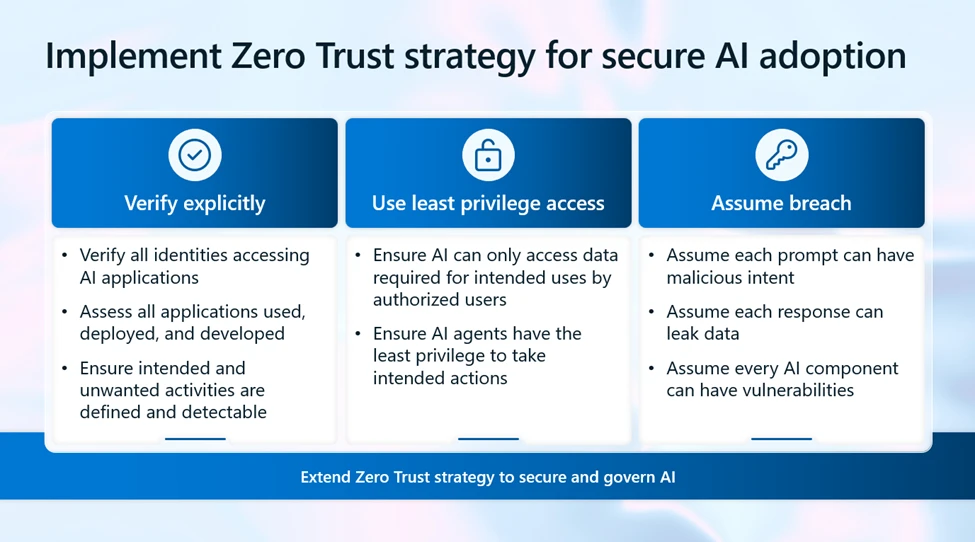
Imagine your AI ecosystem as a high-security vault. You wouldn’t let anyone walk in just because they look familiar. Instead, you check credentials every time, limit what each person can access, and always prepare for the possibility that someone might try to break in.
In practice:
- Apply Zero Trust to data, models, applications, and user interactions.
- Monitor for anomalous activities and enforce adaptive controls.
Securing the AI Lifecycle: Best Practices
A. Data Security Across the Lifecycle
The CSI AI Data Security Sheet and Microsoft’s Secure Future Initiative both emphasize the importance of securing data at every stage:
- Source Reliable Data and Track Provenance
- Use authoritative sources and maintain cryptographic logs.
- Implement provenance tracking to trace data origins and changes.
- Verify Data Integrity
- Employ hashes and digital signatures for datasets.
- Use Modern Auth standards for authentication.
- Encrypt Data
- Apply AES-256 or strong encryption for data at rest, in transit, and in use.
- Classify and Control Access
- Apply sensitivity labels and robust access controls.
- Ensure output inherits input data’s classification.
- Privacy-Preserving Techniques
- Use data masking, differential privacy, and federated learning where feasible.
- Secure Storage and Deletion
- Store data in FIPS 140-2 compliant devices.
- Use secure deletion protocols such as cryptographic erase.
Think of your data as the fuel for your AI engine. If the fuel is contaminated, the engine won’t run smoothly and could even break down. Ensuring clean, secure data is like using premium fuel and regularly checking for leaks.
B. Model and Application Security
- Govern Model Deployment: Restrict deployment to approved, vulnerability-free models.
- Evaluate for Safety and Security: Use Azure AI Foundry for iterative testing, including prompt injection defense.
- Monitor for Data Drift and Poisoning: Continuously assess model performance and input data for anomalies.
C. Operational Controls
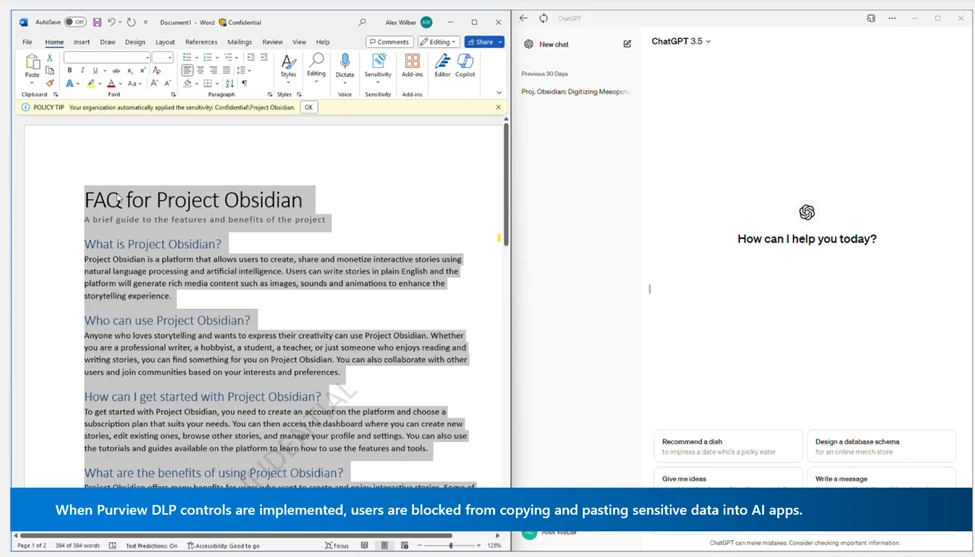
- DLP and Endpoint Protection: Prevent copying or pasting of sensitive data into consumer AI apps.
- Insider Risk Management: Detect and respond to anomalous user behavior.
- Adaptive Protection: Dynamically restrict access for high-risk users.
Microsoft Security Capabilities for AI
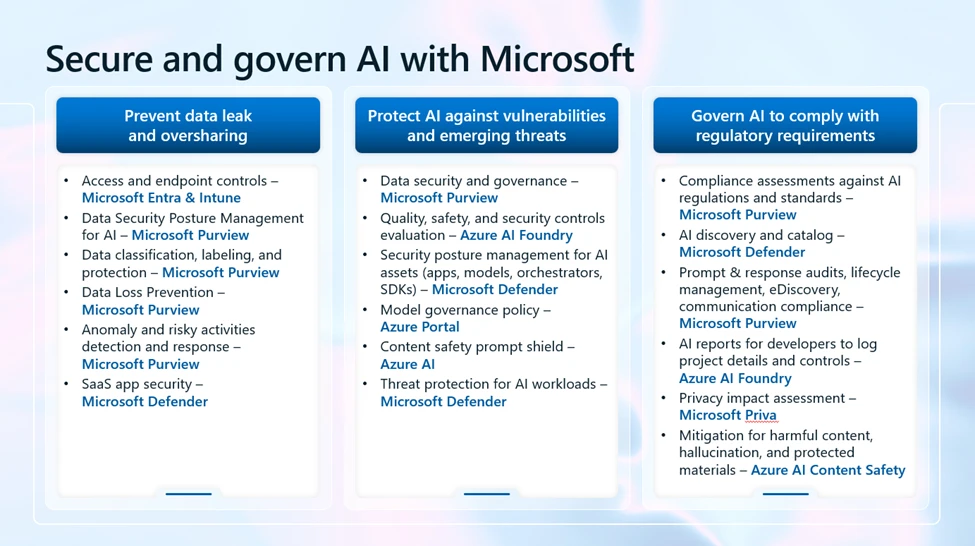
Microsoft provides a comprehensive suite of tools for federal-grade AI security:
| Capability | Solution(s) |
| Data Security and Governance | Purview DLP, Sensitivity Labels, DSPM for AI |
| Threat Protection | Defender for Cloud, Azure AI Content Safety |
| Compliance and Audit | Purview Compliance Manager, Audit, eDiscovery |
| Shadow AI Detection | Defender for Cloud Apps, Adaptive Protection |
| Model Governance | Azure Portal Policies, AI Foundry Reports |
| Privacy Impact Assessment | Priva Privacy Assessments |
Federal Alignment:
- Supports NIST AI RMF, EO 14179, and sector-specific mandates.
- Integrates with existing Microsoft 365, Azure, and hybrid environments.
Compliance, Governance, and Regulatory Readiness
A. Regulatory Frameworks
- NIST AI RMF: Risk-based approach for trustworthy AI.
- EO 14179: Mandates bias-free, secure AI for federal agencies.
- EU AI Act, ISO 42001/23894: Emerging global standards.
B. Governance Practices
- Catalog All AI Systems: Use Defender for Cloud and Defender for Cloud Apps for automated discovery.
- Audit and Retain AI Interactions: Enable eDiscovery, lifecycle management, and communication compliance.
- Document Model Details: Use AI Foundry reports for audit readiness.
- Conduct Privacy Impact Assessments: Integrate Priva Privacy Assessments into development workflows.
Think of compliance as maintaining a ship’s logbook. Every action, every change, and every incident is recorded, so you can prove your vessel is seaworthy and ready for inspection at any time.
Action Plan for CISOs
Step 1: Assess Your AI Landscape
- Inventory all AI systems (custom, enterprise, consumer).
- Map data flows and identify sensitive repositories.
Step 2: Implement Zero Trust for AI
- Enforce identity, device, and data controls for all AI interactions.
- Apply least privilege and adaptive access policies.
Step 3: Secure Data and Models
- Apply encryption, labeling, and provenance tracking.
- Restrict model deployment and evaluate for vulnerabilities.
Step 4: Monitor and Respond
- Use DLP, Insider Risk Management, and Defender for Cloud to detect and respond to threats.
- Continuously audit and update controls.
Step 5: Prepare for Compliance
- Align with NIST AI RMF and EO 14179.
- Document controls, conduct PIAs, and retain audit logs.
Step 6: Educate and Engage
- Train staff on AI risks and controls.
- Foster collaboration between security, IT, and mission teams.
Resources and Further Reading
- https://aka.ms/SecureGovernAI
- https://media.defense.gov/2025/Jan/29/2003634788/-1/-1/0/CSI-CONTENT-CREDENTIALS.PDF
- https://www.nist.gov/itl/ai-risk-management-framework
- https://aka.ms/SecureAndGovernAIWhitepaper
- https://owasp.org/www-project-top-10-for-large-language-model-applications/
Conclusion
Securing AI is a strategic imperative for federal, DIB, and DoW organizations. By following Microsoft’s official guidance and federal best practices, CISOs can build resilient, trustworthy AI systems that support mission objectives while safeguarding sensitive data and maintaining compliance.
For tailored implementation support, reach out to your Microsoft account team or consult the referenced resources.