Skip to main content What is Dynamics 365? Guided tours Customer stories Try our products Build your own agents CRM ERP Sales Service Sales Customer Insights Customer Service Contact Center Field Service Supply Chain Management Commerce Finance Project Operations Human Resources Business Central Pricing Business application topics Training & certifications Migrate to the cloud Documentation Events Dynamics 365 Blog Product updates Onboarding and implementation Community Find a partner Software Development Companies Partner resources Microsoft Marketplace Product documentation Technical support On-premises product support Contact us Try for free Sign in
  • 1 min read

You may get message “Failed to create a session; confirm that the user has the proper privileges to log on to Microsoft Dynamics” during an upgrade or in-place upgrade with Microsoft Dynamics AX 2012


This error message can be a little misleading as it implies that it is related to some security permissions not being configured correctly. In some cases this can be the case, however it can also be a problem with running CIL code. This can especially occur when you are going through the code upgrade steps.
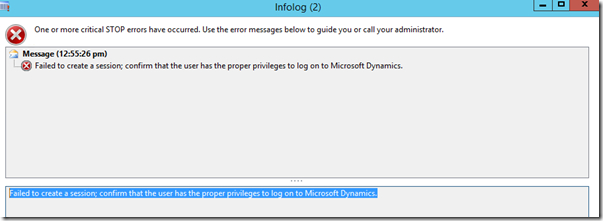
Info log error message.

There are a couple of solutions for this.

  1. Try to complete a full CIL compile with errors.
  2. If the full CIL fails or has errors, then uncheck the “Execute business operations in CIL”, under File > Tools > Options – in the Development tab, as below:
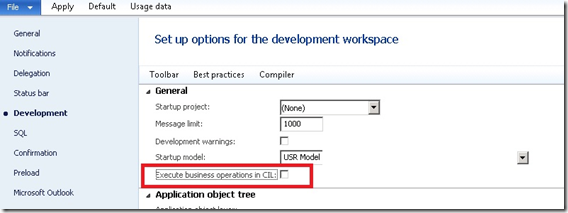
Set up options for the development workspace.

Get started with Dynamics 365

Drive more efficiency, reduce costs, and create a hyperconnected business that links people, data, and processes across your organization—enabling every team to quickly adapt and innovate.