I recently came across a case where the printer destination settings dialog typically used by report to select print destination does not show up.
The cause we found is that an exception occurs when Dynamics AX client queries existing printer from hosted machine. The code is from Forms\SRSPrintDestinationSettingsForm\printerMap() at line 30 which is a call to external DLL to query WMI for all printers in the machine. The exception is thrown so the rest of the code thereafter is not executed resulting in the dialog not shown.
You could use try/catch block like below at Forms\SRSPrintDestinationSettingsForm\printerMap() at line 30 to log more information of the exception thrown from the CLR call with variable of System.Exception ex declared.
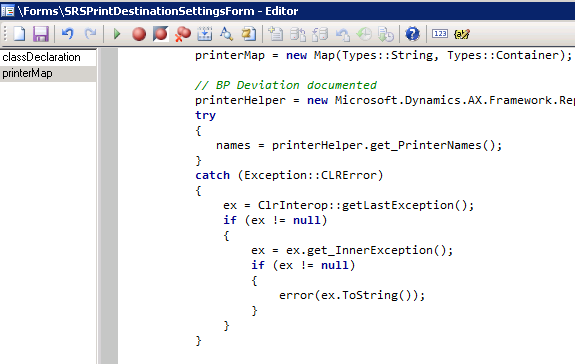
The exception is “not found” that indicates WMI library could not revert back with printer list. What Dynamics AX does is to send “Select * from Win32_Printer” to WMI so wbemtest could also be used to detected the error or to verify using the steps in below.
- Start->Run->Wbemtest.exe
- Click “Connect…” on the Windows Management Instrumentation Tester dialog box
- Click “Connect” on the Connect dialog box
- Click “Query” button and then type in “select * from Win32_Printer” and click Apply
- Send us the Query Result dialog box with printer lists or if it errors out
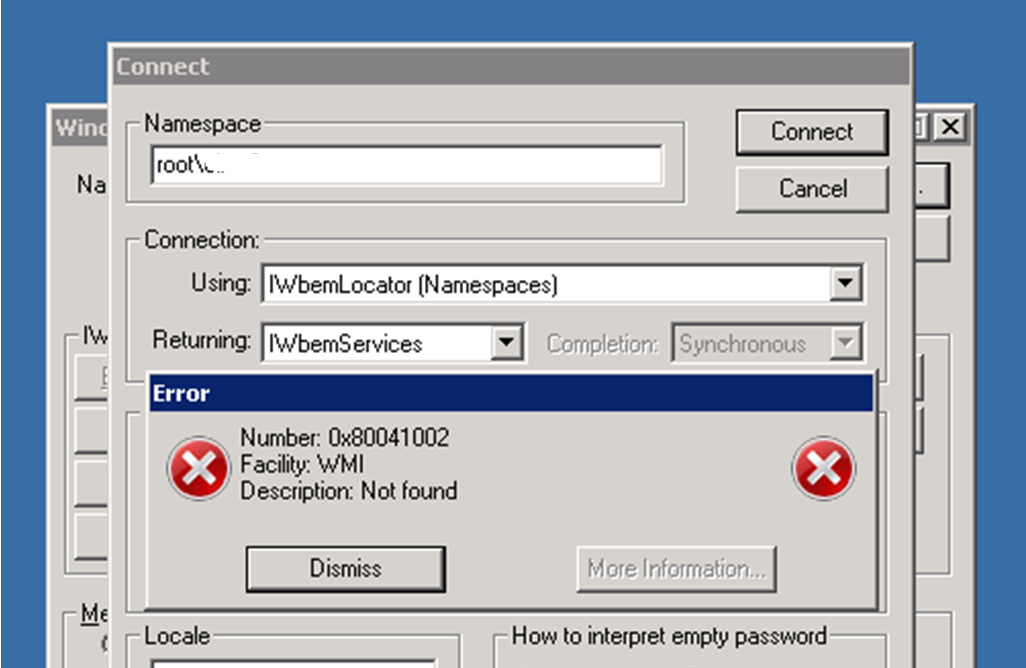
I eventually worked with a Windows Support Engineer to rebuild WMI, which you may want to do the same by discussing with your system admin. and/or Windows Support Engineer. Below is the step we use to rebuild WMI which addresses the print destination setting not shown error for your information.
- Change startup type to Window Management Instrumentation (WMI) Service to disabled
- Stop the WMI Service; you may need to stop IP Helper Service first or other dependent services before it allows you to stop WMI Service
- Make a copy of the repository folder: C:\WINDOWS\system32\wbem\Repository
- run from elevated command prompt:
Winmgmt /salvagerepository