The timeline is a crucial tool for users to monitor customer engagements, track activities, and stay updated on record progress. With Generative AI, we’re introducing timeline highlights, enabling users to grasp activity details in milliseconds.
Streamlined timeline highlights revolutionize the way users interact with essential activities such as emails, notes, appointments, tasks, phone calls, and conversations. With a single click, agents gain access to summaries of key events, including records like cases, accounts, contacts, leads, opportunities, and customized entities.
Agents save time with timeline highlights
This new feature optimizes agent productivity, eliminating the need for excessive clicks and extra reading. Agents can efficiently absorb crucial information, enabling faster and more transparent interactions with customers. Users can expand the highlights section in the timeline by clicking on the chevron.
The highlights show relevant items in a clear and concise bulleted format, facilitating quick analysis and easy reference. The copy functionality empowers users to reuse content by pasting it into notes, with the flexibility to make modifications as needed.
In summary, our innovative approach to timelines, driven by generative AI technology, offers users a transformative experience. Consequently, agents can effortlessly track customer engagements and monitor progress with unparalleled speed and accuracy.
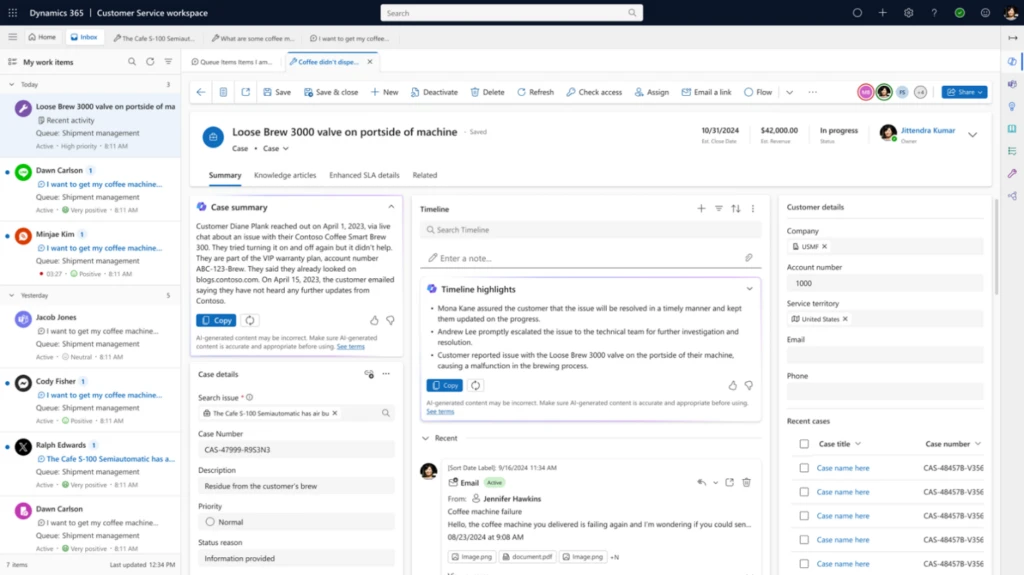
The timeline highlights feature is available within the apps like Dynamics 365 Customer Service, Dynamics 365 Sales, Dynamics 365 Marketing, Dynamics Field Service and custom model-driven Power Apps, providing a unified experience across Dynamics 365.
Timeline highlights are enabled by default. You can enable and disable timeline highlights at the app level and also at form level via the maker portal make.powerapps.com
Learn more
To learn more, read the documentation:
Responsible AI FAQ for Copilot in the timeline – Power Apps | Microsoft Learn
Timeline Overview for Users – Power Apps | Microsoft Learn
Add and configure the timeline control in Power Apps – Power Apps | Microsoft Learn