Applies to: Dynamics 365 Remote Assist (version 2019.10.01)
Microsoft Dynamics 365 Remote Assist for mobile is now generally available!
Users already familiar with Dynamics 365 Remote Assist on HoloLens can access many of the same collaboration tools with just their cell phone or tablet. The Dynamics 365 Remote Assist user on an Android or iOS phone or tablet can place a one-to-one call with an expert using Microsoft Teams to solve complex problems together. Both devices on the call can create mixed reality annotations, such as inking and placing arrows, that appear in the real world.
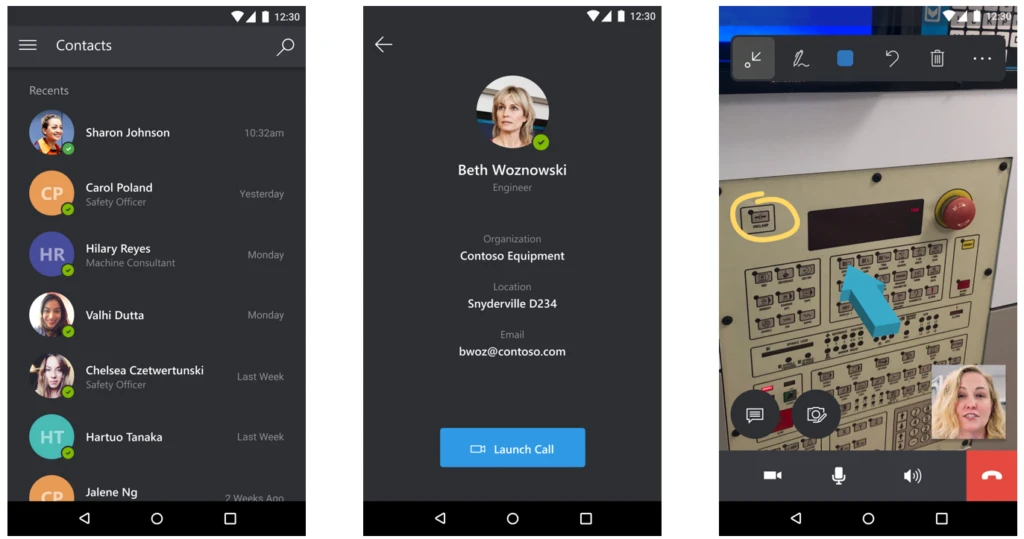
Additionally, as of the October 2019 update:
- Both users can also annotate on a high-quality image capture from the phone for more precise detail and to conserve battery life.
- Users can take advantage of text chat.
- Users can get a quick overview of the app by accessing a new tutorial.
For more information on setting up and using Dynamics 365 Remote Assist for mobile, see the Dynamics 365 Remote Assist for mobile user guide.