Some of the world’s most critical databases run in places where cloud connectivity cannot be assumed. A remote industrial site, for example, may need production systems to continue operating when external connectivity is unavailable. A regulated organization may need sensitive data and processing to remain within sovereign boundaries.
Today, SQL Server on Azure Local is generally available for connected and disconnected operations. With this release, customers can modernize where their data resides while maintaining control over infrastructure, connectivity, and data placement. They can bring AI closer to their data with Foundry Local on Azure Local, currently in preview, and use eligible existing SQL Server licensing investments.
Run SQL Server where your data needs to stay
SQL Server has a long history of supporting mission-critical workloads on customer infrastructure. Azure Local builds on that flexibility by bringing Azure infrastructure to customer-owned environments, giving organizations a consistent platform for running SQL Server across datacenters and edge locations.
Customers can choose the deployment model that fits each environment:
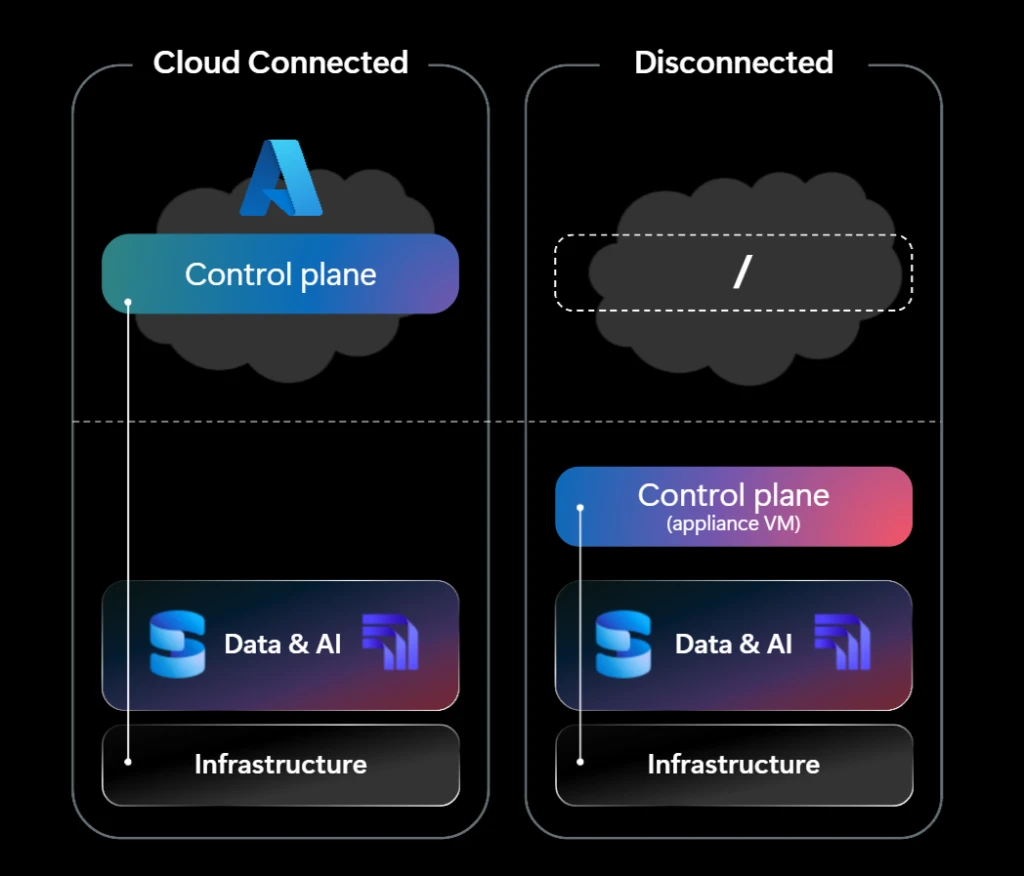
- Connected environments: Run SQL Server locally on Azure Local, while using Azure Arc to manage SQL Server resources through Azure.
- Azure Local Disconnected Operations (ALDO): Run SQL Server in environments where external connectivity is restricted, intermittent, or unavailable, with operations continuing locally.
This means organizations can choose the deployment approach that fits the requirements of individual environments rather than making the same connectivity decision across their entire data estate.
Bring AI closer to your data
Modernizing infrastructure is only part of the opportunity. Organizations also want to bring generative AI to existing enterprise data, including information that cannot leave their environment.
With Foundry Local, customers can run AI models on Azure Local infrastructure alongside SQL Server, bringing inferencing closer to the data. This enables organizations to explore AI-powered applications while keeping sensitive information and processing within their environment.
This can be particularly valuable in sovereign, regulated, and edge scenarios, where organizations want the benefits of AI but need greater control over where models execute and where their data is processed.
The goal is simple: customers should not have to move sensitive data somewhere else simply to begin building intelligent applications around it.
Build on your existing SQL server investments
Modernization should also make it easier to build on existing investments.
SQL Server is licensed separately from the Azure Local infrastructure platform. For connected deployments, customers can use eligible existing SQL Server licenses, including licenses with Software Assurance or qualifying subscriptions, or use pay-as-you-go licensing through Azure Arc.
For fully disconnected deployments, customers can use eligible existing SQL Server licenses through Azure Hybrid Benefit.
This gives organizations options to modernize their SQL Server environments while taking advantage of eligible licensing investments they already own.
A foundation for sovereign and edge data
Enterprise data estates increasingly span cloud, datacenter, edge, and sovereign environments. The opportunity is not to force every workload into the same deployment model, but to give organizations a consistent path to modernization across them.
SQL Server on Azure Local extends that choice to mission-critical SQL Server workloads, helping customers modernize close to their data, applications, and operations while bringing Azure-consistent infrastructure and local AI capabilities into those environments.
SQL Server on Azure Local FAQ
What is SQL Server on Azure Local?
SQL Server on Azure Local lets organizations run SQL Server on Azure Local infrastructure in their own datacenters and edge locations. It supports SQL Server workloads on virtual machines running Windows Server or Linux.
What is the difference between connected and disconnected deployments?
Connected deployments use Azure connectivity and can use Azure Arc to manage SQL Server resources through Azure. Disconnected operations are designed for environments where external connectivity is restricted, intermittent, or unavailable, with operations continuing locally.
Who should consider SQL Server on Azure Local?
It is designed for organizations that need local control because of sovereignty, regulatory, latency, operational continuity, or edge requirements, including public sector, defense, financial services, healthcare, manufacturing, energy, and other regulated or connectivity-constrained environments.
Can customers use existing SQL Server licenses?
Eligible existing SQL Server licenses can be used according to applicable licensing terms. For connected deployments, customers can also use pay-as-you-go licensing through Azure Arc. Fully disconnected deployments use eligible existing licenses through Azure Hybrid Benefit.
Can organizations run AI close to their SQL Server data?
Foundry Local on Azure Local brings AI inference to Azure Local environments and is designed to keep data processing on-premises. As of September 29, 2026, Foundry Local on Azure Local is currently available in preview, so availability and capabilities may change before general availability.
Where can I find deployment guidance?
Microsoft Learn provides guidance for deploying SQL Server on Azure Local, including hardware selection, SQL Server installation, monitoring, performance tuning, high availability, and related Azure hybrid services.
Get Started with SQL Server on Azure Local
SQL Server on Azure Local is generally available for connected and disconnected deployment scenarios.
- SQL Server on Azure Local – Overview
- Deploy SQL Server on Azure Local
- Deploy SQL Server on Azure Local Disconnected Mode
- Learn more about Azure Arc-enabled SQL Server
Additional resources