Meet the Pattern
This pattern shows a solution for integrating W1 features to pre-existing country features that use different tables to achieve similar functionality.
Know the Pattern
It sometimes happens that certain features are requested in a country/region that is supported by Microsoft, but they are not initially considered generic enough to be included in the W1 build. This is how local features, such as Subcontracting in Italy and India, were created or specific banking and payments functionality in Italy, France, Spain, and others.
Then, at some point in time, a decision is made to create a W1 feature that is closely related to the local functionality but uses a completely different set of tables, pages, etc. The developers now face the following problem: How to enable the newly-developed W1 feature into a country, such that the customers who are accustomed to their local structures can seamlessly continue working without completely (or immediately) switching to the W1 objects.
This was the issue that was tackled in the Microsoft Dynamics NAV 2013 R2, in relation to the SEPA Credit Transfers functionality.
Using a Proxy
The generic Proxy pattern is “a class functioning as an interface to something else” (Wikipedia).
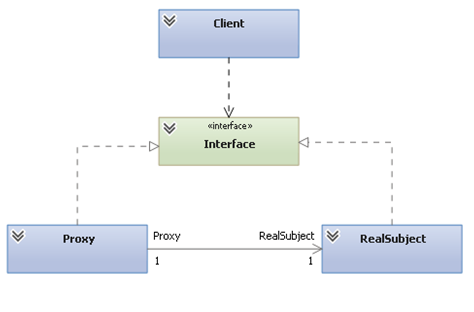
Figure 1. Proxy in UML
Pattern Elements
The Microsoft Dynamics NAV data model translation of the proxy pattern can be used as explained below.
In the diagram, RealSubject is the Microsoft Dynamics NAV data model. Variations in table structures, relationships, and numbers are particular to each country. The W1 model is the base for the localized data models. However, some countries have heavy localizations which cannot be directly processed by the W1 core objects.
The proxy is a codeunit that gathers data from wherever it is stored and transforms it to fit into a standard table, which is later used across all localizations.
The interface is the fixed form in which the data is presented to be consumed by the client.
The client can be an XML port that is fed from the common data interface. It can also be any other data processor (a codeunit fed to another table, etc.) or data display object (page or report).
Pattern Steps
- The user creates records in the local tables.
- The user invokes an action that must be processed using the W1 feature code.
- The proxy codeunit moves the data from the local tables to the W1 tables, either into a temporary or persistent set of records, as needed.
- The W1 code now performs the action on the W1 table data.
Use the Pattern
In Microsoft Dynamics NAV 2013 R2, Continue reading on NAV Patterns Wiki…
Best regards,
Bogdan Sturzoiu at Microsoft Development Center Copenhagen