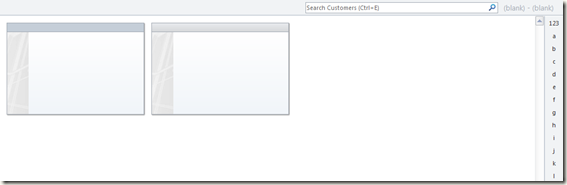
After setting up a new synchronization entity in Dynamics NAV 2009 SP1 to synchronize a specific Dynamics NAV table to Microsoft Outlook, the result of the first synchronization is that empty records are being created. E.g.:
The reason for this is that table 5304, field 15, contains a Read-Only Status field set to Read-Only in Outlook:
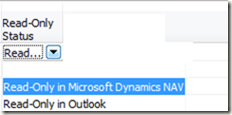
These fields are not synchronized because they are marked as Read-Only in Outlook. This property is retrieved from MAPI for each field. The default entities are generated via CU5300 where the fields are inserted via code. As a work around we suggest one of these 2 options:
1) remove the validation in COD5300 in ValidateOItemPropertyName trigger
[BEFORE]
IF TempOSynchLookupName.FINDFIRST THEN BEGIN
  InputString := TempOSynchLookupName.Name;
  OPropertyInfo := OObjInfo.GetProperty(TempOSynchLookupName."Entry No.");
  IsReadOnly := OPropertyInfo.IsReadOnly;
  EXIT(TRUE);
END;
[AFTER]
IF TempOSynchLookupName.FINDFIRST THEN BEGIN
  InputString := TempOSynchLookupName.Name;
  OPropertyInfo := OObjInfo.GetProperty(TempOSynchLookupName."Entry No.");
  //IsReadOnly := OPropertyInfo.IsReadOnly;
  EXIT(TRUE);
END;
2) Add default customization through code, the same as it is done for the default entries APP, CONT_SP, etc.
For instance, please do have a look at COD5300 triggers :
CreateDefaultContPers
CreateDefaultContComp
CreateDefaultContSp
CreateDefaultTask
CreateDefaultApp
Lines like the below one are used for inserting the fields in table 5304:
InsertOSynchField(OSynchEntity.Code,0,OSynchEntity."Table No.",OSynchEntity."Outlook Item",'BusinnessAddress',
  FALSE,FALSE,0,2,'',0);
NOTE: any entities created before this code adjustment will have to be recreated.
This issue does not occur in Dynamics NAV 5.0 SP1.
Regards,
Marco Mels
CSS EMEA
This posting is provided “AS IS” with no warranties, and confers no rights