Mark the Number allocation at posting setup in Journal form.
When you get the error message find the number sequence that is having the issue.
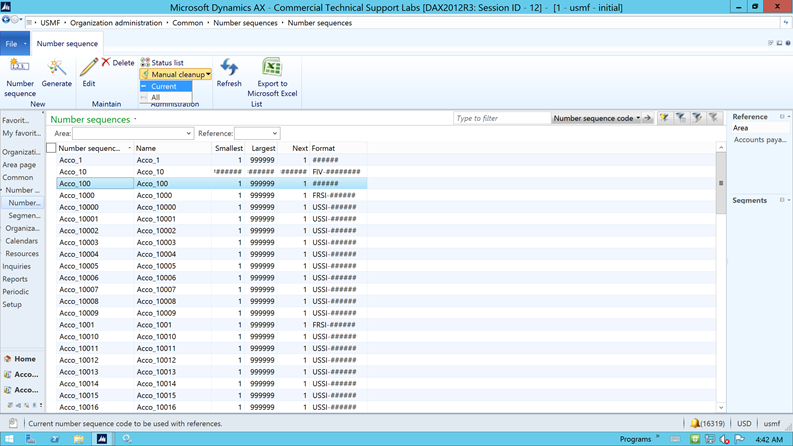
Organization administration/Common/Number sequences/Number sequences select that number sequence, click on Manual Cleanup>current
Note : DO NOT CLICK ALL option
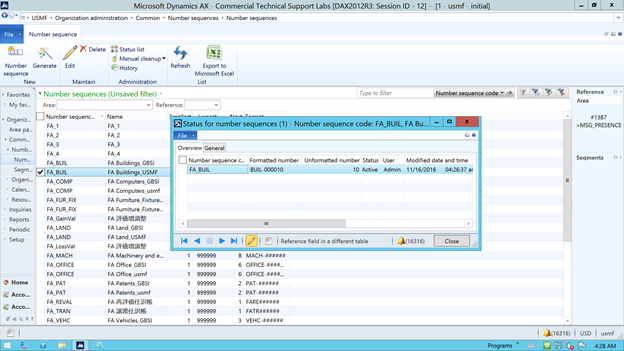
c. Deleting records in status list
Find the number sequence and click status list .
Delete using Alt+F9 option
Microsoft Disclaimer: Microsoft’s suggestion are recommendatory in nature and the partner/customer should fully test any suggestions provided before applying them in production environment. Microsoft will not take any responsibility for any issue that arises because of this.
![Avatar of Maharaja GK [MSFT]](https://secure.gravatar.com/avatar/cb1be11a428459fa98ae1a1374c85206871069eba1cc7c3996cb52e3492d26f3?s=212&d=mm&r=g)