
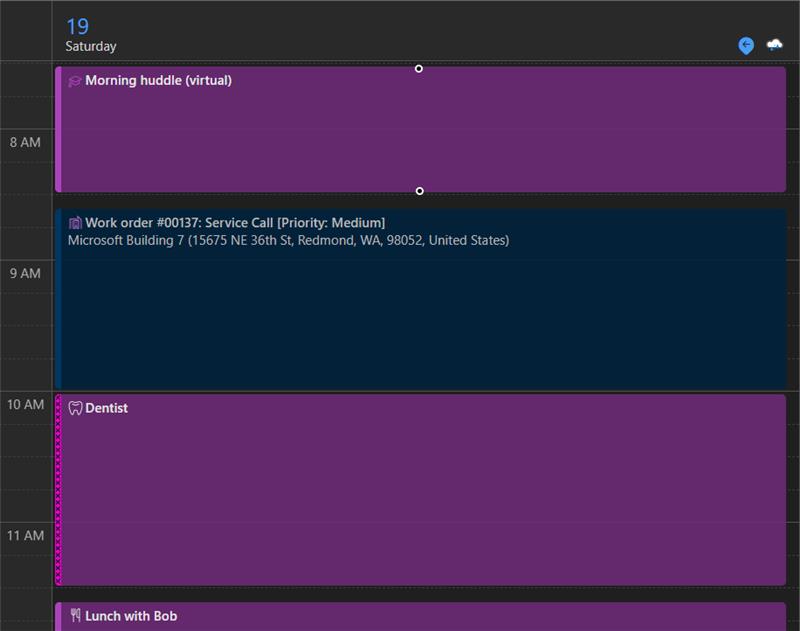
Microsoft is introducing a powerful Exchange integration feature in Dynamics 365 Field Service, designed to seamlessly sync work order bookings with Outlook and Teams calendars. This feature lets technicians see their work assignments, personal appointments, and other work meetings in one place.
How it works
With this integration, work order bookings from Dynamics 365 Field Service will automatically appear on resources’ Outlook and Teams calendars, provided they are set up for syncing. The synchronization process is:
- One-way sync from Dynamics 365 to Exchange.
- Fast and efficient, with a maximum sync time of 15 minutes.
- Seamless—technicians no longer need to switch between applications to track their schedules.
Key benefits
This feature provides significant advantages for organizations managing field operations:
- Enhances workforce efficiency by allowing technicians to operate entirely within Outlook.
- Reduces scheduling confusion, ensuring all work orders and personal commitments are visible in one calendar.
- Supports a modern experience, enabling frontline workers to use the Microsoft ecosystem for a seamless workflow.
Getting started: Setup and requirements
To enable the Exchange integration, organizations must meet the following prerequisites:
- You must have an Exchange admin role for your tenant and either a Dynamics 365 System Admin role or the delegated mailbox approver role in Dynamics 365.
- Exchange Server and Field Service must be in the same tenant.
Availability and early access
The Exchange integration preview is available starting April 2024! It will be available more broadly in Release wave 2 2025.
Organizations interested in the Exchange integration preview can sign up or leave their email for more information by signing up here today. You’ll need to provide:
- Org IDs for the organizations opting into the feature early.
- A contact email for coordination with the product team.