
Modern customer experiences don’t live in a single system or interaction type. Whether agents resolve complex cases in Dynamics Customer Service or manage live conversations in Dynamics Contact Center, the quality of an interaction often depends on how the work is performed and not just what was said.
Across both workloads, customers have consistently asked for the same missing capability: secure, structured visibility into the agent’s on‑screen workflow during customer interactions. Voice, chat, and transcripts capture part of the story, but they don’t always reveal how agents navigate systems, apply processes, or respond in real time.
Today, Screen Recording in Dynamics 365 Customer Service and Dynamics 365 Contact Center addresses that gap by providing organizations with trusted, role‑based access to screen context that supports coaching, quality evaluation, and compliance.
Why Screen Context Matters
Customer interactions are rarely linear. Agents often work across multiple systems, reference internal knowledge, update records, and follow prescribed processes, all while engaging with the customer.
Although Customer Service and Contact Center support different interaction models, customers using both workloads face remarkably similar challenges:
- Supervisors need better context to evaluate agent’s activities when helping customers.
- Compliance teams require auditable visibility in regulated environments.
- Organizations want to coach agents more effectively without guesswork.
Without screen context, organizations must infer intent and execution. With it, teams can:
- Perform more accurate and objective quality evaluations
- Identify training gaps and process inconsistencies
- Reduce time to resolution by understanding workflow breakdowns
- Validate compliance and required actions with confidence
Screen recording complements existing call and chat records, enabling a more complete understanding of each interaction, regardless of the channel.
One Capability, Designed for Two Workloads
We’ve built Screen Recording in Dynamics 365 as a unified capability that serves both Customer Service and Contact Center, while adapting naturally to different ways agents work.
Key Capabilities:
- Automatic Screen Recording for Call Conversations
- Manual Screen Recording for service reps working on multiple cases, chats, etc.
- All screen recordings are securely uploaded to Dataverse
- Role based access to both perform and access screen recordings
Manual screen recording when service reps are working on cases, for example:
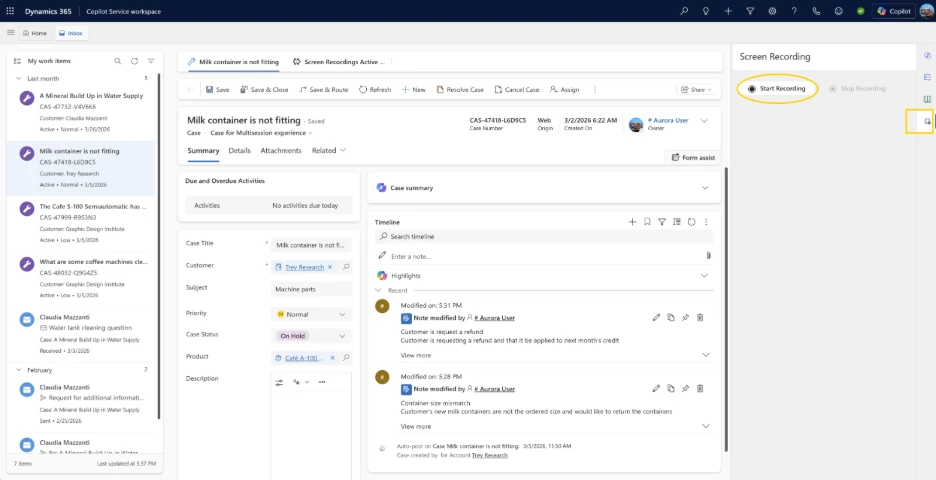
To balance visibility with usability, recording is scoped intentionally, and configuration and operational details are managed by administrators.
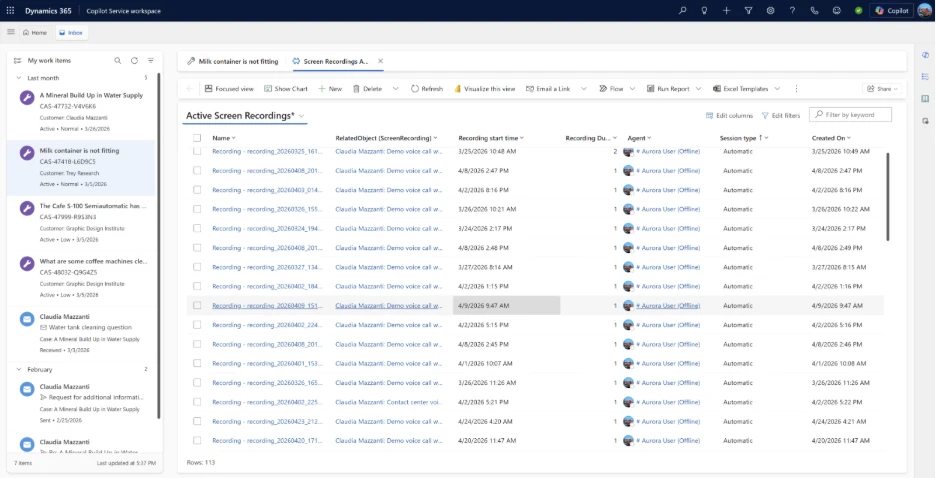
For step‑by‑step setup and configuration guidance, detailed documentation is available on Microsoft Learn.
Secure by Design: Trust, Access, and Governance
Because screen recordings may contain sensitive information, security and governance were foundational to the design.
Access is controlled through role‑based permissions, ensuring only authorized users can record, review, or download recordings. Recordings are stored securely, with controls that align to enterprise and regulatory expectations.
This approach allows organizations to unlock operational insight without compromising trust between agents, supervisors, and compliance teams.
Learn More
To explore how to configure and administer screen recording in your environment, visit the documentation on Microsoft Learn:
https://learn.microsoft.com/en-us/dynamics365/contact-center/administer/configure-screen-recording
We’re excited for you to try this capability and to hear how screen recording is helping you improve quality, coaching, and operational visibility across your service experiences.