
Custom Translator v2 is now available: Introducing higher quality translations and regional data residency

Today, we are releasing Custom Translator version 2. The newest version of Custom Translator boasts higher quality customized translations than version 1 and allows you to keep your training data in the region of your choice, if desired, in order to meet your corporate data security, data privacy, and regulatory requirements.
This upgrade to v2 will roll out in two phases to provide quicker translation quality improvements (in both accuracy and fluency) to our customers and enable regional data residency, with more regions to come. Today, we announce that phase one is live.
Higher quality translations
With Custom Translator v2, we continue our commitment to breaking down language barriers and preserving culture heritage with domain-specific data– one language at a time, one region at a time. Custom Translator v2 ups the quality game by upgrading to the newest version of Microsoft Translator’s state-of-the-art neural machine translation (NMT) architecture. These standard, general domain NMT models power Microsoft products such as Office 365, Speech Services, Teams, Bing.com/Translator, and more.
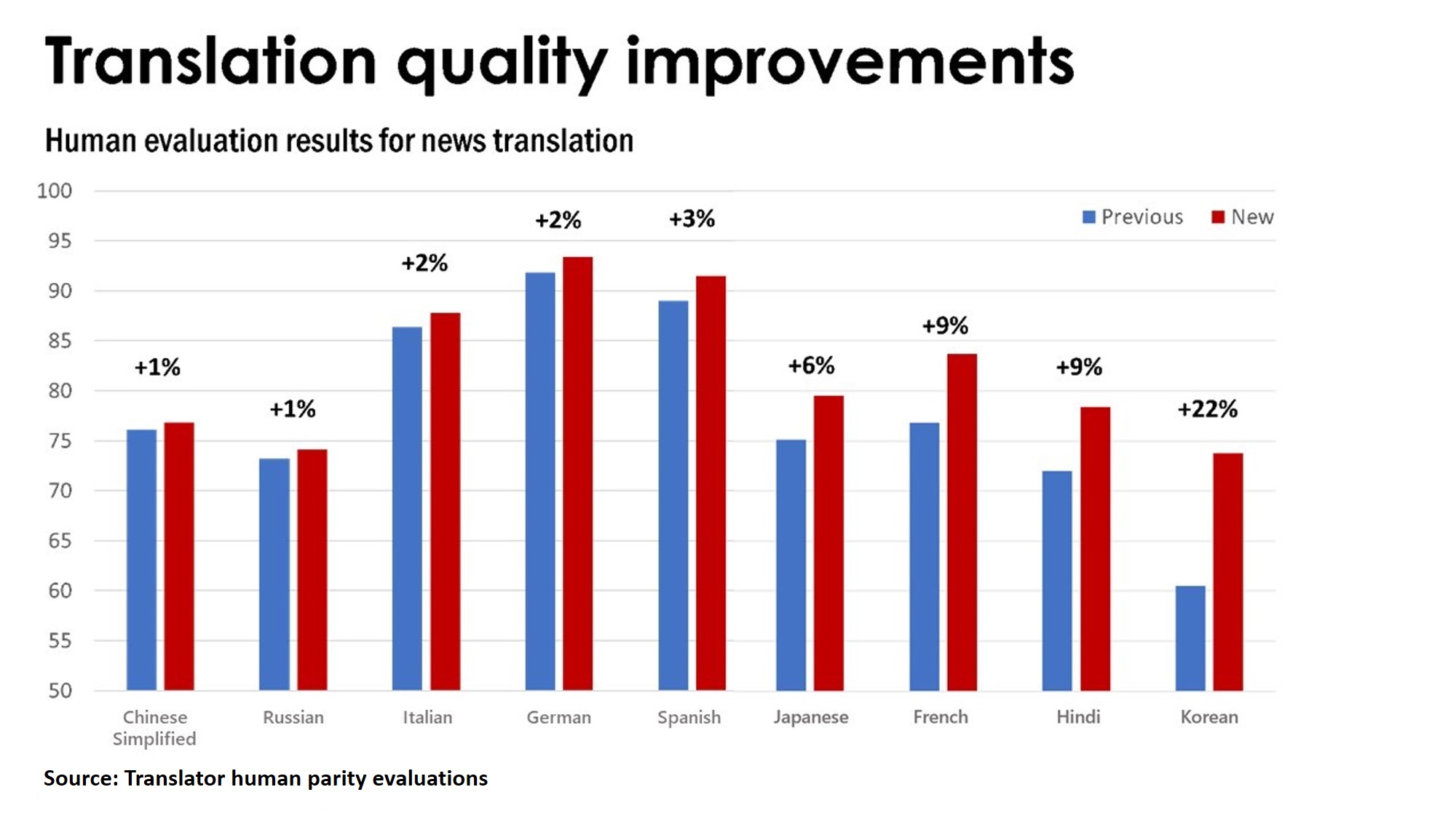
Many of our customers have reported seeing better translation quality when using a dynamic dictionary with Translator’s general domain models. We validated and quantified the quality improvement seen and decided to enable this feature as the first phase in Custom Translator service upgrade.
Deploying dictionary files through a Custom Translator model instead of using the dynamic dictionary feature in a Translator API call simplifies the translation process and reduces the maintenance cost. We expect more than 40% of our customers who train dictionary only models would immediately reap the quality improvement of Custom Translator v2 models.
Now you can use your own domain data in a dictionary document type to customize Translator’s general domain models in all Custom Translator supported languages, while continuing to build models with training document types on Custom Translator v1. You can view the complete language list in the Custom Translator Update in Azure.
Keep your data in your selected region
For customers who were previously blocked from using Custom Translator service because of corporate or regulatory requirements, today we are enabling regional data residency in Asia Pacific, Canada, Europe, and more US regions to meet your needs. If you select a region to create projects, your uploaded documents and trained models are kept at rest in the region you selected.
What you can do with Microsoft Custom Translator
Build custom models with your domain specific terminology and translate real-time using Translator on Azure.
Use the Custom Translator service to build translation solutions to help globalize your business and improve customer interactions.
For more information on Microsoft Translator, please visit microsoft.com/translator/business.


