Skip to main content Home Business intelligence Community, Social, and Gaming Customer Support Education Internal Communications Live and Remote Communications Readiness and Training Web Localization and Ecommerce More Solutions Text Translation Document Translation Custom Translator Translator Apps Office SharePoint Yammer Visual Studio Speech Translation Computer Vision Conversational Language Understanding More Languages Blog FAQ Text Translation Document Translation Custom Translator Other Cognitive Services Support Contact Confidentiality Attribution Machine Translation Customers Partners Partner Program Community Partners Try for free now Microsoft 365 Azure Copilot Windows Surface XBOX Deals Small Business Support Windows Apps Outlook OneDrive Microsoft Teams OneNote Microsoft Edge Moving from Skype to Teams Computers Shop XBOX Accessories VR & mixed reality Certified Refurbished Trade-in for cash XBOX Game Pass Ultimate PC Game Pass XBOX games PC games Microsoft AI Microsoft Security Dynamics 365 Microsoft 365 for business Microsoft Power Platform Windows 365 Small Business Digital Sovereignty Azure Microsoft Developer Microsoft Learn Support for AI marketplace apps Microsoft Tech Community Microsoft Marketplace Software companies Visual Studio Microsoft Rewards Free downloads & security Education Gift cards Licensing Unlocked stories View Sitemap

Microsoft Translator Blog

Back-to-School: How Translator Helps English Language Learners Overseas

Sara Mata, a Certified K-12 Reading Specialist, recently learned about Microsoft Translator and how this tool can help with reading comprehension for her remote English Language Learners (ELL) from China.

While attending the International Society for Technology in Education (ISTE) conference in Chicago, Sara came across a demo of Microsoft Translator and realized immediately how this technology could impact her remote reading comprehension sessions with James, a Chinese student, who is a visual learner.

Although Sara uses tools such as Skype to share her live presentation, there wasn’t a way to provide live captions in English while simultaneously viewing captions in the student’s native language.

Discovering the Microsoft Translator live feature has changed the way Sara engages with her students. As a visual learner, James can now follow along with Sara’s English captions, while also viewing the translation in his native language.
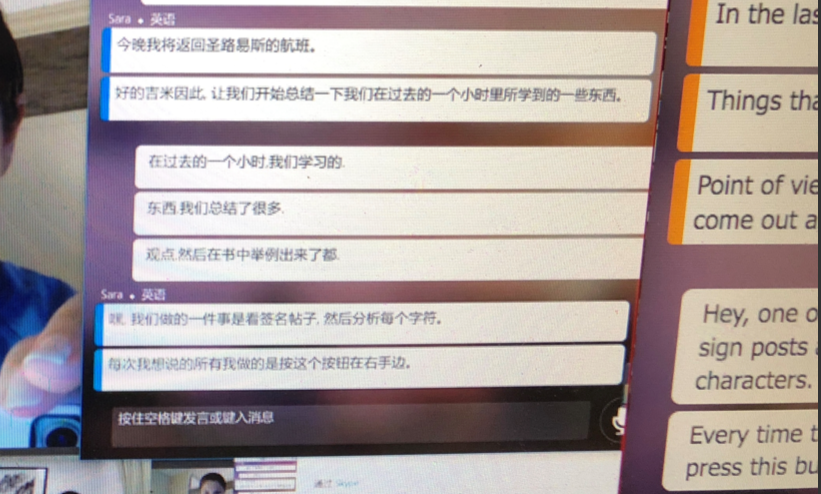
 

James expressed his enthusiasm with the following quote: “Ms. Mata, the Translator helped me feel so much more comfortable during my lesson, and I even learned new vocabulary!”

To learn more about how Microsoft Translator helps engage English Language Learners using live, translated captioning, read Sara Mata’s blog.

To start using Microsoft Translator for Education, visit our Translator for Education page to download the free app and find additional resource materials for teachers: aka.ms/translatoredu


English (United States)
Your Privacy Choices Opt-Out Icon Your Privacy Choices
Consumer Health Privacy Contact us Privacy Manage cookies Terms of use Trademarks About our ads