
March 24, 2026
Share this page


How to use tablet computers in 2026
Tablet computers have become everyday essentials for work, school, creativity, and entertainment. In 2026, tablet computers combine AI‑accelerated performance, long battery life,1 and lightweight designs that travel easily from room to room or city to city.
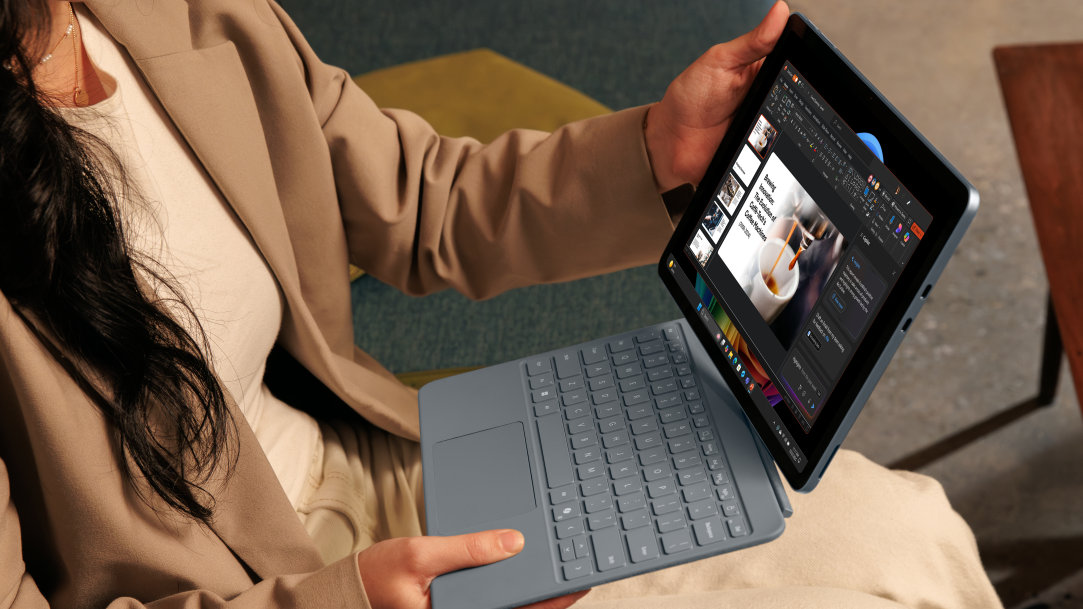
Surface Pro, a Copilot+ PC from Microsoft, gives you a 2‑in‑1 design that works like a laptop and plays like a tablet, so you can move between touch‑first tasks and full typing setups all from one device.
What is a tablet computer today?
A tablet computer in 2026 is a slim, touch‑first device designed for portability and versatility. A modern tablet computer typically includes:
- A high‑resolution touchscreen
- Digital pen compatibility
- Optional keyboard accessories
- A lightweight frame
- Access to productivity, creativity, and entertainment apps
Some tablet computers run full desktop operating systems with advanced AI features. Choose a Surface Pro and get an ultra‑thin 2‑in‑1 device with Snapdragon® X Series processors, a high‑performance NPU, and Windows 11 AI experiences.
Common uses for tablet computers in 2026
Tablet computer for work and productivity
You can use a tablet computer to handle a full workday at home, in shared workspaces, or while traveling. A tablet computer lets you:
- Write emails and edit documents
- Join video calls and collaborate online
- Review presentations and mark up PDFs
- Work across multiple apps at once
When you attach a Surface Pro keyboard,2 you get a laptop‑like typing setup with a precision touchpad, a Copilot key, a microphone mute key, and a snipping key. You can work long stretches of time without plugging in, because Surface Pro battery life1 is built for remote and hybrid schedules.
Tablet computer for school
You can use a tablet computer to manage reading, writing, research, and class participation in one device. A tablet computer lets you:
- Take handwritten or typed notes
- Read textbooks and research materials
- Join online classes
- Complete assignments anywhere
Pair a Surface Pro with a Surface Slim Pen2 for a complete, versatile solution with AI-powered features for sketching, note‑taking, and real-time collaboration. Additionally, the lightweight Surface Pro design fits easily into backpacks and supports long study sessions across campus or at home.
Creativity and design
You can use a tablet computer as a portable canvas for drawing, editing, and planning. A tablet computer lets you:
- Sketch and draw
- Edit photos and videos
- Create music
- Build storyboards and design layouts
When you choose the OLED HDR display option on Surface Pro, you get color‑accurate visuals for creative work. You can draw or write with precise, responsive strokes, and you can use Windows 11 AI features such as Cocreator and enhanced photo editing to speed up creative projects.
Entertainment and media
You can use a tablet computer as a personal entertainment screen. A tablet computer lets you:
- Stream movies and TV
- Play casual games or cloud‑based games
- Read books, comics, and magazines
Watch your favorite movie on a Surface Pro display and get rich color and contrast that make movies and shows look vivid. You can watch for long periods at home or on the go because Surface Pro battery life supports extended viewing.
Everyday personal use
You can use a tablet computer for everyday tasks throughout your home and your day. A tablet computer lets you:
- Browse the web and check social media
- Manage smart home devices
- Plan trips and organize schedules
- Share the device with family members
Surface Pro is built with a large touchscreen and simple navigation that makes daily tasks easy to manage. Carry Surface Pro from room to room and count on long battery life for use throughout the day.
How to use a tablet computer
To make a tablet computer feel more personal and more capable:
- Customize your home screen and widgets
- Sync files and notes across devices
- Use split view and window snapping for multitasking
- Attach a keyboard for typing‑heavy work
Use a digital pen for notes, sketches, and markup
Surface Pro gives you the advantage of Windows 11 AI features such as Recall,3 Live Captions with translation, and Windows Studio Effects to stay organized, communicate clearly, and find information quickly.
Accessories that expand what a tablet computer can do
To expand what a tablet computer can do, add accessories2 like:
- A Surface Pro keyboard for laptop‑like typing
- A Surface Slim Pen for writing and drawing
- A dock or external monitor for a desktop‑like setup
Tablet computer or laptop: Which one fits better?
A tablet computer works well when you want a device that feels comfortable to hold, unlocks quickly, and enhances reading, browsing, and light work. A laptop works well when you want a built‑in keyboard, a trackpad, and a traditional typing setup for long writing sessions or complex tasks.
When you choose a Surface Pro 2-in-1, you get both.
Attach a Surface Pro keyboard when you want a full typing setup for writing and editing. Removing the keyboard gives you a lightweight tablet for reading, sketching, or reviewing documents. Move between both modes throughout your day without switching devices.
Who benefits most from a tablet computer in 2026
You may find a tablet computer especially useful if you want one device that adapts to different environments and different types of work. Surface Pro takes the benefits a step further. For example, you can:
- Handwrite notes, read, and type up assignments as a student
- Join meetings, review documents, and communicate as a remote or hybrid worker
- Draw or edit directly on the screen and type when planning creative projects
- Browse, stream, and manage everyday tasks as a family or casual user
The future of tablet computers
AI‑accelerated performance, improved displays, and adaptable designs are shaping the future of tablet computers. With Surface Pro, you have a 2‑in‑1 tablet computer that handles work, creativity, and everyday use in one portable form. Explore Surface Pro and see how you can take it anywhere and use it for focused work, writing, drawing, watching, browsing, and more.
Frequently asked questions
-
Tablets excel at quick, portable tasks: reading, note‑taking, sketching, video calls, travel‑friendly work, and AI‑assisted tasks. A Surface Pro 2-in-1 adds full Windows 11 power, so it handles both light and heavy workloads.
-
A tablet can replace a laptop for tasks such as writing documents, browsing, email, and cloud-based work. However, it cannot fully replace a laptop for heavy multitasking, advanced software, programming, or long typing-intensive sessions. A Surface Pro 2‑in‑1 PC can absolutely replace a laptop because it runs full desktop apps, supports multitasking, and becomes a full laptop when you attach the keyboard.
-
Yes, especially for students and mobile workers. Tablets work well for reading, research, note-taking, presentations, online classes, meetings, and light office work. More demanding academic or professional tasks still favor laptops. Surface Pro 2-in-1s go further by supporting full productivity software, external monitors, and Copilot, your AI companion, for research, writing, and organization.
-
Keyboard and pen are optional but recommended. A keyboard improves typing and productivity, while a pen is useful for handwriting, drawing, and precise input. Without accessories, tablets are best for light use.
-
Most tablets last about 3–5 years with good performance. Premium 2‑in‑1 devices like Surface Pro often last longer thanks to stronger hardware, long-term Windows support, and efficient AI acceleration.
-
Yes. Tablets are simple, touch-friendly, and easy to learn. A Surface Pro 2-in-1 adds the advantage of growing with the user — from basic browsing to full PC tasks.
- [1] Battery life varies significantly based on device configuration, usage, network and feature configuration, signal strength, settings and other factors. See Surface battery performance for details.
- [2] Sold separately.
- [3] Requires Windows Hello Enhanced Sign-in Security. Optimized for select languages (English, Chinese (Simplified), French, German, Japanese, and Spanish). Content-based and storage limitations apply.
Mentioned in this article

Compare Surface Copilot+ PCs
You may also like

The differences between Surface Laptop and Surface Pro from Microsoft

Why a Microsoft Surface is the best Windows device experience
