Summary Datox’s experience shows how early architecture decisions can support the demands of enterprise workflows. Microsoft for Startups helps founders build on Azure with the technology and resources to develop and scale enterprise-ready AI applications.
Building an AI agent is more accessible than it was even a few years ago as models, development frameworks, and managed services have advanced. Operating that agent in a real enterprise workflow is harder. Startups must make decisions about context, tools, data, controls, validation, and monitoring.
These decisions arise early for startups. An agent may need to understand the state of a workflow, retrieve the right context, call application capabilities, and explain a proposed action. Teams also need ways to validate outputs, control changes, monitor behavior, and protect customer data.
Datox encountered these requirements while developing an agent for regulatory reporting. Its platform supports financial services teams across the regulatory-reporting workflow, from source-data intake and enrichment through transformation, validation, review, approval and regulatory-ready output.
Their experience shows how founders can make architecture decisions early that support consistent operation, control, and future enterprise requirements. Microsoft for Startups helps founders build and scale enterprise-ready AI applications on Microsoft Azure.
Why regulated work demands accuracy, accountability, and control
Regulatory reporting involves structured processes supported by spreadsheets, documents, XML files, system exports, and jurisdiction-specific templates. Teams must resolve inconsistencies and produce reports that can support internal review and regulatory scrutiny.
These workflows require reviewable evidence and clear user control over consequential changes. Datox designed its co-work agent to use the current reporting context and approved application capabilities while leaving judgment, review, and approval with the user.
From interface-led software to workflow-aware collaborator
Traditional software as a service (SaaS) products rely on users to navigate menus, upload files, run validations, review exceptions, and move through stages manually. As reporting complexity increases, the interface can place more cognitive load on the user.
Datox developed a workflow-aware agent that works alongside its existing application. When enabled, the agent uses the current report context, workflow state, validation status, and relevant prior project activity available within the user’s authorized scope. This context allows the agent to explain an issue, identify the next required step, or propose an application action. Datox exposes product workflows as structured tools so that the agent can access approved capabilities through defined interfaces.
The biggest shift was architectural. We stopped thinking of the interface as the only way to access product capability and started exposing workflows as tools so that the agent could understand, explain, and execute with user approval.
Bobur Umurzokov, co-founder and CTO, Datox
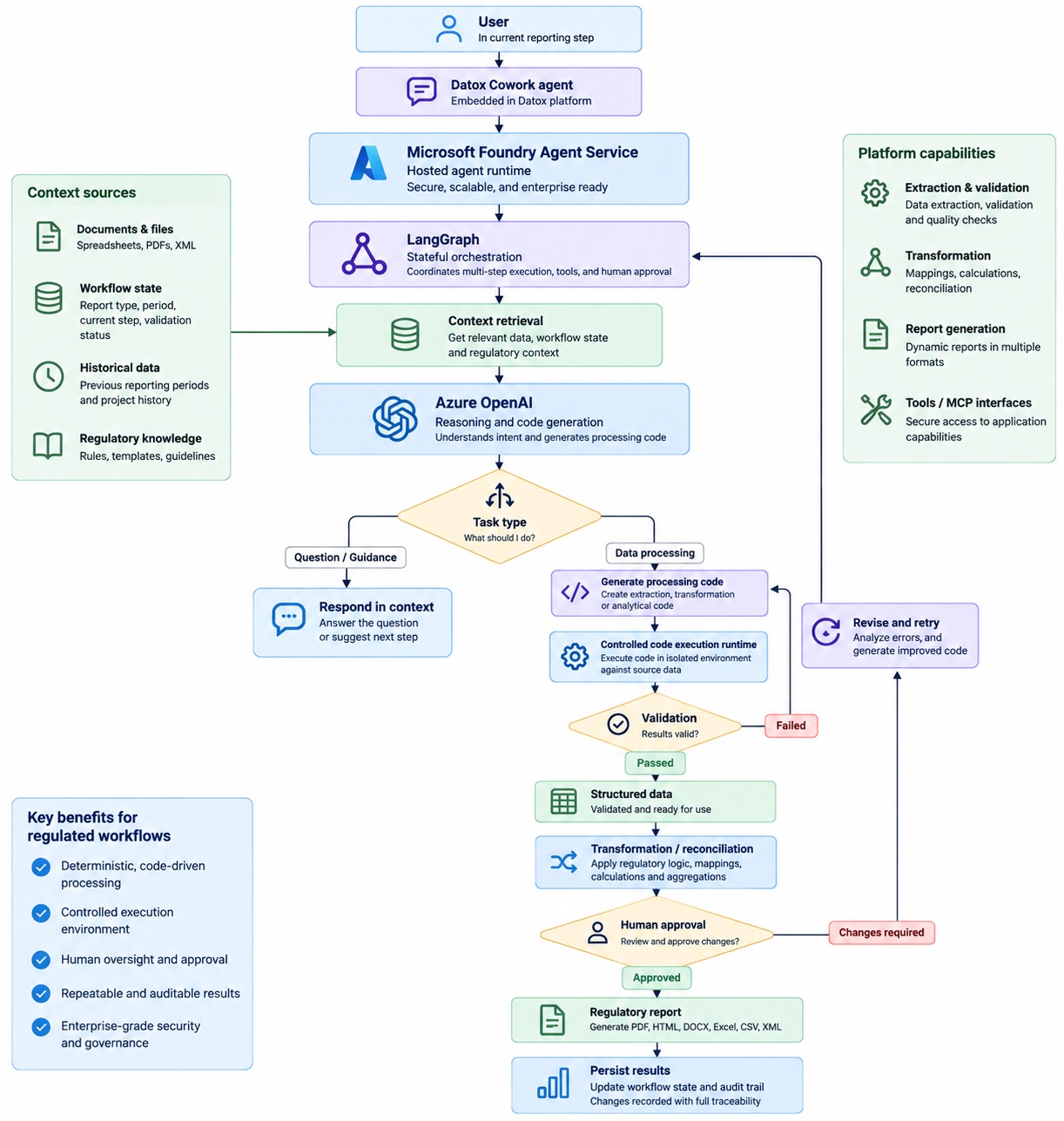
The diagram below shows a sample workflow-driven agent pipeline:
Datox’s experience points to six practical architecture lessons for startups building agents for enterprise workflows.
1. Design the architecture before choosing the model
Agent performance depends on the complete application path, including context retrieval, tool orchestration, network calls, validation, and post-processing.
Datox’s architecture approach supports enterprise readiness through separation of responsibilities, making it easier to isolate issues and update individual components as requirements evolve. Foundry Agent Service provides the hosted agent runtime, while LangGraph coordinates stateful, multi-step execution across context retrieval, reasoning, tool calls, controlled code execution, validation, and human approval. Azure OpenAI provides reasoning, explanations, structured outputs, and code generation. Azure Functions coordinates event-driven processes such as extraction and validation, and Azure Container Apps hosts containerized applications and execution services that can scale with workflow demand.
This separation lets the model determine how a task should be performed while deterministic processing runs through controlled, testable application code.
2. Expose backend capabilities as structured tools
Datox exposes known application capabilities such as extraction validation, transformation checks, workflow actions, and report generation through structured tools and model context protocol server-compatible interfaces. Each tool gives the agent a defined way to request an application capability. For dynamic data-processing tasks that cannot be represented as a fixed tool, the agent can generate processing code that runs inside a controlled execution environment.
Clear inputs, outputs, permissions, validation, and error behavior make tool calls more predictable. Datox’s application services execute each approved operation and enforce its controls. This gives the agent two complementary execution paths: structured tools for known application capabilities and controlled code execution for dynamic extraction, transformation, validation, calculations, and analytics. Both paths remain governed by application permissions, validation, and audit controls.
3. Structure outputs early
Free-form responses can create ambiguity when another application component needs to validate or act on the result. Datox moves from probabilistic model output into validated structured data as early as possible, using formats such as JSON where appropriate. This allows the application to validate required fields and schema compliance before downstream transformations, regulatory checks, reporting, or approval.
Azure OpenAI supports the structured outputs, which the application validates before using them in the reporting workflow. Once information is represented as structured records, downstream processing becomes more predictable and easier to inspect. This creates a clearer boundary between model reasoning and application behavior and provides more consistent records when investigating a workflow or application issue.
4. Confirm before mutation
Datox separates an agent’s recommendation from an application change and asks for user approval before modifications. This creates a clear control point. The agent can flag an issue, such as, “There’s a mismatch between the source currency and the reporting currency. I can apply the existing transformation rule.” Before changing data or workflow state, it asks for approval: “Would you like me to apply this mapping across all funds in this reporting group?”
Our customers don’t want AI for its own sake. They want a faster, clearer, and more controlled way to complete regulatory reporting. The co-work agent lets us bring AI into the workflow in a way that supports user judgment, rather than replacing it.
Farrukh Mukhitdinov, CEO and co-founder, Datox
5. Invest in observability early
Agent applications need visibility across the full request path. Datox identifies telemetry across model interactions, tool execution, user approvals, performance, and failures; this visibility helps developers trace recommendations, investigate problems, and evaluate new workflow conditions. Observability becomes more important as customers begin to depend on the agent within a business process.
6. Separate the control plane from the data plane
The control plane contains agent instructions, orchestration logic, model access, tool coordination, and execution policies. The data plane contains the customer information and generated artifacts needed to complete the reporting process. The reasoning layer accesses data and application actions only through controlled interfaces and approved execution paths.
This separation allows models, agents, and orchestration components to evolve without giving the reasoning layer unrestricted control of customer data. Azure Blob Storage supports document and artifact storage, while persistent reporting and workflow state can remain in the application data layer. The result is a clearer boundary between AI decision-making, deterministic execution, and customer data.
Build enterprise-ready AI agents with Microsoft for Startups
Together, these practices help Datox operate its agent within the controls and responsibilities of an enterprise reporting workflow. Developers can use the AI App Architecture for Startups guide as a broader framework for evaluating and improving the performance, cost, and application path around their models.
Datox’s experience shows how early architecture choices can help startups move towards reliable operations in enterprise workflows. They shared that Microsoft for Startups helped them build on Azure and accelerate its transition toward a collaborative, agent-driven architecture.
Microsoft for Startups supports eligible founders developing AI applications on Azure. Get started with Microsoft for Startups today.
Access your startups benefits today
Microsoft for Startups helps founders build fast, scale smart, and sell more. Apply today to unlock up to $150,000 in Startup credits to start building immediately.