In August, we announced the SQL Server AlwaysOn Offering in the Microsoft Azure Portal Gallery. This offering fully automates the configuration of a highly available SQL Server deployment on Azure Infrastructure Services using AlwaysOn Availability Groups.
Now, we have updated this offering with some exciting improvements. Namely, we have added support for using existing domains, and we have optimized the time it takes to deploy, so you save even more time than before!
AlwaysOn Availability Groups in Azure
SQL Server AlwaysOn technology provides the high availability capabilities needed for mission critical applications. One of the main challenges of this technology is that it requires a complex and time-consuming setup. With the new SQL Server AlwaysOn Template in the Azure Portal, this process is greatly simplified, freeing up your valuable time and resources. After entering the desired settings in the Portal, the setup is automatically completed for you. With this setup you get an Availability Group with two SQL VMs, a listener configured to point to the current primary, a file share witness, failover cluster, and two domain controller VMs for a new or existing domain.
Existing Windows Domain
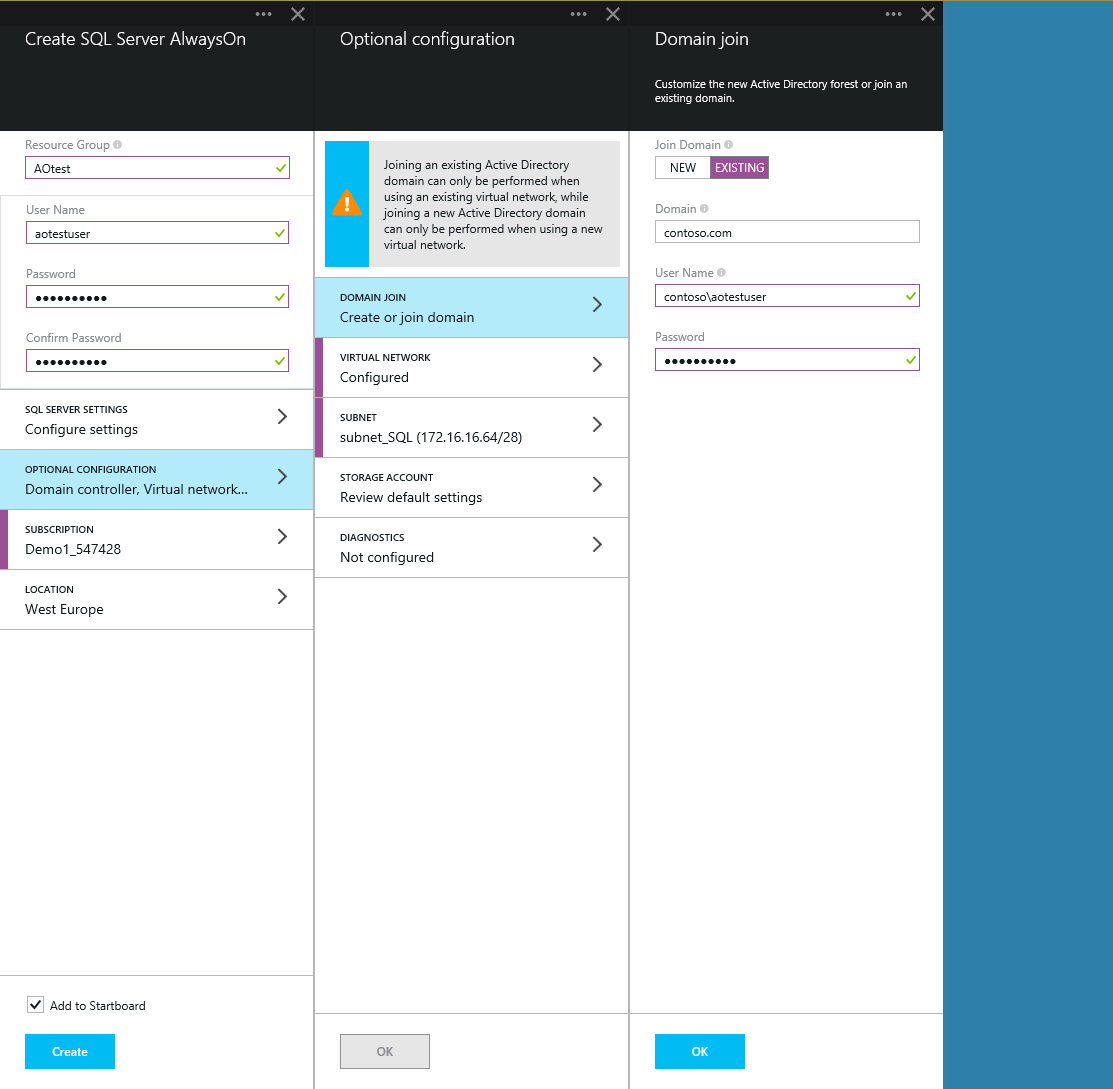
With this update, you can select between having a new domain created for this configuration and utilizing an existing domain you have pre-configured with all your specific requirements. You can use the new domain option to have a domain fully created and set up for you. This is a good option if you do not have very specific domain requirements, or do not have an existing domain you wish to utilize. You can use the existing domain option if you have very specific requirements or prefer to reuse a pre-configured domain from on-premises or in Azure. With this option selected, the SQL primary, secondary, and file share witness will be successfully added to your existing domain.
To use an existing domain, first select the correct existing Virtual Network for that domain, then select the existing domain with the user credentials, as shown in the screenshot below.
Execution Time Cut in Half
Going through the manual setup of an AlwaysOn Availability Group can take anywhere from 2-6 hours, depending on your level of expertise on the technology. When this feature was initially released, it decreased the amount of work to set this up to 1 minute, and had the configuration completely deployed after about 1.5 hours. Now we have decreased that even further, to around 45 minutes. This saves even more valuable time and allows you that much faster access to highly available SQL VMs to use for your critical business applications.