Azure HDInsight Clusters Allows Custom Installation of Spark Using Script Action
Apache Spark is a popular open source framework for distributed cluster computing. Spark has been gaining popularity for its ability to handle both batch and stream processing as well as supporting in-memory and conventional disk processing. Starting today, Azure HDInsight will make it possible to install Spark as well as other Hadoop sub-projects on its clusters. This is delivered through a new customization feature called Script Action. This will allow you to experiment and deploy Hadoop projects to HDInsight clusters that were not possible before. We are making this easier specifically for Spark and R by documenting the process to install these modules.
To do this, you will have to create an HDInsight cluster with Spark Script Action. Script Action allow users to specify PowerShell scripts that will be executed on cluster nodes during cluster setup. One of the sample scripts that are released with the preview is Script Action to install Spark. During preview the feature is available through PowerShell, so you will need to run PowerShell scripts to create your Spark cluster. Below is the snippet of the PowerShell code where “spark-installer-v01.ps1” is the Script Action that installs Spark on HDInsight:
New-AzureHDInsightClusterConfig -ClusterSizeInNodes $clusterNodes
| Set-AzureHDInsightDefaultStorage -StorageAccountName $storageAccountName
-StorageAccountKey $storageAccountKey -StorageContainerName $containerName
| Add-AzureHDInsightScriptAction -Name “Install Spark”
-ClusterRoleCollection HeadNode,DataNode
-Uri https://hdiconfigactions.blob.core.windows.net/sparkconfigactionv01/spark-installer-v01.ps1
| New-AzureHDInsightCluster -Name $clusterName -Location $location
Once the cluster is provisioned it will have the Spark component installed on it. You can RDP into the cluster and use Spark shell:
- In Hadoop command line window change directory to C:\apps\dist\spark-1.0.2
- Run the following command to start the Spark shell.
.\bin\spark-shell
- On the Scala prompt, enter the spark query to count words in a sample file stored in Azure Blob storage account:
val file = sc.textFile(“example/data/gutenberg/davinci.txt”)
val counts = file.flatMap(line => line.split(” “)).map(word => (word, 1)).reduceByKey(_ + _)
counts.toArray().foreach(println)
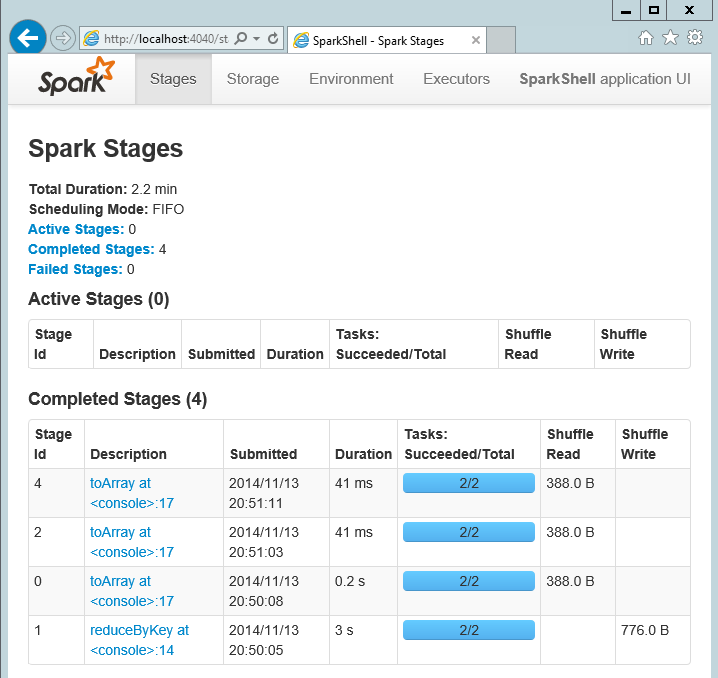
- You can monitor progress of Spark jobs by opening Spark Web UI (http://localhost:4040)
For more information on Azure HDInsight:
- Read more about Azure HDInsight
- Read HDInsight’s Learning Map
- Attend Microsoft’s Virtual Academy for free classes on HDInsight
- Azure 30 day free trial