


In July 2026, Microsoft Defender Experts observed phishing campaigns targeting organizations across multiple industries that distributed a masqueraded MSP360 Remote Monitoring and Management (RMM) installer through meeting invitations, PDF-themed lures, software update prompts, and other social-engineering content. Once executed, the legitimate MSP360 installer, distributed under a deceptive file name established remote management access on affected devices and enabled threat actors to gain an initial foothold using trusted administrative software.
Microsoft observed the MSP360 deployment being used to download and install a ConnectWise ScreenConnect client, creating a secondary remote-access channel that provided redundant access to compromised systems. Microsoft did not observe exploitation of ScreenConnect software itself; rather, threat actors abused legitimately obtained remote administration software to establish and maintain access. After access was established, threat actors used these remote administration channels to deploy additional tools and conduct post-compromise activity, including information collection and credential-access operations.
This activity highlights how threat actors continue to abuse legitimate remote administration software to blend into normal IT operations while maintaining persistent access and reducing detection opportunities. Microsoft Defender for Endpoint detects suspicious and uncommon remote-management activity, while the hunting queries and mitigations in this post can help organizations identify and restrict unapproved RMM use.
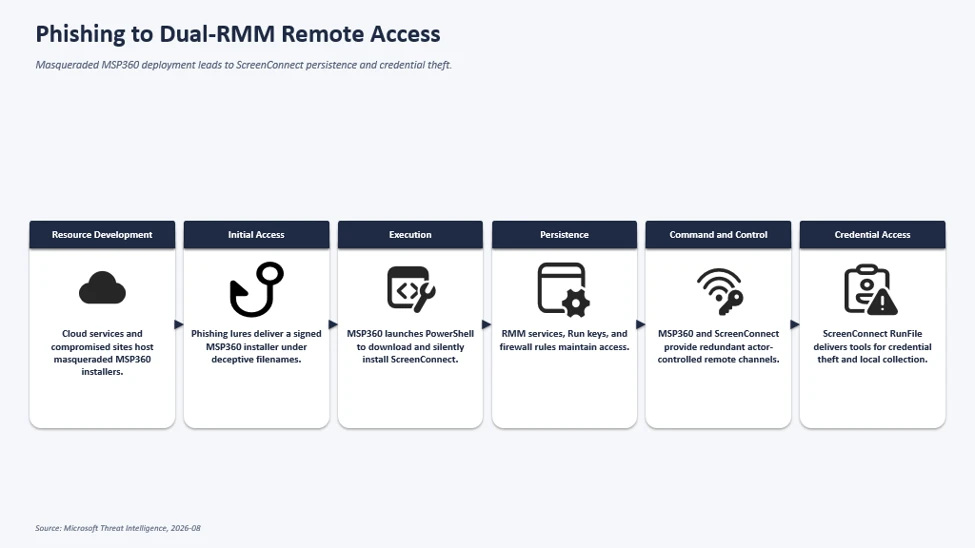
Attack chain overview
The observed multi-stage intrusion chain began when phishing lures delivered a legitimate, digitally signed MSP360 RMM v2.5.0.67 installer under deceptive filenames. Following successful User Account Control (UAC) elevation, the installer established MSP360 services for persistent access and leveraged the RMM agent to invoke PowerShell, download, and silently install ConnectWise ScreenConnect.
This effectively introduced a second remote administration channel on the compromised device, which the threat actor subsequently used to transfer and execute additional tooling supporting credential access, local data collection, and other post-compromise activity.
Initial Access: Phishing Campaign Delivering Masqueraded MSP360 RMM Installer
Microsoft observed multiple phishing campaigns that used a multi-stage delivery chain to distribute legitimate, digitally signed MSP360 RMM software (v2.5.0.67). Phishing emails directed users to actor-controlled landing pages that impersonated document-sharing portals, invitation workflows, Adobe Reader download pages, Zoom installation pages, and business collaboration platforms.
Upon user interaction, victims were redirected to download locations hosted on both attacker-controlled infrastructure and legitimate cloud services including Amazon S3, Cloudflare R2, Dropbox, GitLab, and Supabase. The downloaded executables used filenames crafted to resemble legitimate business content, meeting invitations, PDF documents, and software installers. Analysis of downloaded samples showed that many ultimately contained the same MSP360 RMM installer package despite appearing as different files to the victim.
MSP360 SHA256: 108ef7e628d7a20bd6241a5b57149e27a6061f467123eb64061975559f8f73dc
MSP360 SHA1: f34330d4c6e0aa978dc3af40360c14b31ad51127
Observed lure themes:
We have observed the threat actor using multiple social-engineering themes, including:
- Workplace meeting requests
- Zoom and Google Meet installation prompts
- Adobe Acrobat and PDF reader updates
- RSVP invitations and e-cards
- Job offer documents
- Document review and signature requests
- DHL and package-delivery themed content
Examples of observed filenames included:
- VIP_ECARD_INVITATION_rmm_v2.5.0.67_oid[redacted].exe
- ZoomSetup_Installation_v2.5.0.67_ oid[redacted].exe
- PDF Reader & Editor the Adobe Acrobatte_rmm_v2.5.0.67_ oid[redacted].exe
- RSVP_INVITATION_E_CARD_rmm_v2.5.0.67_ oid[redacted].exe
- SSA.GOV_STATEMENT_rmm_v2.5.0.67_ oid[redacted].exe
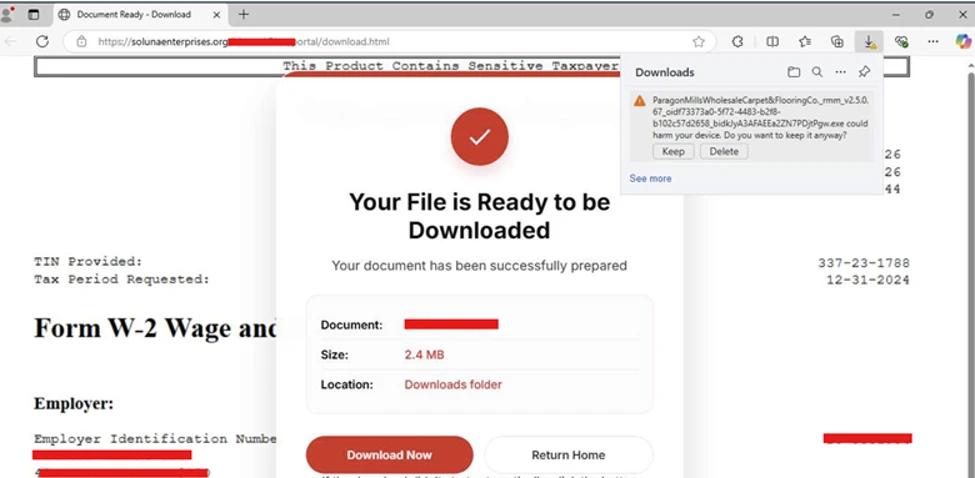
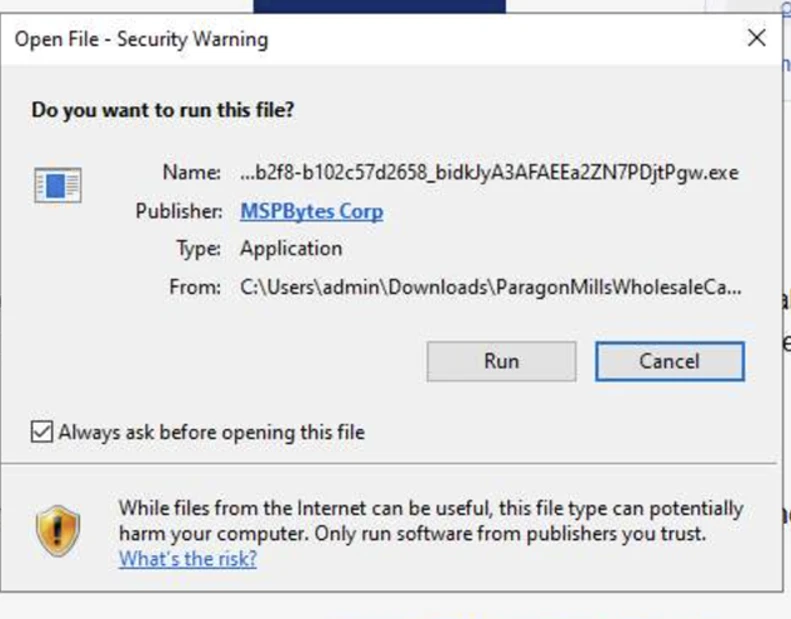
The campaign relied on a diverse set of payload-hosting mechanisms. Microsoft observed the actor distributing the payload through attacker-controlled domains, websites assessed to be compromised, and legitimate cloud-hosted services. Cloud-hosted services used for payload distribution included Amazon S3, Cloudflare R2, Dropbox, GitLab, and Supabase.
This approach enabled the actor to rapidly rotate delivery infrastructure while continuing to distribute the same MSP360 installer using different lure themes and filenames.
RMM platforms are attractive to threat actors because they are designed to provide administrators with broad remote management capabilities across managed endpoints, including remote command execution, software deployment, file transfer, and persistent service-based access. When abused, these same capabilities can give threat actors a flexible post-compromise channel for maintaining access, deploying additional tooling, and conducting follow-on activity while blending in with legitimate remote administration workflows.
MSP360 RMM installation and foothold establishment
After victims downloaded and executed the masqueraded MSP360 installer, the binary launched from the user’s Downloads directory under a filename designed to resemble a legitimate business document.
The installer subsequently dropped multiple installation components, including System.dll, nsExec.dll, and UAC.dll, to the following folder paths before relaunching itself through an elevation workflow generated by the installer framework. Next, the installer invoked a Windows User Account Control (UAC) elevation workflow. In observed successful installations, the process continued with elevated privileges, allowing deployment of MSP360 components and services. In unsuccessful installations, the elevation did not complete, and deployment terminated before the software was fully installed.
Following elevation, the installer initiated the MSP360 installation workflow and recorded installation status messages using Windows eventcreate.exe. The installer generated “Begin installation” and “End installation. MSP360 de Success.” events under the event source: MSP360 RMM Agent installer. The installer dropped multiple MSP360 plugins and binaries within the installation directory: C:\Program Files\RMM Agent\.
The installer also performed prerequisite discovery by enumerating installed .NET runtimes using: dotnet –list-runtimes. To establish long-term access on the affected device, the installer registered two Windows services: RMM.Agent.exe & RMM.Agent.Launcher.exe. Microsoft observed events indicating stopping any existing MSP360 services and installing new MSP360 services.
In addition to service-based persistence, the installer created registry-based autorun entries for MSP360 user interface components, ensuring the tray applications would automatically launch when users signed in.
The installation routine also modified the Windows Firewall configuration by creating an inbound allow rule for the MSP360 agent. The rule allowed inbound UDP traffic to C:\Program Files\RMM Agent\RMM.Agent.exe on port 48678. This configuration enabled network communications required by the remote management platform.
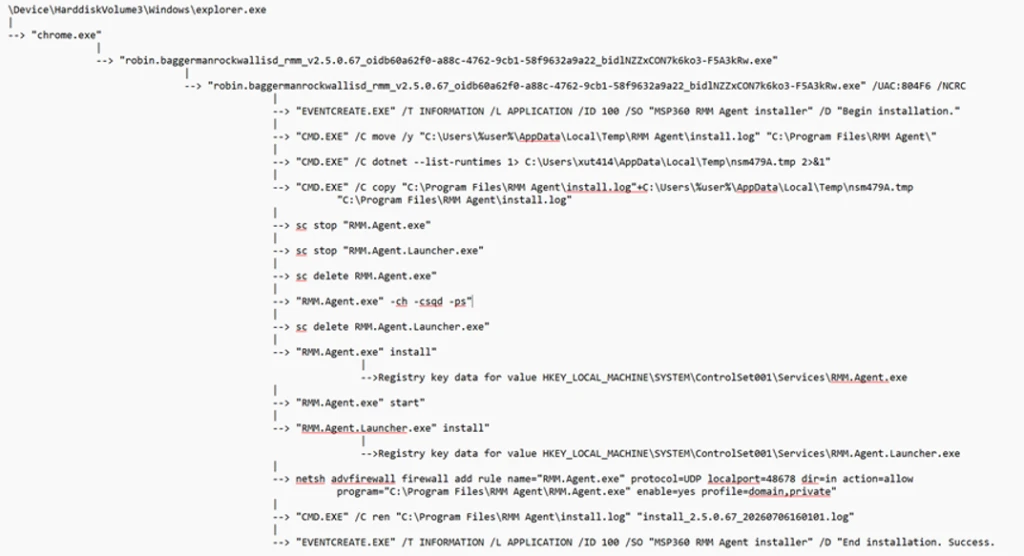
Not every execution of the installer resulted in a successful deployment. In some instances, the installer was launched by the user and began its installation routine but subsequently attempted to obtain elevated privileges through User Account Control (UAC). When elevation was denied or aborted, the installation terminated before completing deployment of the MSP360 RMM components. The process execution flow showed installation initialization activity followed by events indicating that administrative privileges were required, with no subsequent evidence of the persistence mechanisms, services, or remote management functionality observed during successful installations.

Remote command execution from MSP360 Agent and ScreenConnect deployment
Following successful installation of MSP360 RMM, the newly installed RMM.Agent.exe service launched PowerShell. The PowerShell process modified the execution policy for the current session and executed Invoke-WebRequest commands to download an MSI package named ClientSetup.msi from actor-controlled infrastructure. The downloaded package was then installed silently through msiexec.exe using the /qn switch, eliminating visible user interaction. This installation activity resulted in the deployment of a ConnectWise ScreenConnect client on the compromised endpoint, including ScreenConnect.ClientService.exe, ScreenConnect.WindowsClient.exe, and supporting components.
The installer additionally created Windows service registrations, application uninstall entries, and authentication-related registry modifications associated with the newly deployed ScreenConnect client.
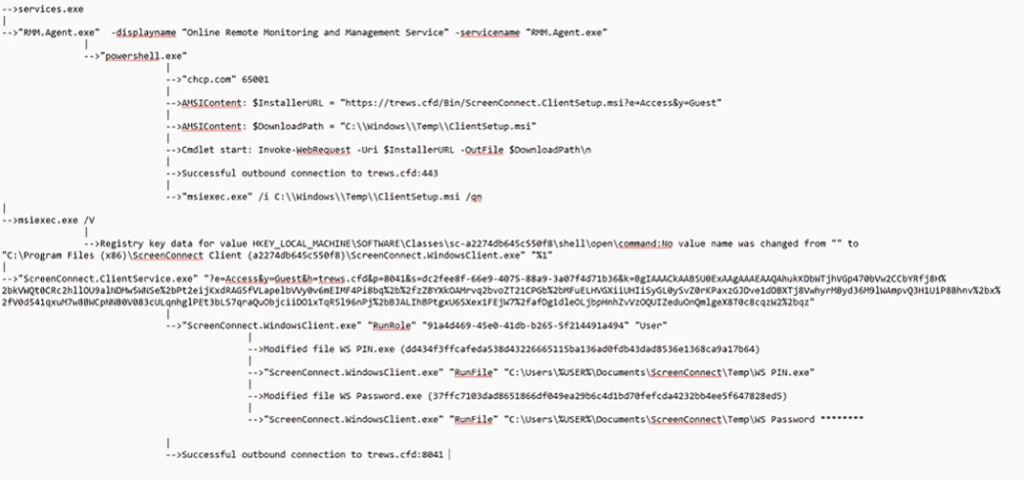
Following deployment, the ScreenConnect client service launched with configuration parameters referencing actor-controlled infrastructure and subsequently established successful outbound communications. The service then spawned ScreenConnect.WindowsClient.exe, providing an additional remote access channel independent of MSP360. Following establishment of the ScreenConnect session, the threat actor used ScreenConnect to transfer and stage additional executables in the following directories:
- C:\Users\%user%\OneDrive\Documents\ScreenConnect\Temp\
- C:\Users\%user%\Documents\ScreenConnect\Temp\
Examples of frequently observed files included:
- WindVerify.exe
- WindowsUpdate.exe
- WindowsSecurity_PIN.exe
- WindowsSecurity_Password.exe
- WindowsPassKey.exe
- SCHider.exe
- PIN.exe
- phonepc.exe
- DefenderDT.exe
- DefenderControl.exe
- phonelinkupdate.exe
- PhoneLinkPrompt.exe
- Passwords.EXE
- OpenCamera.exe
- open_phone_link.exe
- MouseHiderGUI.exe
- HideUL.exe
- HideMouseApp.dll
- HideMouse.exe
- HideFromControlPanel.exe
- HideCursor.exe
- BannerHider.exe
- WebBrowserBookmarksView.exe
- WebBrowserPassView.exe
These files were among the most frequently observed utilities delivered by the threat actor following establishment of a ScreenConnect session. Several filenames were intentionally chosen to resemble legitimate Windows, Microsoft Defender, Phone Link, and security-related components, likely to reduce user suspicion and blend into normal operating system activity. These utilities were observed during post-compromise activity and were used to support subsequent operations on affected systems. Several of the observed tools are commonly associated with credential access, information collection, execution of additional payloads, and efforts to reduce defender visibility.
The execution of these files occurred through ScreenConnect’s built-in RunFile functionality, which allows files to be transferred to and executed on managed endpoints. This activity demonstrates how the threat actor leveraged a legitimate MSP360 RMM deployment to establish an initial foothold before deploying ConnectWise ScreenConnect as a secondary remote access platform. The combination of MSP360 and ScreenConnect provided the threat actor with redundant remote administration channels and enabled the transfer, execution, and management of additional tooling during subsequent stages of the intrusion.
The threat actor subsequently used these remote access platforms to facilitate follow-on activities including information collection, credential access, and the deployment of additional utilities on compromised systems.
Microsoft also observed separate activity during July in which FaronicsDeployAgent.exe, a legitimate deployment and remote access application, was used in a similar manner to MSP360 RMM. In this activity, the threat actor leveraged FaronicsDeployAgent.exe as the initial remote management platform and subsequently used it to download and install ScreenConnect. This observation demonstrates that the deployment of ScreenConnect was not limited to MSP360-based intrusions, with additional legitimate remote administration software also being leveraged to establish remote access and facilitate ScreenConnect installation.
Attribution
Microsoft has not attributed this activity to a named threat actor. The campaigns are tracked as unattributed activity.
Mitigation and protection guidance
Microsoft recommends the following actions to help organizations reduce their exposure to this activity. Check the recommendations card for the deployment status of monitored mitigations.
- Govern approved RMM tools: For approved RMM systems used in your environment, enforce security settings where possible to implement multi-factor authentication (MFA).
- Restrict unauthorized software: Use Application Control for Windows to create policies to block unapproved IT management tools. Both solutions include functionality to block specific software publisher certificates:
- Application Control for Windows file rule levels allow administrators to specify the level at which they want to trust their applications, including listing certificates as untrusted.
- AppLocker’s publisher rule condition is available for files that are digitally signed, which can enable organizations to block non-approved RMM instances that include publisher information.
- Block specific signed applications: Microsoft Defender for Endpoint also provides functionality to block specific signed applications using the block certificate action.
- Consider searching for unapproved RMM software installations (see the Advanced hunting section). If an unapproved installation is discovered, reset passwords for accounts used to install the RMM services. If a system-level account was used to install the software, further investigation may be warranted.
- Strengthen endpoint protection: Turn on cloud-delivered protection in Microsoft Defender Antivirus or the equivalent for your antivirus product to cover rapidly evolving attacker tools and techniques. Cloud-based machine learning protections provide near-instant, automated protection against new and emerging threats.
- Investigate unauthorized installations: Turn on the following attack surface reduction rule to block or audit activity associated with this threat:
- Block process creations originating from PsExec and WMI commands. Some organizations may experience compatibility issues with this rule on certain server systems but should deploy it to other systems to prevent lateral movement originating from PsExec and WMI
Microsoft Defender XDR detections
Microsoft Defender XDR customers can refer to the list of applicable detections below. Microsoft Defender XDR coordinates detection, prevention, investigation, and response across endpoints, identities, email, and apps to provide integrated protection against attacks like the threat discussed in this blog.
| Tactic | Observed activity | Microsoft Defender coverage |
| Initial access | Delivery of masqueraded MSP360 application v2.5.0.67 | Microsoft Defender Antivirus – SupportScam:Win32/RogueMSP.MU!MTB |
| Execution | Execution of the RMM software | Microsoft Defender for Endpoint – Suspicious usage of remote management software – Uncommon remote access software |
| Persistence | Persistence established by RMM software | Microsoft Defender for Endpoint – Anomaly detected in ASEP registry – Suspicious file registered as a service |
| Credential Access | Potential credential-access activity following RMM deployment | Microsoft Defender for Endpoint – Possible theft of passwords and other sensitive web browser information |
Threat intelligence reports
Microsoft customers can use Microsoft Defender XDR Threat Analytics and related Microsoft threat intelligence reporting to stay current on the malicious activity, indicators, detection coverage, and recommended response actions associated with this campaign. These reports provide investigation context, protection guidance, and updated intelligence that security teams can use to prevent, mitigate, or respond to related activity in their environments.
Advanced hunting
// Run this query to identify the presence of MSP360 RMM agent
let MSP360RMM = "108ef7e628d7a20bd6241a5b57149e27a6061f467123eb64061975559f8f73dc";
DeviceFileEvents
| where Timestamp >= ago(30d)
| where SHA256 =~ MSP360RMM
// Run this query to identify the remote command execution from MSP360 RMM Agent
DeviceProcessEvents
| where Timestamp >= ago(30d)
| where (InitiatingProcessVersionInfoCompanyName == "MSP360" and ProcessCommandLine == "\"powershell.exe\"") or ( InitiatingProcessCommandLine == "\"powershell.exe\"" and ProcessCommandLine has_all ("msiexec.exe","\\Temp\\",".msi") and InitiatingProcessParentFileName == "RMM.Agent.exe")
// Run this query to identify the suspicious network connections from the threat actor’s use of ScreenConnect
let MaliciousURLs =  DeviceNetworkEvents
| where Timestamp >= ago(30d)
| where InitiatingProcessCommandLine == "\"powershell.exe\""
| where InitiatingProcessParentFileName == "RMM.Agent.exe"
| where isnotempty(RemoteUrl)
| distinct  RemoteUrl;
DeviceNetworkEvents
| where Timestamp >= ago(30d)
| where InitiatingProcessFileName has_any ( "ScreenConnect.ClientService.exe","ScreenConnect.WindowsClient.exe","ScreenConnect.Client.exe")
| where isnotempty(RemoteUrl)
| where RemoteUrl in (MaliciousURLs)
// Run this query to identify the suspicious payloads dropped and launched by the threat actor’s use of ScreenConnect
DeviceProcessEvents
| where Timestamp >= ago(30d)
| where InitiatingProcessCommandLine  has_all ("ScreenConnect.WindowsClient.exe", "RunFile","\\Documents\\","\\Temp\\")
MITRE ATT&CK Techniques observed
This campaign has exhibited use of the following attack techniques. For standard industry documentation about these techniques, refer to the MITRE ATT&CK framework.
Resource Development
- T1583.001 Acquire Infrastructure: Domains | Domains were used to host phishing landing pages, payload delivery infrastructure, and ScreenConnect services associated with the campaign.
- T1583.006 Acquire Infrastructure: Web Services | The threat actor leveraged legitimate cloud-hosting providers including Amazon S3, Cloudflare R2, Dropbox, GitLab, and Supabase for payload distribution.
Initial Access
- T1566.002 Phishing: Spearphishing Link | Victims received workplace meeting, Zoom, Google Meet, invitation, RSVP, PDF, and Adobe-themed phishing emails containing links that redirected to malicious payload download locations.
- T1204 User Execution | Victims downloaded and executed a masqueraded MSP360 installer distributed under deceptive filenames designed to resemble legitimate business documents and software.
Execution
- T1059.001 Command and Scripting Interpreter: PowerShell | The MSP360 RMM.Agent.exe service launched PowerShell to download and install ConnectWise ScreenConnect.
- T1059.003 Command and Scripting Interpreter: Windows Command Shell | Installation workflows used cmd.exe for logging, prerequisite checks, file management, and installation-related tasks.
- T1218.007 System Binary Proxy Execution: Msiexec | The downloaded ClientSetup.msi package was installed silently using msiexec.exe /qn.
Persistence
- T1543.003 Create or Modify System Process: Windows Service | MSP360 and ScreenConnect were installed as Windows services to establish persistent access.
- T1547.001 Boot or Logon Autostart Execution: Registry Run Keys / Startup Folder | MSP360 created registry Run entries to automatically launch tray application components at user logon.
Defense Evasion
- T1036 Masquerading | The actor distributed legitimate MSP360 software under filenames designed to resemble meeting applications, invitations, PDFs, and business documents.
- T1036.005 Match Legitimate Name or Location | Follow-on tooling used filenames that closely resembled legitimate Windows, Microsoft Defender, security, and Phone Link applications.
- T1112 Modify Registry | MSP360 and ScreenConnect modified registry locations associated with services, persistence, credential provider components, protocol handlers, and uninstall entries.
Command and Control
- T1219 Remote Access Software | The threat actor abused legitimate remote administration software including MSP360 RMM and ConnectWise ScreenConnect to maintain access to victim systems.
- T1105 Ingress Tool Transfer | MSP360 downloaded ScreenConnect, while the threat actor’s use of ScreenConnect was subsequently used to transfer and execute additional tooling on compromised endpoints.
- T1071.001 Application Layer Protocol: Web Protocols | PowerShell and ScreenConnect communicated with actor-controlled infrastructure over HTTP/HTTPS.
- T1573 Encrypted Channel | Payload retrieval and remote access communications occurred over encrypted network channels.
- T1102 Web Service | Multiple cloud-hosted web services were used throughout the delivery and command-and-control infrastructure.
Discovery
- T1082 System Information Discovery | The installer enumerated installed .NET runtimes using dotnet –list-runtimes during the installation workflow.
Collection
- T1005 Data from Local System | Additional tooling delivered through ScreenConnect was observed in post-compromise activity and used to collect information from victim devices.
Indicators of compromise (IOCs)
Observed indicators associated with this campaign are listed below.
| Indicator | Type | Description | |
| •108ef7e628d7a20bd6241a5b57149e27a6061f467123eb64061975559f8f73dc | SHA256 | Legitimate MSP360 RMM v2.5.0.67 installer observed being distributed under deceptive filenames during the campaign. The observed sample was signed using a certificate that has since been revoked. | |
| •f094b8263471c7b76dbed03d420736449920368fa0eca2ed6b1aea2645138d97 •857c2f283de799faa74b56e862c0a9f96e67aa1b4fa4a9e46395098365b99de3 •6a89de024ca62536de6f5fc10e49896bb1ac330ca39dce30203afdcc45ae237e •4188c6588f3dcda881c3f2d12df580051179a999f040b799af506edeb3211a26 | SHA256 | Legitimate MSP360 RMM Agent Service observed during the campaign | |
| •adswre[.]cfd •trews[.]cfd •swedcorry[.]stefneyv[.]com •ojsuyw[.]niyari[.]org •bunstar[.]harej[.]si •adsaw[.]cfd •sdfghj[.]rd-team[.]ru | Domains | Domains contacted by ScreenConnect clients in observed malicious sessions. | |
| •ceb3f7fe9a618ff29a21b126383c23900fad58d6ae2b5552d7e306e4b6acf4b0 •02f2ce03a2650f17bfe6e8744eebbf58522016cbdb92af8f2217b5dd4a1ad550 •499d07894f730fb685ee3cbfc1a933e0da93750c1ed25a49b2eb9c32adef156a •d49cc01641c3045bf3119f9d71e7ffd29bfce32ca4b27cc96340716ed4d41cdc •67c979dc13961b09f24f85a801e4c918420adca6117c92efbeeeaa68a6344f55 •6cc665057c4a4fe42a309afd3a7fa96cf1af126e9c6e08e56df5105e05378bcc •dd434f3ffcafeda538d43226665115ba136ad0fdb43dad8536e1368ca9a17b64 •40f8e774e1e7a484b78c7ae4336bc47aa9cab20dc8e1e67d89838e807975f9b1 •3ff5e49fd2f2bd0758467763c44d69e781b7460af84a6e3966e2621bc5bf7096 •374c4934b14a1151ea68847c8627c3f1c0b878f4e673bda3f15e4388dfde0187 •bc8b1b0c80512ba0e8ffccfee5b507df16a3355db1143c3ba81ef42dac1baa6c •c2c004a56de2a99f5b06ceb58d8a4b371fb60fd66ff5936786fe8d8037ead208 •5bf8cf29ac6803e7269b045dea48003af7cfe48bedfc081b57ff9e86cb08971b •19035c8e2520fb70b3e2ec5338c14311b88a26cc1fb8304a01494260b6b55af1 •d232d82e410de12702a67c58acf927304ee42f3e6d81a9d71eca99f9052126db •d3cb7ded277b49be06e6a1860f7c7e913e252802e9d32453a185e24797bf53ef •e31e5da7c58a7e8f89f9629f095edd7d741a1fb0b85fcb39f3818dbd9497b1e3 •1a534d04bf30894d20764e91f7e94e0a73f060f0abacc9feeedba427995c83a8 •77fb0e75f4396cb57bbbd28f6dc5310369a87abec9e2acc457aa99a0063ed27a •fc96a04c615847f0fb1391f04d9d1aac7f78ddfb7d459168df0a4172b98354e2 •06ad69b9bebad3cc75b594cc5bb1ca0035ea22bb8a683002ca051d948566426b •a93c946c237b981189d2668d938a9d4d1d9681757e48dae8d9d65ed25b5da657 •529543b4fe6a4c21d28be56dbf92fcac91d8df808d8518b4275c973fa547ad63 •ccea4e1acc51ac43ba9da76ada00e7e308cc33d9c5c264dff82d1be83e957b88 •a03c84ae9e569c04fdd271277f508bba5a299d53c3c0efe0819338d178fe1c5b | SHA256 | Utilities transferred or executed through ScreenConnect sessions and observed during post-compromise activity. Several of the identified tools are commonly associated with credential access, information collection, and efforts to reduce defender visibility. | |
Learn More
For the latest security research from the Microsoft Threat Intelligence community, check out the Microsoft Threat Intelligence Blog.
To get notified about new publications and to join discussions on social media, follow us on LinkedIn, X (formerly Twitter), and Bluesky.
To hear stories and insights from the Microsoft Threat Intelligence community about the ever-evolving threat landscape, listen to the Microsoft Threat Intelligence podcast.
Review our documentation to learn more about our real-time protection capabilities and see how to enable them within your organization.
- Learn more about securing Copilot Studio agents with Microsoft Defender
- Evaluate your AI readiness with our latest Zero Trust for AI workshop.
- Microsoft 365 Copilot AI security documentation
- How Microsoft discovers and mitigates evolving attacks against AI guardrails
- Prompt injection protection in Microsoft Defender for Office 365 – official documentation of the prompt injection protection in Microsoft Defender for Office 365.
- How Microsoft discovers and mitigates evolving attacks against AI guardrails | Microsoft Security Blog
- Manipulating AI memory for profit: The rise of AI Recommendation Poisoning | Microsoft Security Blog – a related example of an AI-era technique observed in email traffic
- Defending the inbox against prompt injection attacks | Microsoft Defender for Office 365 Blog – feature announcement introducing prompt injection protection in Microsoft Defender for Office 365.
- Learn how Microsoft is reimagining the SOC for the agentic era with ISOC in Microsoft Defender