

(Note: Microsoft Active Protection Service is now called Windows Defender Antivirus cloud protection service. Read about it in this blog entry: Windows Defender Antivirus cloud protection service: Advanced real-time defense against never-before-seen malware.)
Malware can easily send a huge enterprise infrastructure into a tailspin. However, you can get greater protection from malware by using services in the cloud.
Yes, there’s an opportunity to get real-time results from suspicious malware triggers where your system can:
- Consult the cloud upon detecting suspicious malware behaviors.
- Respond by blocking malware based on derived logic from the account ecosystem data, and local signals from the client.
How? Through the Microsoft Active Protection Service (MAPS).
What is MAPS?
The Microsoft Active Protection Service is the cloud service that enables:
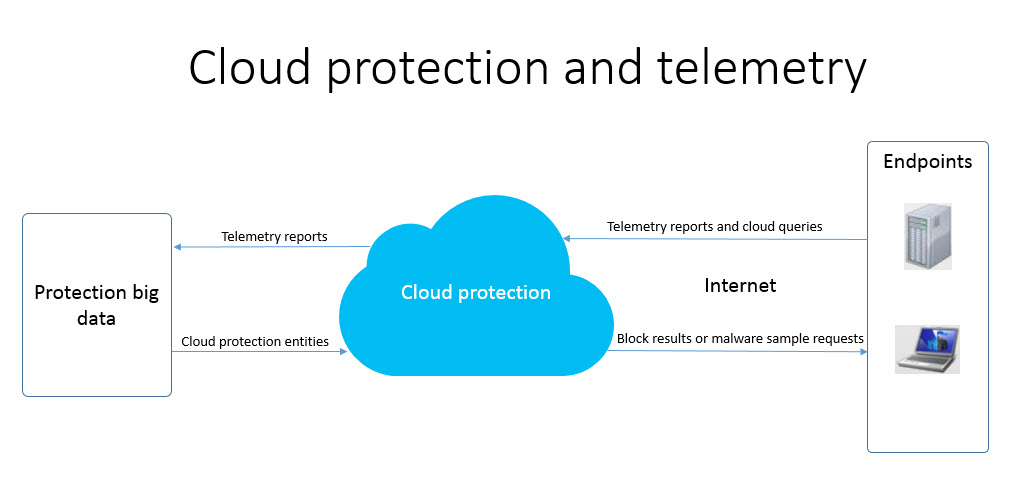
- Clients to report key telemetry events and suspicious malware queries to the cloud
- Cloud to provide real-time blocking responses back to the client
The MAPS service is available for all Microsoft’s antivirus products and services, including:
- Microsoft Forefront Endpoint Protection
- Microsoft Security Essentials
- System Center Endpoint Protection
- Windows Defender on Windows 8 and later versions
What can MAPS do for your enterprise software security?
Enabling MAPS in your system gives you:
- Greater malware protection through cloud-delivered malware-blocking decisions
Enable MAPS to trigger cloud calls for suspicious events. Doing so helps ensure that the machine uses the latest malware information available from the Microsoft Malware Protection Center (MMPC) research team, back-end big data, and machine learning logic.
- Aggregated protection telemetry Leverage the latest ecosystem-wide detection techniques offered through the cloud. Microsoft aggregates protection telemetry from over one billion clients, and cross-references them with numerous signals.
MMPC threat intelligence leverages algorithms to construct and manage a view of threats in the ecosystem. When the endpoint product encounters suspicious activities, it can consult the cloud for real-time analysis before acting on it.
The vast data and computing resources available in the cloud allows the fast detection of polymorphic and emerging threats and the application of advanced protection techniques.
Client machines selectively send telemetry in real-time (for detection), or periodically (for health checks) to the Microsoft Malware Protection Center’s (MMPC) cloud service which includes:
- Threat telemetry – to identify the threats, threat-related resources, and remediation results
- Suspicious behavior – to collect samples, determine what to monitor and remediate
- Heartbeat – to check the system’s pulse to know if the antivirus application is still running, and if it has the updated version
The MMPC cloud service responds to client telemetry with:
- Cloud actions – which include context and a set of instructions from the cloud on how to handle a potential threat (for example, block it).
- Cloud false positive mitigation response – to suppress false positive malware detections
The data gathered is treated with confidentiality. See the Microsoft Privacy Statement for details. To help protect your privacy, reports are sent to Microsoft over an encrypted connection. Relevant data is analyzed.
Prerequisites
Both Basic membership and Advanced membership enable cloud protection. See the Microsoft Active Protection Service (MAPS) section of the Microsoft System Center 2012 Endpoint Protection Privacy Statement for details.
By default, MAPS Basic is enabled in all of Microsoft’s new antimalware products. For enterprise customers, you have to enable it to get cloud protection from new threats that are coming in.
With the Advanced membership, you can get more information about the malware and/or suspicious behaviour. Such information can give your enterprise infrastructure better protection.
To get your system ready for MAPS, see the Introduction to Endpoint Protection in Configuration Manager.
So, what can you do to protect your enterprise?
Keep MAPS enabled on your system.
Join the Microsoft Active Protection Service Community.
To check if MAPS is enabled in your Microsoft security product, select Settings and then select MAPS.
Addendum:
When MAPS sends information for analysis, it only sends the metadata of the detection, not the actual file.
There is a chance of false positives, but our default action is to quarantine the resource(s), and not to delete them. The resources are recoverable for 30 days, by default. If a customer have opted into MAPS, we check for false positive mitigation signatures (SDNs) on every detection, and send them back down to the client. It’s another good reason to enable MAPS.
Talk to us
Questions, concerns, or insights on this story? Join discussions at the Microsoft community and Windows Defender Security Intelligence.
Follow us on Twitter @WDSecurity.