Skip to main content Microsoft 365 Copilot Download Microsoft 365 Copilot app Microsoft Copilot Studio Microsoft Security Copilot Microsoft Copilot in Azure GitHub Copilot Agents Customer stories Get started with AI for your business Copilot learning hub Copilot 101 Microsoft AI Copilot blog For personal use Try Copilot Chat Microsoft Security Azure Dynamics 365 Microsoft 365 Microsoft Teams Windows 365 Microsoft AI Azure Space Mixed reality Microsoft HoloLens Microsoft Viva Quantum computing Sustainability Education Automotive Financial services Government Healthcare Manufacturing Retail Find a partner Become a partner Partner Network Microsoft Marketplace Software companies Blog Microsoft Advertising Developer Center Documentation Events Licensing Microsoft Learn Microsoft Research View Sitemap

Add a PVA chatbot to your Power Apps portal in a few steps

You can now add a Power Virtual Agents chatbot to a Power Apps portal without any code, making it very easy to answer visitors' questions on your portal page.

You can now add a Power Virtual Agents chatbot to your Power Apps portal without any code, making it very easy to answer visitors’ questions on your portal page. This functionality is currently in Preview. During this preview, you can add an existing Power Virtual Agents chatbot to your Power Apps portal or create a new chatbot from within your portal.

How to get started?

Get started within the Power Apps portal designer by going to make.preview.powerapps.com.

Create a starter Portal by following documentation here: Create a Dataverse starter portal.

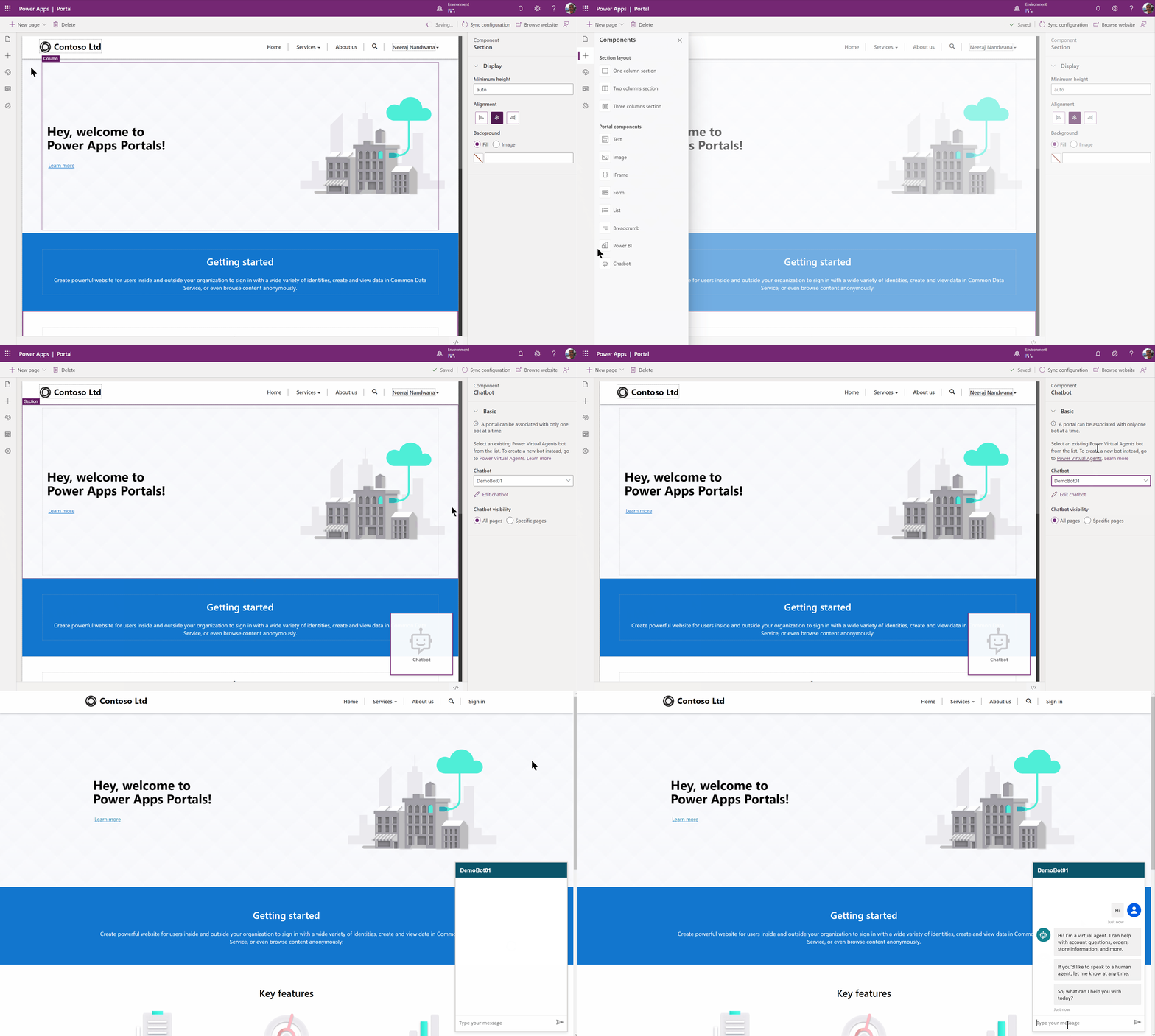
Once you have a portal created, you can easily add a bot from the same Dataverse environment by following a few quick steps:

  1. Select Components from the left pane.
  2. Select Chatbot component.
  3. Select your bot.
Contoso gif

For more information on advanced customization, refer to documentation here: Add a chatbot to a page (Preview)

Go ahead and try this feature at make.preview.powerapps.com. Your feedback will help us continue to build on and improve the functionality. We want to hear from you!

Thank you,
Gitika
Gitika Gupta
English (United States)
Your Privacy Choices Opt-Out Icon Your Privacy Choices
Consumer Health Privacy Sitemap Contact Microsoft Privacy Manage cookies Terms of use Trademarks Safety & eco Recycling About our ads