Expectations for agents are changing quickly. Teams want to move beyond conversational experiences to systems that can help get work done by interacting with applications, executing workflows, collaborating across tools, and supporting customers more naturally across channels.
But getting there can be tough. Many organizations are still balancing modern, real-time AI experiences with older systems and processes that were never designed to work together. That can leave teams stuck maintaining brittle automations, disconnected processes, and rigid customer interactions that are difficult to evolve. New updates in Microsoft Copilot Studio focus on helping organizations achieve more connected, adaptive automation systems—structured where needed and adaptive where valuable.
Computer use and workflows: Adapt automation to your team’s real work
Traditional automation works best in predictable environments. But many real business processes are anything but predictable. Interfaces change. Vendor portals update unexpectedly. Legacy systems lack APIs entirely. As a result, even relatively simple processes can require constant maintenance just to keep automations running reliably.
That’s the kind of gap computer-using agents are designed to help close.
What are computer-using agents in Copilot Studio?
With computer-using agents now generally available in Copilot Studio, organizations can build agents that interact directly with websites and desktop applications through the user interface (UI). This helps you automate processes that previously relied on brittle scripts or manual workarounds because the underlying systems lacked APIs.
With the new release also comes new enterprise-ready capabilities designed to help you operationalize UI automation more confidently. Organizations can now manage credentials more securely, choose models best suited for different automation scenarios, and build more resilient automations that can adapt to changing interfaces instead of breaking whenever a screen or webpage changes.
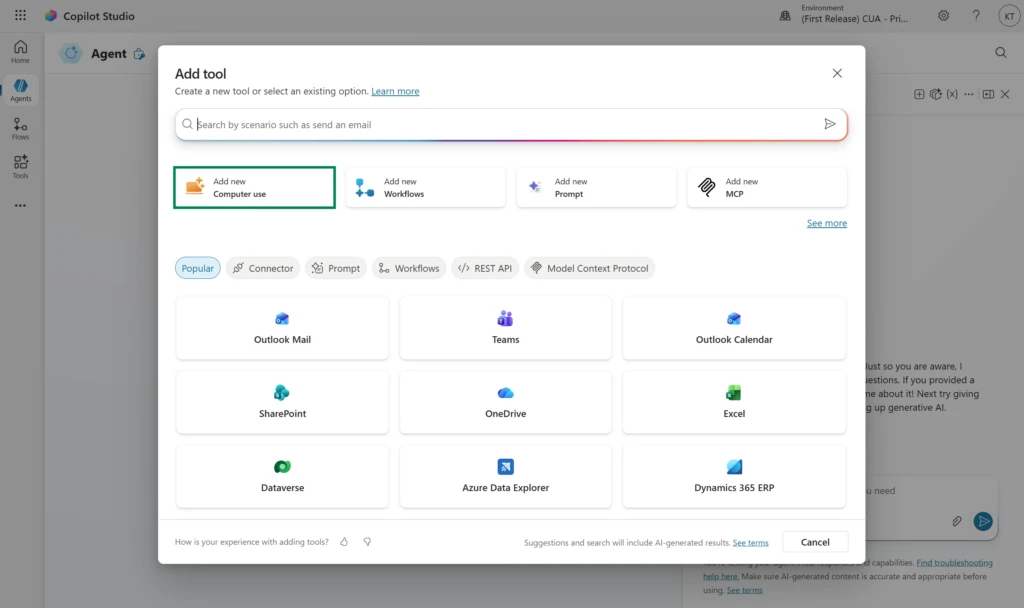
In addition, organizations can now embed computer-using agents directly into multi-step workflows. This feature, now moving into preview, further helps teams combine API-based actions, approvals, business logic, and adaptive UI interactions within the same automation system.
But adaptability automation still needs structure. As organizations scale beyond isolated automations, teams need a way to orchestrate all these in a way that’s easier to understand, maintain, and evolve over time.
That’s where the new workflows experience in Copilot Studio comes in.
A simpler, more intuitive way to build powerful workflows
Now available in early release environments, the redesigned workflows experience introduces a more intuitive visual designer for building and orchestrating agentic automation in one place. Instead of stitching together disconnected tools and logic across multiple surfaces, you can design workflows end-to-end on a unified canvas. This helps you more clearly see how actions, decisions, and AI-powered steps work together across a business process.
A core component of the new experience is the ability to add existing agents directly into workflows. These agent nodes allow you to create automated solutions that keep the scalable reliability of workflows while bringing in AI intelligence when you need it. For example, when a workflow hits a decision that can’t be captured in simple if-then logic—where it needs to use reasoning over context, orchestrate tools, or retrieve knowledge from multiple sources—an agent node can help bridge the gap and make your workflow more effective.
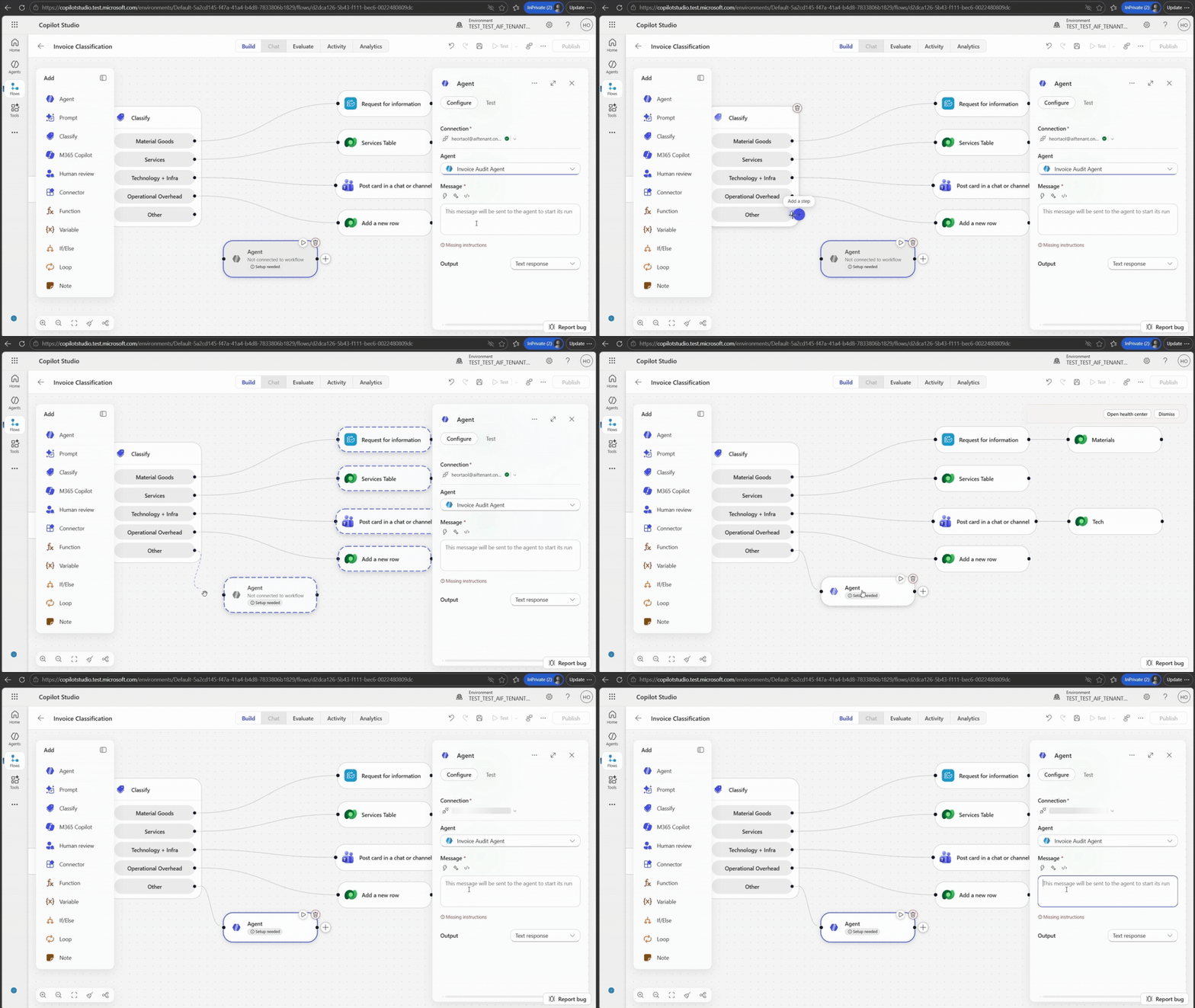
The new designer also helps reduce friction for teams building and maintaining these systems. Inline configuration, simplified building blocks, and node-level testing help validate workflow behavior earlier and iterate more quickly. In addition to agent nodes, AI-powered actions like classification, content generation, and decision support can now be incorporated directly into the workflow.
Together, these updates help organizations combine deterministic orchestration with adaptive execution—structured where needed, adaptive where valuable.
How Graebel combines flows and computer-using agents
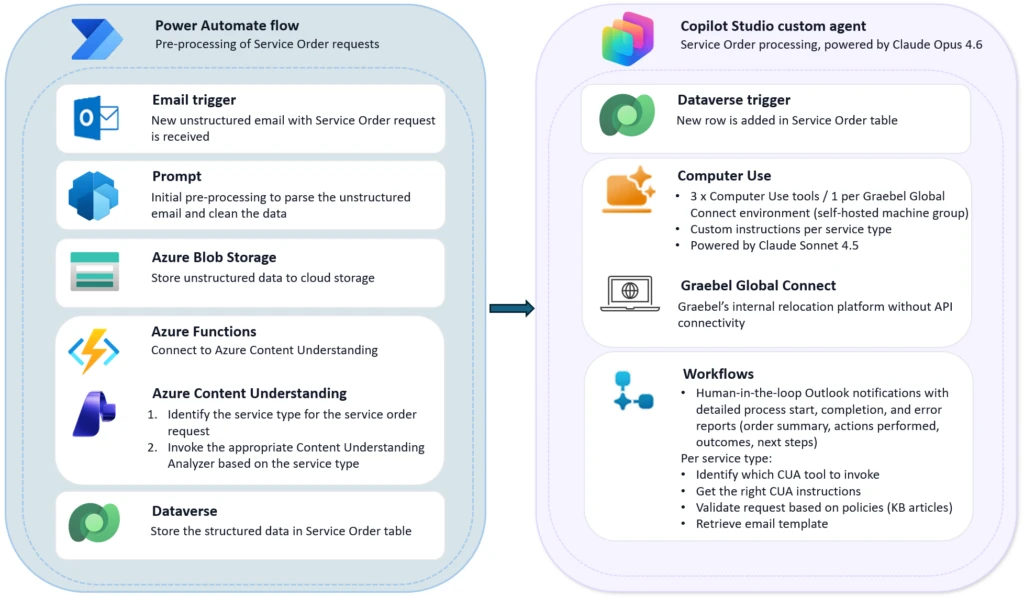
Graebel, a global leader in talent mobility, processes thousands of employee relocation requests each year. Most of these come in as unstructured emails filled with unique instructions, attachments, and edge cases. Because Graebel’s proprietary Global Connect platform lacked API support, earlier automation efforts proved too rigid to keep up with the variability of real-world requests. That meant lots of manual input and handoffs—which automation was supposed to solve. Basically, Graebel needed automation that could use reasoning, not just click.
Working with GET AI and Microsoft, Graebel built the Graebel Service Order Agent in Copilot Studio using computer use capabilities to help automate the process end to end. The agent can interpret incoming emails, validate requests against business rules, operate Global Connect directly through the UI, and escalate exceptions through workflows when needed.
By adopting Microsoft Copilot Studio and AI agents, we’ve moved beyond traditional automation to a more intelligent, scalable operating model. This initiative strengthens our ability to serve clients faster and more accurately while positioning Graebel for long-term growth.
—Matt Brownlee, Chief Revenue Officer, Graebel
The Service Order Agent is live today and designed to scale across more than 30 relocation service categories. So far, results include a meaningful reduction in manual effort, faster service-order turnaround, more consistent data quality, and a repeatable blueprint for bringing intelligent automation to the rest of their operations.
Connect intelligent automation systems with Work IQ and interoperable agents
As automation systems become more adaptive, another challenge quickly emerges: connection. Even the most capable agent can only go so far if it operates in isolation. Many organizations are still navigating fragmented ecosystems where agents, workflows, APIs, and external tools all function separately. This naturally makes it difficult to share context or complete work across systems without custom integration effort.
This fragmentation—which is very common—slows adoption and makes it harder to scale intelligent automation beyond isolated pilots.
How does Work IQ connect agents across systems?
Now, new interoperability and extensibility capabilities in Work IQ help organizations build more connected agent systems—making it easier for agents, workflows, and enterprise tools to operate together across environments.
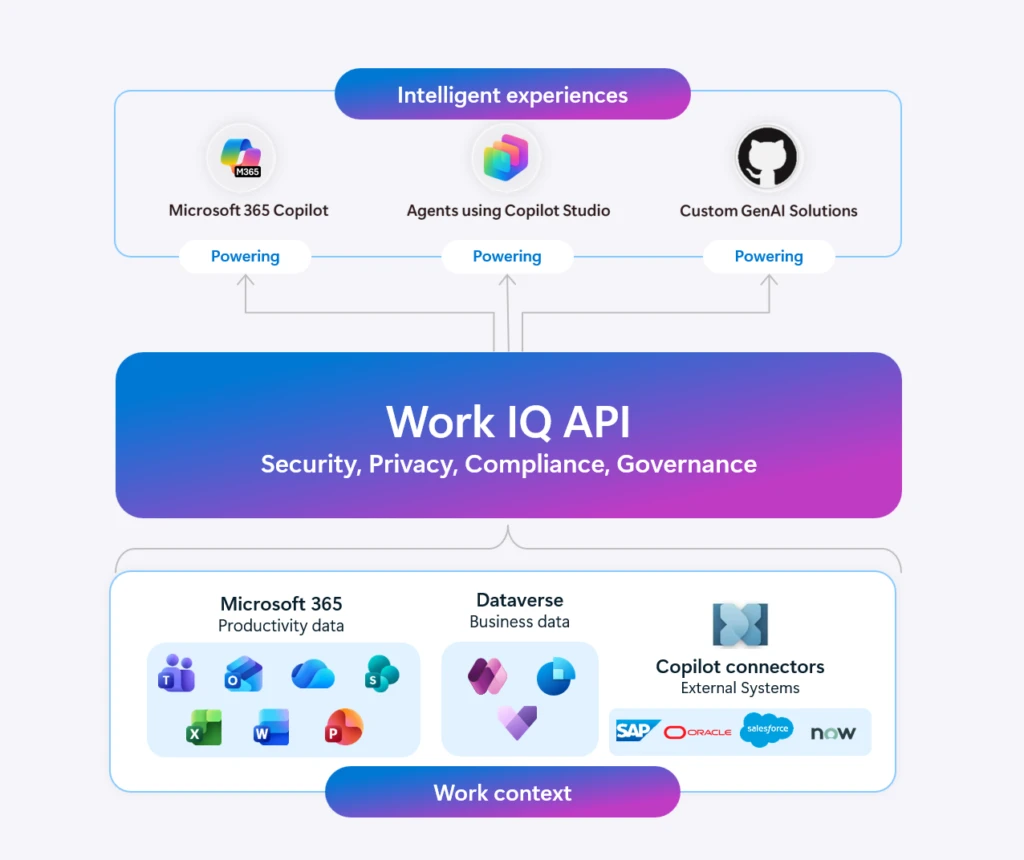
With the new Work IQ REST API and command-line interface (CLI) capabilities, teams can integrate Work IQ more flexibly into existing operational and development workflows. Support for remote model context protocol (MCP) servers also introduces a more standardized way to connect agents with tools, services, and enterprise resources. This reduces the need for one-off integrations across growing agent ecosystems.
And as organizations deploy more specialized agents across departments and business processes, coordination between those agents becomes increasingly important. With agent-to-agent (A2A) communication now generally available in Copilot Studio, agents can exchange information, delegate tasks, and be set up to work together more effectively across systems and workflows.
Together, these updates continue the shift from isolated AI experiences toward connected operational platforms—where workflows, agents, APIs, and enterprise systems can be designed to collaborate more naturally across the organization.
Learn more about these new Work IQ interoperability and extensibility updates.
Bring more natural, responsive experiences to customer voice interactions
For many organizations, voice support is still one of the most difficult channels to modernize. Customers get stuck in rigid phone trees, repeat information multiple times, or lose context entirely when they’re transferred to a live agent. Meanwhile, service teams are under pressure to handle growing call volumes without sacrificing customer experience.
How do real-time voice agents improve customer experiences?
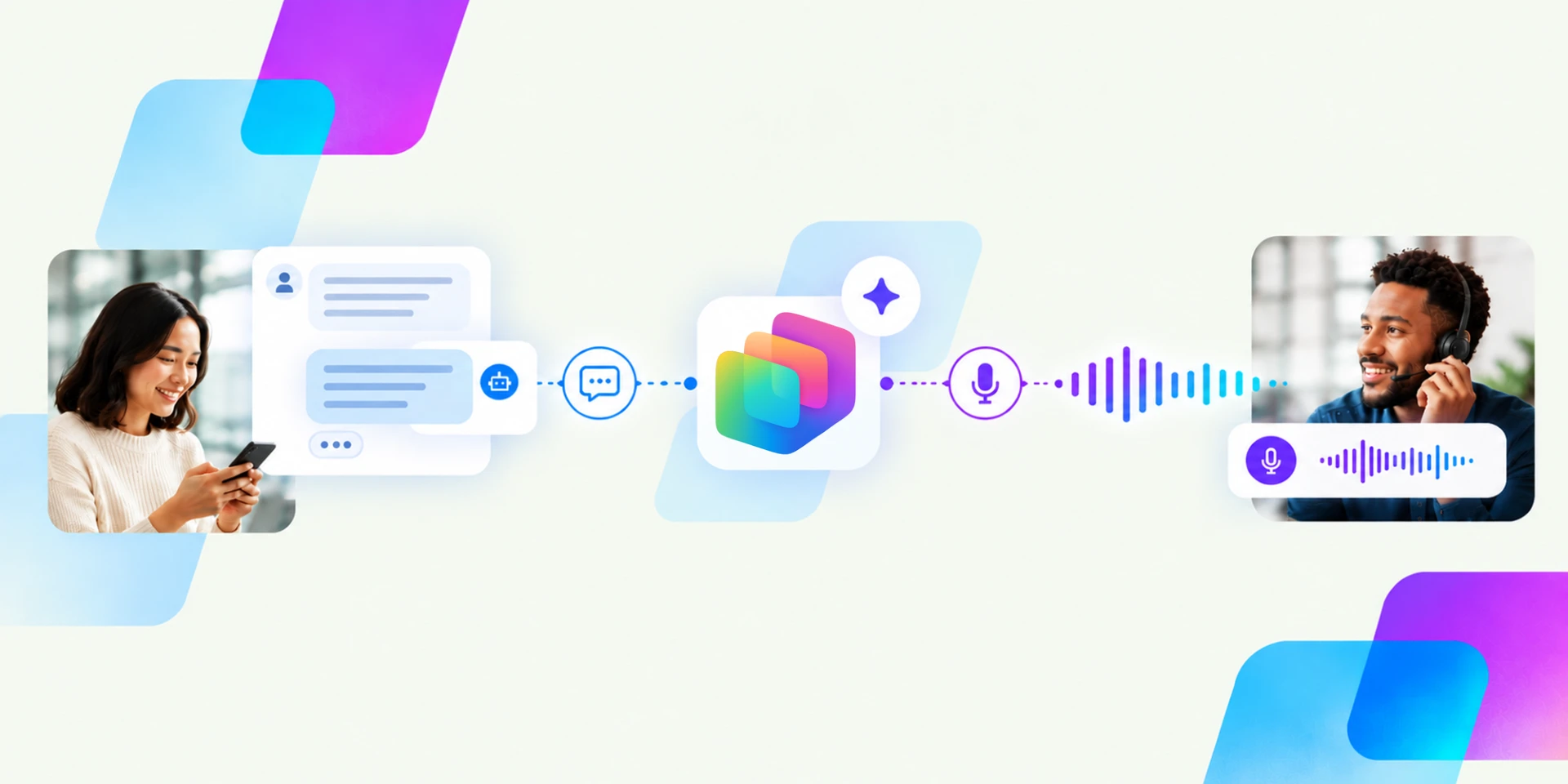
Copilot Studio is helping organizations move beyond those limitations with real-time voice agents, now generally available in North America through Dynamics 365 Contact Center. These capabilities help organizations build more natural voice experiences that can identify callers, answer questions, take action during conversations, and transition customers to live agents while preserving context.
Support for speech-to-speech (S2S) voice experiences also makes it easier to connect voice agents into existing customer service and operational systems.
Now, as voice agents become part of real customer interactions, governance and operational readiness become increasingly important. A poor escalation experience, missing context during handoff, or lack of monitoring can quickly become a customer trust issue—not just a technical issue.
That’s why we’re also sharing a new in-depth voice agent governance guide. It covers practical considerations for scaling customer-facing and real-time voice agents responsibly, including escalation testing, monitoring, security, compliance, and operational readiness.
Learn more about real-time voice agents in Copilot Studio and explore the new governance guidance for customer-facing voice agents.
What else is new and improved in Copilot Studio
- A new orchestration layer in Copilot Studio improves how agents execute business processes with greater accuracy and efficiency. Built on an upgraded AI stack, it has demonstrated measurable gains—improving evaluation performance by approximately 20% while decreasing net token usage by 50%—so agents can complete tasks more reliably and cost-effectively.1 By strengthening tool orchestration and execution quality, the new orchestrator helps ensure more consistent outcomes across complex, multi-step business processes. The result is faster, more dependable automation that scales across enterprise scenarios. This feature is currently in early release environments, where it applies automatically.
- Agent lifecycle visibility updates help the whole team understand an agent’s approval and publishing status. Agent creators can more easily understand whether an agent is still generating, ready for testing, successfully published, or encountering issues, which reduces guesswork during development and iteration. For IT and platform teams managing agents across environments, clearer publishing and status visibility can make it easier to identify stalled deployments, troubleshoot operational issues, and maintain better oversight as agent programs scale.
All together, these updates are focused on helping teams solve the kinds of problems that slow automation efforts down in the real world: workflows that break when systems change, disconnected tools that create extra manual work, and customer experiences that still feel rigid or fragmented.
With new investments across computer-using agents, workflows, interoperability, and real-time voice, Copilot Studio continues to expand as the agentic platform for building agents, apps, and workflows. The goal is simple: help organizations build systems that are easier to connect, easier to adapt, and easier to operate at scale—without losing the structure, visibility, and governance enterprise teams depend on.
Stay up to date on all things Copilot Studio
More is coming across voice channels, workflows, and the building experience. Check out all the updates as we ship them, as well as new features releasing in the next few months here: What’s new in Microsoft Copilot Studio.
To learn more about Microsoft Copilot Studio and how it can transform productivity within your organization, visit the Copilot Studio website or sign up for our free trial today.
Take your automation further
Design adaptive AI systems that integrate across tools and workflows to help teams get meaningful work done.

1 Source: Microsoft usage data, 2026.