Today we announced three major OneNote developments, including me@onenote.com.
One of our goals is to make it easy to get content into OneNote, no matter where you are or what app you’re using. me@onenote.com is a big step towards that goal. Now, you can use any ‘Email this’ button to send content to OneNote.
Email to OneNote is a great way to forward receipts, travel itineraries or documents that you want to keep track of from your mailbox. If you’re on the run and want to send yourself a quick to do, it’s hard to get faster than writing up a quick mail. Or, if you’re in an app, and want to remember what you’re seeing, you can do so quickly by sharing via email.
Try it out now
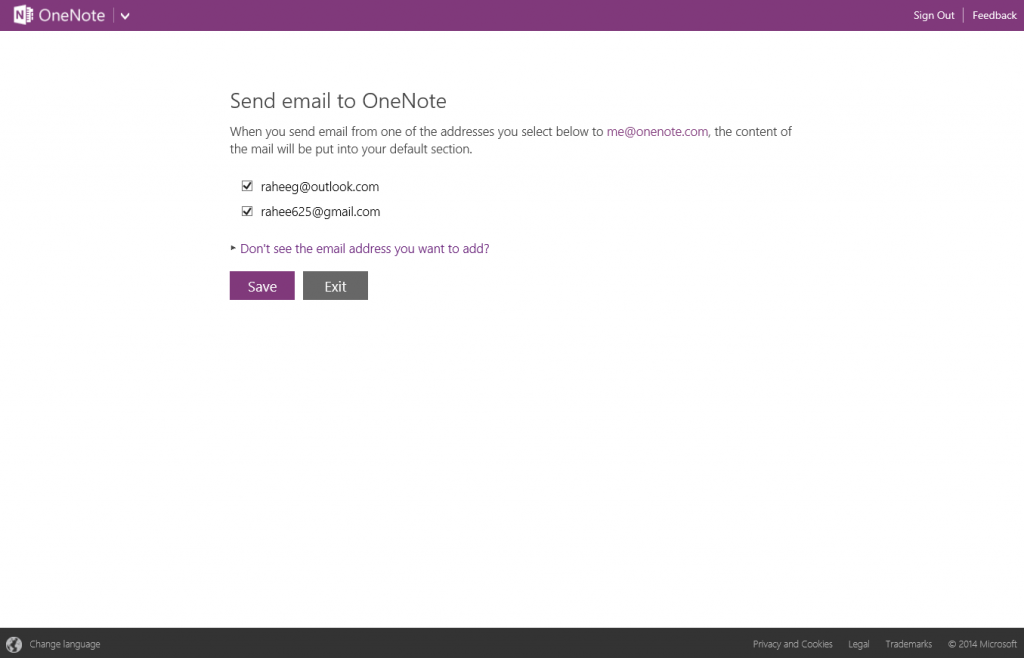
To get set up just visit the email settings page and select the addresses from which you would like OneNote to accept emailed content. You can also add any email addresses that are not already associated with your Microsoft account by using the link at the bottom of the settings page. If you don’t remember any of that, just send an email to me@onenote.com and we will email back with instructions.
Now you’re ready to email content to OneNote quickly and easily! Please let us know in the comments if you have any feedback, we would love to hear from you.
Get OneNote |Follow OneNote