Have you ever created your Aging Period Definitions, run the Customer aging snapshot, and do not receive any results in the Collections Grid? If so, this could be a result of the format used in the Aging Period Definition name.
I have recently discovered that commas in the Aging Period Definition name are treated by SQL as special characters, and cause conflicts when running the Customer aging snapshot. The good news is there is a simple fix to resolve this issue.
Aging Period Definitions are setup under Accounts Receivable > Setup > Collections > Aging period definitions.
Example with commas which produce no results in the Collections grid after running Aging.
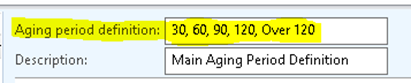
Example with underscores which produce results in the Collections grid after running Aging.

If you do not use numbers in the Aging Period Definition and use alpha characters, be sure that no commas exist. The same results will be encountered with alpha characters and commas.
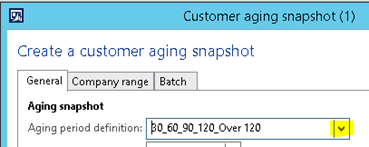
Once you have made the changes to the Aging Period Definition be sure to remove the incorrect one. When running the Customer aging snapshot re-select the Aging period definition. The Customer aging snapshot is run by going to Accounts receivable > Periodic > Collections > Customer aging snapshot.
![Avatar of Dave Bader [MSFT]](https://secure.gravatar.com/avatar/8cb65361e5aea60c094fe816578c3f20ff4543d23c74c3b079c30c00a492a913?s=212&d=mm&r=g)