Skip to main content What is Dynamics 365? Guided tours Customer stories Try our products CRM ERP Sales Service Sales Customer Insights Customer Service Contact Center Field Service Supply Chain Management Commerce Finance Project Operations Human Resources Business Central Pricing Business application topics Training & certifications Migrate to the cloud Documentation Events Dynamics 365 Blog Product updates Onboarding and implementation Community Find a partner Software Development Companies Partner resources Microsoft Marketplace Product documentation Technical support On-premises product support Contact us Try for free Sign in

[Updated as of July 15, 2019 6pm PST – this issue has been resolved.  The View update button of version 10.0.4 in the Upcoming service update is now available. Customers should be able to view and download this update option from the Availabe updates section in LCS environment detail page]


In the recent Lifecycle Services (LCS) release for the new LCS update experience for One Version, the View update button for the update option of version 10.0.4 in the “Upcoming service update” is not available.
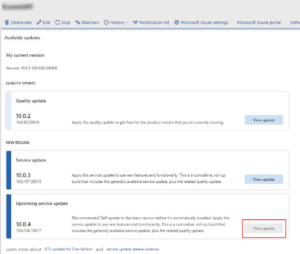
10.0.4 view update button is greyed out

This is caused by a systematic error that we’re planning to resolve by early next week.


Workaround

You can obtain version 10.0.4 with Platform update 28 from the Action center.
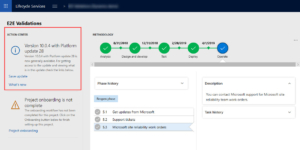
Obtain 10.0.4 from Action center

Get started with Dynamics 365

Drive more efficiency, reduce costs, and create a hyperconnected business that links people, data, and processes across your organization—enabling every team to quickly adapt and innovate.