
Using This Guide
Copilot Credits power AI experiences across the Microsoft ecosystem. This guide provides an overview of how Copilot Credits are consumed and managed. It outlines where credits are required, how usage is measured, and key considerations that help organizations plan and govern AI workloads effectively.
For help determining the right technology solution for an organization, including the license requirements for a specific product or scenario, consult a Microsoft account team or a Microsoft Certified Partner.
All pricing is in USD and subject to change.
Additional Information
This guide does not supersede or replace any of the Microsoft Product Terms legal documentation covering use rights.
Microsoft reserves the right to review or update this document at any time without notice.
Copilot Credits Overview
As AI workloads become more advanced, particularly with multi-step, agent-driven scenarios, the amount of work required to complete a task can vary significantly. This variability is best served by a usage-based model that aligns cost to the work performed, complementing subscription-based services with flexible consumption. Copilot Credits serve as the common currency in this usage based model, powering AI capabilities across Microsoft offerings. These capabilities span Microsoft Copilot experiences such as Copilot Cowork, agents and apps built with Microsoft Copilot Studio, AI-powered capabilities in Dynamics 365 and Power Platform, and Work IQ APIs for agent and AI solutions.
The number of Copilot Credits consumed for each response, action, or operation depends on the complexity of the task performed. Copilot Credits are pooled at the tenant level. An organization’s total cost is based on the sum of Copilot Credits consumed across all supported experiences. This shared model enables organizations to centrally manage consumption and allocate usage across scenarios. Copilot Credits are offered through the Microsoft Copilot Studio pay-as-you-go meter and the Copilot Credit Pre-Purchase Plan.
Copilot Credit Purchase Options
AI Flex Plan
The AI Flex Plan gives customers a flexible way to purchase Copilot Credits and fund other eligible consumption through a single monetary commitment. Available with a one-year or three-year term, the plan can be applied toward Copilot Credit usage and usage of Microsoft Foundry, GitHub AI, and Security Copilot. Customers can pay up front or monthly. The AI Flex Plan is available through the Microsoft Customer Agreement for Enterprise (MCA).
Microsoft Copilot Studio Pay-As-You-Go Copilot Credit
The Microsoft Copilot Studio pay-as-you-go Copilot Credit meter enables organizations to post-pay based on the actual number of Copilot Credits consumed by agents in a billing month. No up-front commitment is required, allowing organizations to scale usage and ensure business continuity for critical business processes with flexibility, scalability, seasonality, and no interruptions due to overages.
Pricing: $0.01/Copilot Credit
Meter Definition: The Microsoft Copilot Studio pay-as-you-go Copilot Credit meter counts the total number of Copilot Credits consumed by agents. This usage is billed in arrears at the end of the billing month.
Microsoft Copilot Studio Pay-As-You-Go Copilot Credit Offer Summary
| SKU Description | Microsoft Copilot Studio Pay-As-You-Go Copilot Credit |
|---|---|
| Billing Configuration | Manage spend policy and billing plan (Learn more about billing) |
| Meter name | Microsoft Copilot Studio – Pay As You Go Copilot Credit |
The Microsoft Copilot Studio pay-as-you-go Copilot Credit meter can be provisioned in the Power Platform admin center.
Copilot Credit Pre-Purchase Plan (P3)
Copilot Credit P3 is a one-year pay-upfront purchase option for Copilot Credits. Customers purchase a pool of Copilot Credits, which are automatically deducted from the Copilot Credit P3 balance. If usage exceeds the available number of credits, customers can purchase additional Copilot Credits or be billed on a pay-as-you-go basis. Unused credits expire at the end of the annual term.
Copilot Credit Pre-Purchase Plan (P3) Pricing Tiers
| Tier | Copilot Credits | Discount |
|---|---|---|
| 1 | 300,000 | 5% |
| 2 | 1,500,000 | 6% |
| 3 | 3,000,000 | 7% |
| 4 | 15,000,000 | 8% |
| 5 | 30,000,000 | 10% |
| 6 | 75,000,000 | 12% |
| 7 | 150,000,000 | 14% |
| 8 | 225,000,000 | 17% |
| 9 | 300,000,000 | 20% |
Copilot Credit Pre-Purchase Plan Offer Summary
| SKU Description | Microsoft Copilot Studio |
|---|---|
| Billing Configuration | Manage billing configuration and billing plans (Learn more about billing.) |
| SKU Name | Copilot Credit Pre-Purchase Plan (P3) |
The Copilot Credit Pre-Purchase Plan (P3) can be provisioned in the Azure admin portal.
Both the Microsoft Copilot Studio pay-as-you-go and the Pre-Purchase Plan (P3) purchasing constructs will decrement the Microsoft Azure Consumption Commitment (MACC).
Please refer to the Microsoft Copilot Studio Licensing Guide for more information on other purchasing constructs (e.g., Microsoft Agent Pre-Purchase Plan (P3), Microsoft Copilot Studio License (Copilot Credit Pack).
Managing Usage and Spend
Copilot Credit usage is centrally managed through the Microsoft 365 admin center (MAC), giving administrators the capabilities to govern AI consumption across workloads, services, and agents. Administrators can monitor spend and usage, configure spend policies, define usage thresholds, and manage Copilot Credits allocation across the organization. MAC provides the FinOps controls to help organizations scale AI adoption while maintaining visibility into consumption and cost management. Learn more about managing usage-based billing in MAC.
Microsoft provides Copilot Credit estimators to help organizations model potential consumption and spending. Select the estimator that supports the workload or agent type being evaluated.
| Estimator | Use for |
|---|---|
| Copilot Credit Estimator | Copilot Cowork and GitHub Copilot harness in Microsoft Copilot Studio |
| Copilot Credit Estimator for agents | Copilot Studio agents, Dynamics 365 agents, Microsoft 365 agents, and other supported agent experiences |
These estimators provide informational estimates and do not guarantee final costs. Additional workloads may be added as estimator support expands.
Usage Based Billing Across Workloads
The sections below detail usage-based billing through Copilot Credits across Copilot Cowork, Copilot Code, Copilot in SharePoint, Work IQ APIs, Microsoft Copilot Studio, Teams Phone Agent, Microsoft Copilot Managed Runtime, and Business Applications.
Copilot Cowork
Copilot Cowork is an agentic system that plans, executes, and delivers real work. Describe the outcome, and Cowork does the work, building apps (Microsoft Frontier Program), sending emails, scheduling meetings, creating documents, posting in Teams, and managing files, while maintaining user oversight. Grounded in Work IQ and operating within Microsoft 365's security and governance boundaries, Cowork runs multi-step work autonomously at enterprise scale. Learn more about Copilot Cowork.
How Copilot Cowork uses Copilot Credits
Users rely on Cowork for complex, multi-step work across apps that runs autonomously. Credit usage scales with task complexity, driven by intermittent steps and capabilities involved.
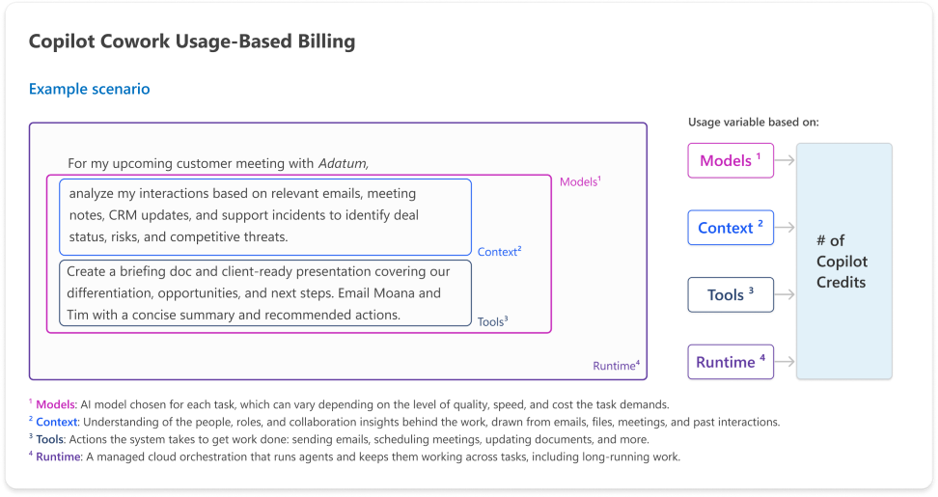
Copilot Credit usage for a given task varies based on the mix of four cost buckets:
Models — AI models chosen for each task, which can vary depending on the level of quality, speed, and cost that the task demands.
Runtime — A managed cloud orchestration that runs agents and keeps them working across tasks, including long-running work.
Context — Understanding of the people, roles, and collaboration patterns behind the work, drawn from emails, files, meetings, and past interactions.
Tools — Actions the system takes to get work done including sending emails, scheduling meetings, updating documents, and more.
Here is an illustrative view of how Cowork uses Copilot Credits.

Copilot Cowork tasks and task types
Copilot Credit consumption varies based on the type and complexity of the task being performed. This section provides estimated consumption for representative task types.
| Light tasks | Medium tasks | Heavy tasks |
|---|---|---|
|
Leverages a handful of knowledge sources for a light reasoning scenario like a summary, usually resulting in one short deliverable.
|
References many sources over varying timeframes, uses structured reasoning, and produces multiple deliverables.
|
Requires deep analysis and broad source aggregation over long time frames, generating many outputs.
|
| Prompt example: "Create a weekly status update for my team that runs every Monday morning - including my top-of-mind prioirities and a short list of key executive meetings pulled from my calendar." | Prompt example: "Help me prepare for a customer meeting by pulling relevant emails, calendar items, and recent files into a briefing doc based on our template, an Excel overview of sales and sales trends, and a client-ready presentation." | Prompt example: "Analyze 6 months of exported product usage data to understand usage patterns, classify prompts, and produce a leadership-ready report." |
| Est. Credits 100 - 300 | Est. Credits 300 - 700 | Est. Credits > 700 |
These figures are rough planning estimates. Actual pricing will vary based on workflows and usage patterns.
Microsoft Copilot Studio agents and workflows in Cowork (Public Preview)
Users can create Microsoft Copilot Studio agents and workflows using natural language in Copilot Cowork. Authoring activities are considered Copilot Cowork usage and follow its usage-based billing model. When these agents or workflows are executed, the resulting consumption is considered Microsoft Copilot Studio usage.
Apps in Copilot Cowork
Build apps
With Cowork, users can leverage a secure, governed way to build apps using natural language. Users describe the app they want to create, and Cowork generates the data schema and user interface required for the app.
Apps built in Copilot Cowork are billed through Copilot Credits usage-based billing. Copilot Credit consumption varies based on the large language model (LLM) used, the complexity of the app, and the amount of generation and iteration involved during creation.
Apps in Copilot Cowork scenarios and estimated costs
| Light | Medium | Heavy |
|---|---|---|
| Build an app: Actual credit usage for building an app varies based on the LLM model used, complexity of the app, and the amount of generation and iteration involved during authoring. | ||
| Prompt example: "Build a workshop hub where attendees can view the schedule, session materials, labs, and submit feedback. Add an admin page to mange session." | Prompt example: "Create a high-touch donor task manager that shows who is arriving today, why each donor needs attention, and let center managers complete and track follow-up tasks." | Prompt example: "Build a supplier complaince audit workspace. Let quality managers upload certificates, pull audit findings from Dataverse and contacts from SharePoint, and trigger an agent that scores suppliers against our risk rubric. Add a status board with retries, a reviewer page to approve or reject, an exceptions page for failures, and export approved results to Azure Blob storage." |
| Est. Credits: 250 - 450 | Est. Credits: 400 - 750 | Est. Credits: 700 - 1350 + |
These figures are rough planning estimates.
Host, run and manage apps
Apps built in Copilot Cowork are deployed to the Copilot Managed Runtime host. See Microsoft Copilot Managed Runtime for licensing, scenarios, and estimated costs.
Managing Copilot Cowork usage and spend
To help organizations translate this model into practical planning, the simplest way to estimate Cowork usage is by first sizing the number of users, then modeling usage intensity across light, medium, and heavy profiles, and finally applying estimated pricing per prompt. This approach provides a way to forecast usage based on expected behavior.
Estimating Copilot Credits for Cowork:
- Determine number of Cowork users (grouped by persona)
- Estimate number of prompts per persona (across light, medium, and heavy prompts)
- Apply an average price per prompt (across light, medium, and heavy prompts)
Result: Estimated monthly Copilot Credit spend for Cowork

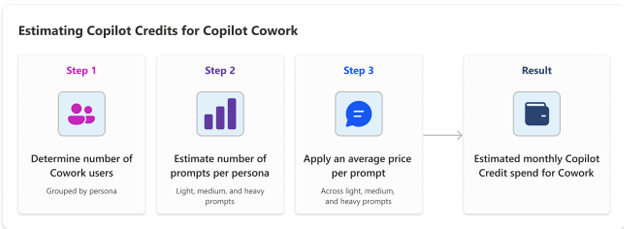
Organizations can use this same methodology to build their own estimates, adjusting user counts, intensity assumptions, and cost inputs to reflect their environment, using this simple, transparent model.
Copilot Cowork prerequisites
Here's what you need to get started with Copilot Cowork:
- Microsoft Copilot User SL
- Cowork enabled in the Microsoft Copilot environment
- Copilot Credits usage-based billing enabled
- Anthropic enabled in the tenant
For more information about Cowork see the Get started with Copilot Cowork article on Microsoft Learn.
Copilot Code (Microsoft Frontier Program)
Copilot Code makes the power of coding accessible to knowledge workers. It helps people turn ideas into dashboards, trackers, and apps grounded in the context of their work. An optional Azure DevOps or GitHub connection adds versioning across teams, collaboration through pull requests, and automations. Learn more about Copilot Code.
How Copilot Code uses Copilot Credits
Copilot Credits are consumed as users create, refine, and publish solutions with Copilot Code. Credit usage scales with scenario complexity, driven by intermittent steps and capabilities involved.
Copilot Credit usage for a given scenario varies based on the mix of four cost buckets:
- Models - AI models chosen for each task, which can vary depending on the level of quality, speed, and cost that the task demands
- Context - Understanding of the people, roles, and collaboration patterns behind the work, drawn from emails, files, meetings, and past interactions
- Tools - Actions the system takes to get work done including sending emails, scheduling meetings, updating documents, and more
- Runtime - A managed cloud orchestration that runs agents and keeps them working across tasks, including long-running work
Here is an illustrative view of how Code uses Copilot Credits
Microsoft Copilot Studio agents and workflows in Code (Public Preview)
Users can create Microsoft Copilot Studio agents and workflows using natural language in Copilot Code. Authoring activities are considered Copilot Code usage and follow its usage-based billing model. When these agents or workflows are executed, the resulting consumption is considered Microsoft Copilot Studio usage.
Copilot Code tasks and task types
Copilot Credit consumption varies with the type and complexity of the task being performed. This section provides estimated consumption for representative tasks for information workers. Actual Copilot Credit consumption may vary.
| Light tasks | Medium tasks | Heavy tasks |
|---|---|---|
| Direct, bounded work with little judgement and normally no retrieval - one clear output. | One bounded input, or a broader workflow with retrieval and moderate synthesis. | Judgement-heavy work across many sources and tools, producing several deliverables. |
|
Prompt example: Standup timer Build a standup meetng timer that cycles through paticipants with a visible countdown and alerts when each person's time ends. |
Prompt example: New-hire onboarding checklist Build an onboarding checklist from a new-hire record, show completion by stage, and flag overdue or unowned steps. |
Prompt example: Buyer ROI sources Build an adjustable ROI application,a dd conservative, expected, and aggressive adoption scenarios with sensitivity analysis, and seed it from account usage while flagging incomplete inputs. |
| Est. Credits 25 - 60 | Est. Credits 75 - 100 | Est. Credits > 200 |
These figures are rough planning estimates. Actual credit consumption will vary based on workflows and usage patterns.
Host, run and manage apps in Copilot Code
Cloud-hosted apps built in Copilot Code are deployed to the Copilot Managed Runtime host. See Microsoft Copilot Managed Runtime for licensing, scenarios, and estimated costs.
Managing Copilot Code usage and spend
To help organizations translate this model into practical planning, the simplest way to estimate Code usage is by first sizing the number of users, then modeling usage intensity across light, medium, heavy profiles and finally applying an estimated pricing per prompt. This approach provides a way to forecast usage based on expected behavior.
Estimating Copilot Credits for Code:
- Determine number of Code users (grouped by personas like corporate knowledge workers, management and senior leaders, customer-facing knowledge workers, and technical workers)
- Estimate number of prompts per persona (across light, medium, and heavy prompts)
- Apply an average price per prompt (across light, medium, and heavy prompts)
Result: Estimated monthly Copilot Credit spend for Code
Copilot Code prerequisites
- Microsoft Copilot USL
- Copilot Credits usage-based billing enabled
Get started with Copilot Code here.
Autopilot (Frontier Program)
Autopilot is a personal, proactive, persistent agent that takes work off your plate. Instead of waiting for a prompt, it stays connected to your priorities, monitors what matters, and helps keep work moving. It can do things like set up and manage a full supplier review process: building the schedule and workback plan, then handling prep, meetings and follow-ups on its own, right down to reaching out to stakeholders for updates. Organizations can control what Autopilot can access, protect the data it uses and respond to threats. IT can also see how Autopilot is used, manage its tools and measure its business value in one place through Agent 365.
How Autopilot uses Copilot Credits
Users rely on Autopilot for long-running, multi-step work across apps that runs autonomously. Copilot Credit usage depends on the following drivers:
- How complex the work is: Multi-step goals that require more planning, reasoning, and coordination across apps use more credits than simple, single-step tasks.
- How often it runs: Recurring or continuous work, such as ongoing inbox management or regular commitment tracking, uses Copilot Credits each time Autopilot checks in or acts.
- How much information it accesses: The more emails, files, meetings, and chats Autopilot draws on to understand the work, the more Copilot Credits it uses.
- Which actions it takes: Each action Autopilot completes, such as sending an email, scheduling a meeting, or updating a document, adds to Copilot Credit usage.
Copilot Credit usage includes:
- The agent account, email address, and persistent access to Microsoft 365 resources (e.g., Exchange and OneDrive workspaces) have a recurring charge of 100 Copilot Credits per agent per month
- All agent activity is billed consumptively. This includes:
- Use of the agent’s standalone Microsoft 365 resources, such as sending/receiving emails and storing work deliverables over time
- Applicable protections for the agent’s ongoing use of its Exchange and OneDrive workspaces
- Any model, context, runtime, or tools usage
- Models – AI models chosen for each task, which can vary depending on the level of quality, speed, and cost that the task demands
- Context – Understanding of the people, roles, and collaboration patterns behind the work, drawn from emails, files, meetings, and past interactions
- Runtime – A managed cloud orchestration that runs agents and keeps them working across tasks, including long-running work
- Tools – Actions the system takes to get work done including updating documents, accessing websites and more
Autopilot Usage
Monthly planning estimates are based on early recurring uses cases (credits per Autopilot per month, based on 20 working days). These estimations have been calculated using early use cases, which include continuous inbox management, regular commitment tracking across Outlook and Teams, and Teams-assigned work. We will continue to update Copilot Credit ranges as new capabilities are made available.
Autopilot usage profiles
The Copilot Credits an Autopilot uses depend on how it is used, not on who uses it. Four things shape usage: how many scenarios it handles, how often it runs, how complex each run is, and how much information it draws on.
| Light usage | Medium usage | Heavy usage |
|---|---|---|
| One task, done often, each using relatively little information. | A few tasks, run a few times a day, each using a lot of information. | Many tasks, done often, each using a lot of information. |
| Scenarios: Single scenario | Scenarios: Multiple scenarios | Scenarios: Multiple scenarios |
| Run frequency: Many runs a day | Run frequency: Fewer runs a day | Run frequency: Many runs a day |
| Run complexity: Short, simple runs | Run complexity: Multi-step runs | Run complexity: Multi-step runs |
| Information used: A little per run | Information used: A lot per run | Information used: A lot per run |
| Example: Sorting and categorizing incoming email throughout the day. | Example: Drafting detailed replies and tracking commitments a few times a day. | Example: Managing email, tracking commitments and handling Teams tasks all day. |
| Est. credits 5,000-10,000 / month | Est. credits 15,000-25,000 / month | Est. credits >40,000 / month |
Estimated Copilot Credits per Autopilot per month, based on 20 working days. Scenarios include inbox management, commitment tracking and work assigned in Teams. Planning estimates only; actual usage varies.
Managing Autopilot usage and spend
To help organizations translate this model into practical planning, we recommend: sizing the Autopilot user base, estimating the mix of usage profiles, using these variables to calculate monthly credit usage, and using the applicable credit pricing to estimate spend.
Autopilot prerequisites
- Microsoft Frontier program enrollment
- Microsoft Copilot USL
- Copilot Credits usage-based billing enabled
- Admins must enable Autopilots in Microsoft 365 Admin Center and activate Autopilot
- Admins must have the following controls:
- Identity platform: Microsoft Entra Agent ID (provisioned automatically)
- Isolated runtime environment: Microsoft local containers (MXC)
- Immutable audit logs and cost management: Microsoft 365 audit logs and Agent 365 cost management
In addition to the required controls listed above, the following controls are highly recommended:
- Access and authorization governance: Microsoft Entra ID Governance (least-privileged access), Microsoft Entra Global Secure Access (tool, MCP, and data inspection), and Microsoft Entra Conditional Access.
- Data security and insider risk: Microsoft Purview Data Loss Prevention and Microsoft Purview Insider Risk Management.
- Threat protection: Microsoft Defender XDR and Dynamic Agent Risk.
For the most secure configuration, the following controls are also recommended:
- Agentic security: Microsoft Perception (limited preview), Microsoft Entra Conditional Access dynamic controls (limited preview), Microsoft Entra ID Governance dynamic permissions (limited preview)
This licensing and controls guidance applies to Frontier Public Preview. Additional requirements and security recommendations may apply at General Availability.
How do I get these required and highly recommended capabilities from Microsoft?
- Required Microsoft Security capabilities: Intune P1/ME3, Any Microsoft 365 commercial license
- Highly recommended Microsoft Security capabilities: Entra Suite, Purview Suite/ME5, Defender Suite/ME5, Agent 365 paid license
Copilot Chat (Frontier Program)
Copilot Chat provides a secure AI chat for work, enabling users to ask questions, explore ideas, take action, and create and refine content. Chat provides access to multiple models from leading AI providers. Users can pick the model or select Auto to let Copilot choose the right one for each request. Each model is evaluated, validated, and deployed with enterprise-grade protections.
How Copilot Chat usage-based billing models consume Copilot Credits
Everyday AI, including Auto and model selection, is included with the user subscription license (USL), subject to applicable limits. Advanced AI, such as specific frontier models or continued use of a model after hitting a limit, requires usage-based billing and consumes Copilot Credits. Copilot Credit usage for a given chat varies based on the mix of four cost buckets:
- Models - AI models chosen for each task, which can vary depending on the level of quality, speed, and cost that the task demands
- Context - Understanding of the people, roles, and collaboration patterns behind the work, drawn from emails, files, meetings, and past interactions
- Runtime - A managed cloud orchestration that runs agents and keeps them working across tasks, including long-running work
- Tools - Actions the system takes to get work done such as sending emails, scheduling meetings, and updating documents
Copilot Chat usage-based billing models scenarios
Using usage-based billing models in Chat consumes Copilot Credits in two scenarios:
- Continuing to use a model after hitting a limit: Some models in Chat are provided with limits as part of the user subscription license (USL). If a user hits a limit, they have the option to continue using that model through usage-based billing which consumes Copilot Credits.
- Using frontier models: Some frontier models like GPT Astra and Claude Fable require usage-based billing. Copilot Credits are consumed for any usage.
Managing Copilot Chat usage and spend
Model use in Copilot Chat uses the centralized Copilot Credits cost-management experience. Administrators can monitor credit usage and runway, view reporting and spend trends, set spending limits and policies, receive alerts as thresholds are approached, and manage purchasing and allocation through the Microsoft 365 admin center. End users can see how many credits were used for a chat by prompting “/cost” and can check how many credits remain until their monthly limit resets.
Copilot Chat usage-based billing prerequisites
- Microsoft 365 Copilot user subscription license (USL)
- Copilot Credits usage-based billing enabled
- “Models with usage-based billing in Chat and Office” service enabled in spending policy
Video Creation in Microsoft Copilot (Frontier Program)
Video creation in Copilot turns ideas, documents, and work content into narrated videos people can see and hear, not just read, created and refined through conversation. Start with a prompt, a Word, PowerPoint, or PDF file from OneDrive, or relevant context from your work, then describe who the video is for and what they should take away. Copilot creates a complete video with a script, visuals, natural voice-over, and music that you can preview and shape through conversation, from the story and visuals to the voice-over, pacing, and language.
It’s designed for information workers who need to turn existing work content into video but don’t have the time, tools, or specialized video production expertise. Example scenarios include team leads explaining a new process, HR teams welcoming new hires, or sales enablement leads preparing sellers for customer meetings. Videos are created in Clipchamp Video Hub on the web and export as MP4 files.
How video creation in Microsoft Copilot uses Copilot Credits
Copilot Credits are consumed as users create and refine videos with video creation in Microsoft Copilot. Each video generated consumes Copilot Credits, and each refinement turn, such as changing the story, visuals, voice-over, pacing, or language, consumes additional credits. Copilot Credit usage for a given video varies based on:
- Video length: Longer videos need more script, narration, and visuals than a short clip.
- Sources and work context: Videos that draw on meetings, files, email, and other work content require more retrieval and reasoning than a video created from a simple prompt.
- Complexity: Deep reasoning across many sources and generated images increase consumption compared with straightforward narration and basic edits.
- Refinements: Each refinement turn after the first draft consumes additional credits, so the number of revisions affects the total for a video.
Copilot Video creation tasks
Copilot Credit consumption varies with the type and complexity of the video being created. The tiers below are rough planning estimates per video generated for representative tasks. Each refinement turn consumes additional credits, and actual consumption will vary based on video length, sources, refinements, and usage patterns.
Video creation: estimated credits per video
Planning tiers per video generated: each refinement turn consumes additional credits.
| Light video tasks | Medium video tasks | Heavy video tasks |
|---|---|---|
| Explains a simple topic or quick idea from a prompt, with narration and basic refinement. | Draws on your meetings, files and email to recap work, share updates and transfer knowledge. | Deep reasoning across many sources plus generated images, for training or executive stories. |
|
|
|
| Prompt example: "Turn this announcement into a 30 second video for my team:[pasted text]" | Prompt example: "Summarize my last week's meetings and identify any tasks for me in a video that's 2 min or shorter." | Prompt example: "Create a video that we can use to train new starters on the project delivery methodology. Generate images as necessary and limit the duration to 5 min." |
| Est Credits < 200 | Est Credits 200 - 450 | Est Credits > 500 |
Actual credit consumption will vary based on video length, sources, refinements and usage patterns.
Managing Video creation usage and spend
To estimate Copilot Credit needs for video creation in Microsoft Copilot:
- Determine how many users will create videos, grouped by persona (for example, team leads, enablement and HR teams, and sellers).
- Estimate how many light, medium, and heavy videos each persona will create per month.
- Apply the estimated credits per video from the planning tiers above, and add a buffer for refinements, since each refinement turn consumes additional credits.
Video creation in Microsoft Copilot is managed through usage-based billing in the Microsoft 365 admin center under Copilot > Cost management. There, admins control who can create videos, how many Copilot Credits they can use, notifications for monthly limits, and consumption by spending policy, user, group, and service.
Video creation in Copilot prerequisites
- A Microsoft Copilot license for each user who creates videos.
- Access to the Frontier program, where video creation in Copilot is available in preview.
- Copilot Credits usage-based billing enabled, with video creation in Copilot enabled in a spending policy that includes the user.
Copilot in SharePoint and OneDrive
Copilot in SharePoint and OneDrive brings agentic capabilities to teams enabling them to ask questions and run workflows. For SharePoint and OneDrive, teams can create and manage Office files, rules and skills using natural language. SharePoint users can also create and edit site pages, interactive reports, and libraries at scale.
How Copilot in SharePoint and OneDrive use Copilot Credits
Everyday individual productivity experiences are included with the Microsoft Copilot USL. Advanced capabilities and tasks that require greater scale, automation, or real-time processing use usage-based billing and consume Copilot Credits.
Copilot Credit consumption varies based on the type and complexity of the task being performed. Here are examples of representative task types that are included with a Microsoft Copilot license or available through usage-based billing with Copilot Credits.
Everyday productivity is included with a Microsoft Copilot license:
- Ask questions, find content, and catch up
- Create HTML, Word, Excel, or PowerPoint files
- Create simple rules, approvals, and deterministic workflows
- Rename and share individual files
- Create and manage skills
- Use Autofill metadata processing
- Create and edit pages, libraries, or lists (SharePoint only)
Advanced capabilities and scale operations are available through usage-based billing with Copilot Credits:
- Work across large or unbounded content sets, including large-scale synthesis and document review
- Create and edit files
- Build multi-step, complex AI workflows, such as involving skills in scheduled AI automations
- Use real-time Advanced Autofill (processing in near real time) and other continuous AI-driven metadata processing
- Generate new images directly into document libraries and pages and edit existing pages
- Get analytics on site and content performance across sites, pages, news and documents (SharePoint only)
- Create entire sites and solutions (SharePoint only)
- Create and edit pages, libraries, and lists at scale (SharePoint only)
Copilot in SharePoint tasks
Copilot Credit consumption varies based on the type and complexities of the Copilot in SharePoint task being performed. This table provides representative examples of light, medium and heavy tasks.
| Light tasks [1] | Medium tasks [2] | Heavy tasks [2] |
|---|---|---|
|
Works with one item or a small, clearly defined set of content to complete a focused task.
|
Works across a defned collection of content to review, create, or update information within a know scope.
|
Works across large content collections or runs AI repeatedly to complete broad, ongoing work.
|
|
Prompt examples: "Does this contract have a termination clause?" "Create an HTML report from this Excel file." "Update the status on this list item to Complete." "Set up an alert to notify me when a document in this library changes." |
Prompt examples: "Summarize termination terms the contracts in this folder." (folder have 1000 files) "Create a summary from these 250 deal rooms" "Review and re-tag the documents in this project folder." (folder has 500 files)
|
Prompt examples: "Find all contracts that have a termination clause" (in a document library of 10,000 files) "Create an HTML report summarizing sales across 1000 deal rooms." "Re-tag every document in this library" (library contains 50,000 files) "Stand up an entire onboarding site: with resources, benefits information, things to know."
|
1. Available through the Microsoft 365 Copilot License
2. Available through the Microsoft 365 Copilot License and requires Copilot Credits.
Managing Copilot in SharePoint and OneDrive usage and spend
Copilot in SharePoint uses the centralized Copilot Credits cost-management experience. Administrators can monitor credit usage and runway, view reporting and spend trends, set spending limits and policies, receive alerts as thresholds are approached, and manage purchasing and allocation through the Microsoft 365 admin center. End users can see how many credits were used for a tasks by prompt /cost and can check how many credits remain until their monthly limit resets.
Copilot in SharePoint and OneDrive prerequisites
- Microsoft Copilot USL
- A Microsoft 365 subscription that includes SharePoint or OneDrive
- Copilot Credits usage-based billing enabled
- In the Microsoft 365 admin center, admins must create a spending policy and configure access for the applicable users by enabling the Advanced work for SharePoint or the Advanced work for OneDrive in Microsoft Copilot.
- For site-wide real-time Advanced Autofill, usage-based billing must also be enabled for the SharePoint site. Autofill in which metadate fills in over time, remains included for Microsoft Copilot licensed users.
Teams Phone Agent
Teams Phone Agent is an AI-powered receptionist that adds conversational intelligence to phone communications to help organizations enhance customer service. Teams Phone Agent greets callers, answers common questions, schedules appointments, and routes calls to the right person or department with context. Through an integration with Microsoft Copilot Studio, businesses can embed custom conversational voice agents into Teams Phone Agent to handle specialized workflows like billing, order status, inventory management, customer support, and more.
How Teams Phone Agent uses Copilot Credits
Credit usage scales with model usage, call duration, and the complexity of the tasks that Teams Phone Agent performs during the call.
Copilot Credit usage for a given call varies based on the mix of three factors:
- Models - AI models handle real-time, low-latency conversational interactions that listen (receive audio), reason, and speak (deliver audio) to an end user, including real-time translation and transcription for supported voices and languages. AI models chosen for each task can vary depending on the level of quality, speed, and cost that the task demands.
- Tools - Reasoning and actions used by the agent to satisfy user intents scales Copilot Credit usage, including answering questions, user / extension contacts lookup, scheduling appointments, and transferring calls.
- Runtime - Copilot Credit usage scales with the length of time the agent is engaged on each call. Longer calls incur more Copilot Credit consumption.
Teams Phone Agent tasks
This section provides illustrative consumption calculations for representative call types. Actual Copilot Credit consumption may vary.
|
Light Calls 0-60 sec Simple Information requests |
Medium Calls 1-2 min Information plus action |
Complex Calls > 2 min End-to-end customer journeys |
|---|---|---|
|
Customer needs a quick answer to a single questions or request. The interaction typically involves one customer intent one Teams phone Agent response or action.
|
Customers have requests that require follow up or multiple requests within the same conversation. The interaction may require combinations of Teams Phone Agent capabilities.
|
Customers have complex inquiries that require advanced reasoning and multi-step workflows often combining several Teams Phone Agent capabilities.
|
|
Example Scenarios:
|
Example Scenarios:
|
Example Scenarios:
|
| Est Credits: 5-15 Copilot Credits | Est Credits: 15-40 Copilot Credits | Est Credits: 40 < Copilot Credits |
Please note that these examples are illustrative only, not necessarily typical or expected.
Light calls category
A hotel group uses Teams Phone Agent to answer common traveler questions, such as stay policies, parking, and amenities, before callers reach a front desk employee. A guest calls the front desk to ask about the hotel’s checkout policy. Teams Phone Agent answers the call, listens to the question, and explains that the standard checkout time is 10 a.m.
The guest then ends the call. This call could cost the hotel between 5 and 15 Copilot Credits because:
- Number and complexity of tasks: Teams Phone Agent provided one answer to one simple caller question.
- Call length: The interaction was relatively short, lasting less than one minute.
Medium calls category
An automotive service center uses Teams Phone Agent to answer customer questions and book maintenance appointments. A new customer calls the center’s service line to ask whether it offers oil changes. Teams Phone Agent confirms that it does, then provides the center’s location and hours when the customer asks. The customer next asks a specialized question about a vehicle issue that may require more involved service. Teams Phone Agent gathers the relevant context, transfers the call to a service technician, and provides AI-generated notes summarizing the conversation. This gives the employee context about the reason for the call and reduces the need for the customer to repeat information.
This call could cost the automotive service center between 15 and 40 Copilot Credits because:
- Number and complexity of tasks: Teams Phone Agent performed three moderately complex tasks: two question-and-answer tasks and one intelligent transfer with context notes.
- Call length: The interaction was moderate in length, lasting between one and two minutes.
Complex calls category
Suppose a municipality’s waste management division uses Teams Phone Agent to help callers with questions and service requests. A new resident calls in the evening to set up waste collection service and first asks about the weekly pickup schedule. Teams Phone Agent asks which service area the resident lives in and confirms that waste is collected on Wednesdays in that area. The resident then asks about available waste collection options and rates. Teams Phone Agent explains the available trash bin sizes and corresponding monthly fees. Next, the resident asks whether the municipality has landfill locations where residents can drop off their own waste. Teams Phone Agent confirms that two locations are available and provides their addresses and hours. Finally, the resident asks to set up a new account and provide billing information. Because the account department is closed in the evening and no employees are available, Teams Phone Agent helps the resident schedule an appointment with an accounting specialist for an available time the next day, giving the resident a predictable time to receive assistance.
This call could cost the municipality more than 40 Copilot Credits because:
- Number and complexity of tasks: Teams Phone Agent performed approximately six or more tasks, including multiple rounds of questions and answers, followed by a more complex task involving booking an appointment.
- Call length: The conversation was extended in duration, lasting more than two minutes.
Copilot Studio custom voice agents with Teams Phone Agent (Extensibility for Copilot Studio) (Microsoft Frontier Program)
When Teams Phone Agent transfers a caller to a Copilot Studio custom voice agent, Teams Phone Agent billing stops, and separate billing begins for the interaction with the custom voice agent. When the Copilot Studio custom voice agent transfers the caller back to Teams Phone Agent, billing for the custom voice agent stops and Teams Phone Agent billing resumes. Usage of Copilot Studio custom voice agents is billed separately under the applicable Copilot Studio consumption model. Charges depend on the capabilities and orchestration selected when the custom agent was built, Learn more about Copilot Studio billing rates.
Managing Usage and Spend
To help organizations translate this model into practical planning, the recommended approach is to categorize incoming calls into light, medium, complex; determine call volume per category; and then multiply by estimated rates. This approach provides a way to forecast costs based on expected behavior.
Teams Phone Agent prerequisites
- Microsoft Teams Phone
- Teams Phone Resource Account license
- Teams Phone Agent configuration in Teams admin center
- Copilot Credits Usage-Based Billing enabled
Intelligent Call Delegation (Public Preview)
Intelligent call delegation answers incoming calls on a user’s behalf so they can stay focused without missing important calls. Once enabled in Teams call settings, it screens for spam and asks callers why they are reaching out.
If a call is time-sensitive, it attempts a live transfer. Otherwise, it offers the caller a choice to leave a voicemail or schedule a follow-up through Microsoft Bookings. After each screened call, Copilot provides a summary of the key topics, caller context, and suggested next steps so the user can respond without reading the full transcript.
How Intelligent call delegation uses Copilot Credits
Customers can use Intelligent call delegation to screen and handle incoming calls on behalf of an individual user. Credit usage scales with model usage, call duration, and the complexity of the tasks performed during the call.
Copilot Credit usage for a given call varies based on the mix of three factors:
- Models - AI models that handle real-time, low-latency conversation: listening (receiving audio), reasoning, and speaking (delivering audio) to the caller, including real-time translation and transcription for supported voices and languages. Usage varies with the quality, speed, and cost the task demands.
- Runtime - Usage scales with the length of time the AI is engaged on each call. Longer calls consume more Copilot Credits.
- Tools - Usage scales with the reasoning and actions the AI performs to meet the caller’s intent including answering questions, user/extension contacts lookup, scheduling appointments, and transferring calls.
Intelligent call delegation tasks
| Light Calls 0 - 30 sec | Medium Calls 30 - 60 sec | Complex Calls > 1 min |
|---|---|---|
| Simple information request | Information plus action | End-to-end customer journeys |
|
Callers need to quicklyconnect with the callee oe have a question for the owner. The interaction typically involves one caller intent and one Intelligent call delagation response or action.
|
Callers have requests that require follow up or multiple requests within the same conversation. The interaction may require combinations of Intelligent call delagation capabilities.
|
Callers have complex inquiries that require advanced reasoning and multi-step workflws often combining several Intelligent call delegation capabilities.
|
|
Example Scenarios:
|
Example Scenarios:
|
Example Scenarios:
|
| Est Credits 0 - 1 Copilot credits | Est Credits 1 - 2 Copilot credits | Est Credits > 2 Copilot credits |
These figures are rough planning estimates. Actual credit consumption will vary based on workflows and usage patterns.
Managing Intelligent call delegation usage and spend
To help organizations translate this model into practical planning, the recommended approach is to categorize incoming calls into light, medium, complex; determine call volume per category; and then multiply by estimated rates. This approach provides a way to forecast costs based on expected behavior.
Consecutive Interpretation in Interpreter Agent
Consecutive interpretation in the Teams Interpreter agent makes conversations across languages feel more natural by translating each speaker’s words aloud for everyone in the meeting after they finish speaking. The turn-by-turn experience uses the context of each completed statement to support clearer, more interactive discussions. This experience supports bilingual conversations across 10 languages: English, French, German, Italian, Japanese, Korean, Portuguese, Spanish, Simplified Chinese, and Traditional Chinese.
Note that Consecutive interpretation is distinct from simultaneous interpretation in Interpreter agent. Simultaneous is a mode in Interpreter that does speech-to-speech translation over a speaker’s words in real-time. Simultaneous interpretation is ideal for presentations and other primarily one-way listening meeting experiences.
How Consecutive Interpretation uses Copilot Credits
Copilot Credits are consumed while consecutive interpretation is active, primarily based on the duration of the interpreted meeting. Consumption can vary with the length and flow of the conversation, including pauses and speaker turns. Credits are billed through the organizer’s applicable billing policy; attendees are not billed for use of the feature.
Consecutive Interpretation tasks
| Standard Meeting 30 min | Longer Conversations 45 min | Extended Discussion 60 min |
|---|---|---|
| Est Credits 160 - 260 Copilot Credits | Est Credits 190 - 320 Copilot Credits | Est Credits 300 - 400 Copilot Credits |
These figures are rough planning estimates. Actual Credits may vary with meeting duration and conversation flow.
Managing Consecutive Interpretation usage and spend
To estimate needs, select the meeting length in the table closest to you typical interpreted meeting (Standard Meeting, Longer Conversations, or Extended Discussion), then multiply its estimated Copilot Credits by the number of interpreted meetings you expect in a given period.
Admins can then use spending policies in the Microsoft 365 admin center to control which users and groups can access eligible services, choose which services each policy covers, and set spending limits. Learn more about usage-based billing and cost management for Copilot Credits.
Consecutive Interpretation prerequisites
Please note, Consecutive interpretation in Interpreter agent is only supported within Teams Meetings. Only the organizer or co-organizers of a meeting are able to activate Consecutive Interpretation. The activator in the meeting must have the below:
- Microsoft Teams
- Microsoft Copilot USL
- Copilot Credits Usage-Based Billing enabled
Work IQ APIs
Microsoft Work IQ APIs enable developers to build agentic and AI-powered applications that securely reason over Microsoft 365 data. Work IQ APIs are available through A2A, MCXP and REST protocols and support permission-aware access to organizational data and actions. Work IQ APIs are the access mechanisms that expose the Work IQ intelligence layer to developers allowing apps and agents to reason over Microsoft 365 data while preserving permissions, compliance and governance controls.
Work IQ is a workplace intelligence layer that delivers semantic understanding of business data, content and interactions across the organization. Built on four core components: chat, context, tools, and workspaces, it continuously transforms signals from Microsoft 365 and business systems into agent-ready intelligence for grounding, reasoning, and permission awareness. The result is a platform, built for agentic intelligence, speed, and efficiency at enterprise scale enabling higher utilization, with security and governance by design now accessible via APIs. By shifting more AI processing into the Work IQ runtime, tokens needed for context retrieval and tool use are reduced by up to 80%, thereby reducing Copilot Credit consumption in agentic solutions.
Note: Work IQ APIs integrate with Business Application tools across Dynamics 365, Power Platform, and Dataverse to provide Copilot and agents with shared context for understanding business data, relationships between records, and the business rules that guide next steps. This shared context enables Copilot and agents to efficiently execute business workflows.
See Business Applications Tools, including Model Context Protocol (MCP) for scenarios and to learn more.
How Work IQ API uses Copilot Credits
Usage is billed in two parts: a variable charge for query-style consumption (grounding, retrieval, and reasoning) and a static component for actions and tools.
| Query Type | Scope | Copilot Credits Consumption |
|---|---|---|
| Work IQ Chat or Context API | Variable | Query-style consumption — grounding, retrieval, and reasoning. Driven by models, runtime, context, and tools. |
| Work IQ Tools API | Static | 0.1 Copilot Credit per API call for actions and tools. |
Work IQ API Experiences
Given cost scales with usage and intensity, pricing is easiest to reason through representative scenarios. The ranges below are illustrative and will vary with the complexity of the query:
| Scenario | Work IQ API examples | Estimated Copilot Credits |
|---|---|---|
| Light | “Identify tasks or action items assigned to me from my manager and compile them into a checklist.” | 15 - 30 credits / task |
| Medium | “Review the latest customer interview emails to identify top themes and roadmap impact and recommend three prioritized product actions with alignment, tradeoffs, and objections.” | 30 - 60 credits / task |
| Heavy | “You are a business partner and PR-sensitive editor. Your job is to produce Level 1 and Level 2 summaries from our most recent roadmap executive review and use the latest meetings, documents, and what’s top of mind for our CMO.” | 60 - 100 credit / task |
Managing Work IQ API usage and spend
Work IQ APIs can be invoked in agents and AI solutions on behalf of any Microsoft 365 user. These agents can be built on a variety of agent building platforms such as Microsoft Copilot Studio, Azure Foundry etc. Use of Work IQ APIs in these agents and AI solution scenarios is billed using Copilot Credits. Work IQ APIs are not included as entitlements in the Microsoft Copilot license.
Microsoft Copilot is natively built on Work IQ and does not need to leverage Work IQ APIs. There are no incremental charges for Work IQ accessed in Microsoft Copilot experiences such as chats, AI experiences in apps such as Word, Excel, PowerPoint, or agents natively included in Microsoft Copilot such as Researcher, Facilitator and Analyst. The usage charges described above only apply to access to Work IQ using the Work IQ APIs.
Note: There are no changes to the licensing for older APIs such as Retrieval API and Chat API. Users licensed with Microsoft Copilot were not charged for use of these APIs. This licensing model will continue for now.
Work IQ API prerequisites
- Enable Work IQ for the tenant
- Copilot Credits usage-based billing enabled
Microsoft Copilot Studio
Microsoft Copilot Studio is a comprehensive conversational AI platform that empowers users to create, customize and deploy agents, apps, workflows and agent flows using natural language or a graphical interface. With Copilot Studio, users can easily design, test and publish agents tailored to specific needs for internal or external scenarios across industries, departments, or roles. For licensing details, see the Microsoft Copilot Studio Licensing Guide.
How Copilot Studio uses Copilot Credits
Copilot Studio uses Copilot Credits across different creation and runtime experiences, depending on what makers build and where those solutions run.
A key concept is the harness. A harness is the software scaffolding that enables an agent to plan, reason, maintain context, and interact with tools, systems, or other agents to complete tasks. Harnesses are optimized for different scenarios, and in some cases the selected harness can affect how Copilot Credits are consumed during authoring and runtime execution.
Copilot Studio uses three primary harnesses:
| Harness | Description |
|---|---|
| Microsoft Copilot harness | Agents and workflows: Build agents that automate end-to-end business processes. |
| Customer conversation harness | Customer-facing agents: Build agents that can answer questions, complete tasks, and provide support across voice and chat. |
| Standard harness | Agents and agent flows: Build rule based conversational agents with predefined topics and flows. |
Beyond agents, workflows, and agent flows, Copilot Studio enables makers to build apps and publish them into the Copilot Managed Runtime host. Separately, Copilot Chat agents can extend Microsoft Copilot with organizational knowledge.
Copilot Studio authoring experience and runtime usage of agents and workflows
Microsoft Copilot harness
Microsoft Copilot harness authoring:
Building agents and workflows with the Microsoft Copilot harness consumes Copilot Credits during LLM-power creation experiences, including natural language authoring, evaluation, and preview. Manual, non-LLM configuration does not require Copilot Credits. For information about usage-based billing and how Copilot Credits are measured, see Overview of usage-based billing.
Natural language creation using the Microsoft Copilot harness
| Light creation scenarios | Medium creation scenarios | Heavy creation scenarios |
|---|---|---|
| 1 - 2 conversation turns | 3 - 5 conversation turns | 6 + conversation turns |
| Prompt example: "Create an agent that gets the emails in my inbox, and when I chat with it, it can summarize important action items I've missed so I don't need to read through all my emails." | Prompt example: "Build a Knowledge Broker that has access only to two tools: Azure DevOps Search work items and Work Item Get Details, with all other tools disabled. It should also integrate with a SharePoint product-docs-index and the public documentation site Contoso Product Docs. In it's instructions, it should use ADO tools for internal engineering docs and work items and rely on the SharePoint knowledge base for curated and authoritative product knowledge. I also want it to send emails." | Prompt example: "Create a Case Escalation Manager agent that can delegate specialized product questions to a Product Troubleshooter, use a deterministic tool for escalation handoff, and use Outlook to notify the support manager. Configure the deterministic tool to accept case Id, severity, customer Name, issue Summary, and assigned Engineer as inputs, and configure the Outlook tool to send escalation notifications to supportmanager@contoso.com. Ground it in the support operations SharePoint site and the escalation policy page at https://support.contoso.com/escalation-policy. Turn on this agent's memory." |
| Est. Credits 1 - 20 | Est. Credits 21 - 60 | Est. Credits 61 + |
These figures are rough planning estimates. Actual pricing will vary based on workflows and usage patterns.
For Copilot Studio licensing details when using the GitHub Copilot harness, please see the Microsoft Copilot Studio Licensing Guide.
Microsoft Copilot harness runtime / scenarios
Agents and workflows built with the Microsoft Copilot harness can perform complex, multi-step tasks autonomously. Copilot Credit usage increases with the complexity of the work being performed.
Runtime costs are driven by four factors:
- Models - AI models chosen for each task, which can vary depending on the level of quality, speed, and cost that the task demands.
- Runtime - A managed cloud orchestration that runs agents and keeps them working across tasks, including long-running work.
- Context - Understanding of the people, roles, and collaboration patterns behind the work, drawn from emails, files, meetings, and past interactions.
- Tools - Actions the system takes to get work done including sending emails, scheduling meetings, updating documents, and more.
Because usage depends on these factors, the most effective way to estimate cost is through representative scenarios. The examples below are illustrative and actual credit consumption will vary based on task complexity.
Microsoft Copilot harness runtime scenarios
| Light agent scenarios | Medium agent scenarios | Heavy agent scenarios |
|---|---|---|
|
Leverages a handful of knowledge sources for a light reasoning scenario like a summary, usually resulting in one short deliverable.
|
References many sources over varying timeframes, uses structured reasoning, and produces multiple deliverables.
|
Requires deep analysis and broad source aggregation over long time frames, generating many outputs.
|
| Promt example: "Check (person's name)latest daily ops email, verify the operations workbook has a Daily Logs table, and post a status summary to Ops-Support." | Prompt example: "Compile an end-of-day operations summary, total entries logged and any flagged items and post it ot the Ops-Support channel." | Prompt example: "Run a multi-year (2020-2025) water compliance audit for facility AQL: recompete daily withdrawal, flag every exeedance of the 150,000 GPD limit, correlate against NPDES permit conditions and ph/turbidity logs, then write a full audit report and distribute it via SharePoint, Teams, and email." |
| Est. Credits 100 - 300 | Est. Credits 300-500 | Est. Credits > 500 |
These figures are rough planning estimates. Actual pricing will vary based on workflows and usage patterns.
Customer conversation harness
Customer conversation harness runtime:
Build agents that help customers get answers and complete tasks through natural voice and chat. The customer conversation harness uses Copilot Credits through usage-based billing. Consumption depends on text versus voice, duration, model selection, conversation volume, and the work the agent performs.
Customer conversation harness runtime scenarios
| Light conversation scenarios | Medium conversation scenarios | Heavy conversation scenarios |
|---|---|---|
|
A short voice call or brief digital chat that resolves a simple request with minimal reasoning.
|
A multi-turn interaction that gathers context and uses one ot two tools to complete the request.
|
A long interaction that reasons across multiple facts and tools to plan and execute a resolution.
|
| Conversation example: "What time does the support line close?" or "Confirm whether my payment was received." | Conversation example: "Find my order, explain the delay, and update the delivery address before it ships." | Conversation example: "Investigate several disputed charges, compare them with my service history, correct the account and confirm next steps." |
| Digital 5 - 15 credits | Digital 15 - 25 credits | Digital 25 - 50 credits |
| GenAI Voice 20 - 30 credits | GenAI Voice 50 - 75 credits | GenAI Voice 100 - 150 credits |
| Premium (S2S) 34 - 44 credits | Premium (S2S) 85 - 110 credits | Premium (S2S) 170 - 220 credits |
These figures are rough planning estimates. Actual credit consumption will vary based on workflows and usage patterns.
Learn more about the Customer conversation harness here.
Standard harnesses
Authoring and runtime execution in Microsoft channels for agents and agent flows built using the Standard harness are included with the Microsoft Copilot USL (fair usage limits apply), including Copilot Chat agents. Otherwise, Copilot Credits are required. See Copilot Studio Billing Rates and Management for Copilot Credit rates.
Apps in Microsoft Copilot Studio
Build apps
Makers can build apps in Copilot Studio and publish them into the Copilot Managed Runtime host. Apps built in Copilot Studio are billed through Copilot Credits usage-based billing. Copilot Credit consumption varies based on the large language model (LLM) used, the complexity of the app, and the amount of generation and iteration involved during authoring.
| Light | Medium | Heavy |
|---|---|---|
| Build an app: These figures are rough planning estimates. | ||
| Prompt example: "Build a workshop hub where attendees can view the schedule, session materials, labs, and submit feedback. Add an admin page to manage sessions." | Prompt example: "Create a high-touch donor task manager that shows who is arriving today, why each donor needs attention, and let center managers complete and track follow-up tasks." | Prompt example: "Build a supplier compliance audit workspace. Let quality managers upload certificates, pull audit findings from Dataverse and contacts from SharePoint, and trigger an agent that scores suppliers against our risk rubric. Add a status board with retries, a reviewer page to approve or reject, and excepetions page for failures, and export approved results to Azure Blob Storage." |
| Est Copilot Credits: 250 - 450 | Est Copilot Credits: 400 - 750 | Est Copilot Credits: 700 - 1350+ |
Host, run and manage apps
Apps built in Microsoft Copilot Studio are deployed to the Copilot Managed Runtime host. See Microsoft Copilot Managed Runtime for licensing, scenarios, and estimated costs.
Managing Copilot Studio usage and spend
Organizations can estimate Copilot Studio consumption by evaluating the types of agents, apps and workflows they plan to deploy, the expected number of users, anticipated traffic levels and features used within each solution. Copilot Credit consumption varies based on design, orchestration, knowledge sources, tools, workflows and user interaction patterns. Forecasting expected usage helps organizations plan budgets, and align spend with anticipated outcomes.
Estimating Copilot Credits for GitHub Copilot harness
- Identify the agents, apps and workflows expected to be deployed.
- Estimate user volume and interaction frequency.
- Evaluate solution complexity, including orchestration, knowledge sources, actions, workflows, and AI tools.
- Use the Microsoft Copilot Credit Estimator and to model potential Copilot Credit consumption and spending based on traffic, orchestration, knowledge, and tool usage. (This estimator provides a monthly Copilot credit informational estimate for a single agent and makes no guarantees of final costs.)
Copilot Studio prerequisites
- Access to Microsoft Copilot Studio (Turn on the new experience toggle on the home page to see the App Preview tile).
- Copilot Credits usage-based billing enabled
Microsoft Copilot Managed Runtime (Paid Public Preview)
Copilot Managed Runtime enables organizations to deploy, host, run, and manage apps in a Microsoft-managed environment with enterprise governance, security, monitoring, and administrative controls. Apps can be built in Copilot Cowork, Microsoft Copilot Studio, Copilot Code, or third-party development tools and deployed to the Copilot Managed Runtime host. Hosting, runtime, and management consume Copilot Credits.
Apps built using the following solutions can be hosted, run and managed with Copilot Managed Runtime.
- Copilot Cowork
- Copilot Studio
- Copilot Code
- Third-party development tools
How Copilot Managed Runtime uses Copilot Credits
Hosting, runtime and management of apps deployed to the Copilot Managed Runtime host are billed through Copilot Credits. Usage is measured through API calls and billed at a rate of 0.1 Copilot Credits per API call. Additional AI-powered usage through agents and Work IQ APIs consumes Copilot Credits through separate usage-based billing.
Copilot Managed Runtime usage measurement and rate
| Usage measurement | Copilot Credits comsumption rate |
|---|---|
| API calls | 0.1 Copilot Credits per API call |
For users with Power Apps Premium USLs, running apps in the Copilot Managed Runtime host is included, subject to existing Power Apps Premium request limits. Usage exceeding these request limits is billed through Copilot Credits at the above rate. Refer to Requests limits and allocations and the Microsoft Copilot Studio Licensing Guide for additional information.
Copilot Managed Runtime scenarios and estimated costs
| Light | Medium | Heavy |
|---|---|---|
| Host, run and manage an app [1] | Host, run and manage an app [1] | Host, run and manage an app [1] |
| Small personal or team apps used by a handful of people for simple tasks like forms, with ligh connect use. | Departmental apps with multiple connectors and moderate daily usage across a department. | Enterprise or business-unit-wide apps with many users and heavy middle-tier and connector traffic. |
| Est. Copilot Credits: 10 - 50 per app / month | Est. Copilot Credits: 300 - 500 per app / month | Est. Copilot Credits: 3,000 - 5,000 per app /month |
1. Actual credit usage for building an app varies based on the LLM model used, complexity of the app, and the amount of generation and iteration involved during authoring.
2. Estimates are illustrative examples based on API call volume at a rate of 0.1 Copilot Credits per API call and do not reflect request limits included in Power Apps Premium USLs. Actual consumption varies based on application usage. Agents and Work IQ APIs consume Copilot Credits separately.
These figures are rough planning estimates.
Copilot Managed Runtime and Microsoft Fabric integration (Public Preview)
Apps built with Copilot Cowork or compatible third-party development tools and hosted on Copilot Managed Runtime can connect to a range of data sources, such as Microsoft Fabric, SharePoint, or an organization's existing data systems. When Fabric is used as the data backend, it provides database, data APIs (GraphQL), and storage, while Copilot Managed Runtime continues to provide app hosting, security, and enterprise management. Fabric usage through this integration is billed through Copilot Credits usage-based billing and managed with your existing Copilot Managed Runtime governance controls.
As an example, a maker asks Copilot Cowork to build a team expense-tracking app and chooses Fabric as the data backend. Expense records are kept in Fabric storage. When a team member submits or views an expense, the app sends a request through the data API, and the SQL database saves or retrieves the record, consuming Copilot Credits based on the compute used.
How Microsoft Fabric integration uses Copilot Credits
Fabric usage as part of the integration with Copilot Managed Runtime is billed in Copilot Credits, based on the Fabric compute consumed by the app's SQL database and data APIs (GraphQL).
Fabric integration usage measurement and base rate
| Usage measurement | Copilot Credits consumption base rate |
|---|---|
| Fabric Compute | 0.005 Copilot Credits per second |
Final billing is based on the base rate, adjusted by the regional pricing, on-demand multiplier, and individual Fabric workload consumption rate and billed in Copilot Credits. No Fabric capacity purchase is required.
Fabric integration scenarios and estimated base costs
| Light | Medium | Heavy | |
|---|---|---|---|
| App usage | Small personal or team apps by a handful of people for simple tasks like forms, with light connector use. | Departmental apps with multiple connectors and moderate daily usage across a department. | Enterprise or business-unit-wide apps with many users and heavy middle-tier and connector traffic. |
| Est. database daily active hours | 0.5 - 1 hour / day | 3 - 4 hours / day | 8 - 10 hours / day |
| Est monthly Copilot credits | 250 - 500 / month | 1,650 - 2,150 / month | 4,700 - 5,600 / month |
These are rough planning estimates based on the base rate, using Database daily active hours as a proxy metric. They exclude regional pricing. Actual billed amount in Copilot credits for Fabric workloads depends on each Fabric workload's consumption rates, regional pricing, and on-demand multiplier.
Prerequisites
To allow the system to create a Fabric workspace and backend resources for your app, you need both:
- One of the following Microsoft Fabric license: Power BI Premium Per-User (PPU), Power BI Pro, or Fabric Free license
- Copilot Credits usage-based billing enabled
Microsoft Contact Center Intelligence (CCI)
Microsoft Contact Center Intelligence (CCI) is a contact center solution that enables organizations to transform existing contact centers with intelligent customer service experiences without requiring a full replacement of their current contact center platform. CCI supports both Microsoft and third-party contact center systems and provides capabilities for self-service, agent assistance, quality management, and contact center operations.
How Contact Center Intelligence uses Copilot Credits
CCI is designed to support voice, chat, web, Teams Phone, and contact center scenarios and includes capabilities for building customer-facing conversational agents, human agent assistance, quality evaluation, analytics, and operational automation.
Examples of billable CCI workloads include Contact Center agents (Customer Assist Agent, Quality Assurance Agent, and Service Operations Agent), contact center workflows and orchestration, real-time coaching and evaluation, and customer conversation and voice experiences.
This section provides estimated Copilot Credit usage for representative task types across supported Contact Center Intelligence agents.
Customer Assist Agent (Voice and digital interactions)
The Customer Assist Agent supports customer interactions by combining autonomous self-service with real-time assistance to service representatives. This agent understands customer needs and resolves issues, assists representatives during live interactions, and proactively contacts customers.
| Low agent scenarios | Medium agent scenarios | Heavy agent scenarios |
|---|---|---|
|
Short customer interactions with limited knowledge and context.
|
Bounded, multi-step interactions; real-time voice is defining.
|
Long, branching interactions with broad knowledge and context.
|
| Example: Answer a short digital-chat query using limited knowledge, with at most one lookup. | Example: Handle a voice interaction with lookups and one update; transfer context if it is escalated. | Example: Run a branching voice flow with lookups and actions, then hand off with cutomer context. |
| Est. Credits 2 - 5 | Est. Credits 10 - 15 | Est. Credits 20 - 25 |
These figures are rough planning estimates. Actual credit consumption will vary based on workflows and usage patterns.
Quality Assurance Agent
The Quality Assurance Agent assesses conversations, providing quality scores and detailed evaluation insights to help supervisors take informed actions that enhance quality.
| Low agent scenarios | Medium agent scenarios | Heavy agent scenarios |
|---|---|---|
|
Evaluate a closed convesation once, at close.
|
Real-time evaluation: every 4 turns in messaging / 10 seconds in voice.
|
Real-time coaching every turn, with live in-conversation nudges.
|
| Example: Manually sample a completed conversation, evaluate at close and investigate manually. | Example: Inspect a flagged conversation; request issue-specific diagnostics and review post-close insights. | Example: Use live nudges and alerts; review auto-surfaced corrective actions recommended by AI. |
| Est. Credits 5 - 10 | Est. Credits 5 - 10 per turn | Est. Credits 10 - 20 per turn |
These figures are rough planning estimates. Actual credit consumption will vary based on workflows and usage patterns.
Service Operations Agent
The Service Operations Agent is a self-service agent that supports configuration, governance, and optimization of the contact center environment while maintaining full operational control. This agent provisions Contact Center components, configures settings using natural language, and orchestrates conversations in real time.
| Low agent scenarios | Medium agent scenarios | Heavy agent scenarios |
|---|---|---|
|
Confirm manually across screens, with custom setup and no template.
|
Guided conversational setup of core channels, routing and queues.
|
Automated end-to-end provisioning: channels, routing, queues knowledge.
|
| Example: Manually configure routing across screens and review basic historical reports. | Example: Set up a queue conventionally; test one intent/persona and request diagnostics for a specific issue. | Example: Simulate before go-live: multi-persona, multi-intent and concurrent-call load testing. |
| Est. Credits 15 - 20 per setup | Est. Credits 35 - 45 per setup | Est. Credits Not specified |
These figures are rough planning estimates. Actual credit consumption will vary based on workflows and usage patterns.
Managing Contact Center Intelligence usage and spend
To help organizations translate this model into practical planning, the simplest way to estimate Contact Center Intelligence usage is by first sizing the number of users, then modeling usage intensity across light, medium, and heavy scenarios, and finally applying estimated credit consumption per prompt. This approach helps forecast Copilot Credit consumption based on expected usage.
Estimating Contact Center Intelligence usage and spend
- Identify the Contact Center agents the organization plans to use.
- Estimate expected usage for each agent based on anticipated usage patterns and workload needs.
- Model Copilot Credit consumption using the Microsoft Copilot Credit Estimator to estimate expected usage across the selected agents. (The estimator provides an informational estimate of monthly Copilot Credit usage and does not guarantee final costs.)
- Review the estimated Copilot Credit requirements across Contact Center agents to plan the appropriate Copilot Credit capacity.
- Monitor actual Copilot Credit consumption and adjust capacity or usage as needed.
Note: Microsoft Copilot Studio management capabilities allow administrators to view billed credits and configure monthly consumption limits for individual agents.
Contact Center Intelligence prerequisites
- Configure and connect the desired contact center environment and customer engagement channels.
- Copilot Credits usage-based billing enabled
Business Applications
Across Business Applications, Copilot Credits power AI and agentic capabilities in Dynamics 365 and Power Platform, with credit consumption varying based on the capabilities already included in each license.
Business Application tools, including Model Context Protocol (MCP)
Business Application tools across Dynamics 365, Power Platform, and Dataverse provide Microsoft Copilot and agents with shared context for understanding business data, relationships between records, and the business rules that guide next steps. This shared context enables Copilot and agents to efficiently execute business workflows. These tools may be exposed through Work IQ APIs, MCP servers, or other supported integration surfaces.
The same pattern applies across business functions. Business Application tools provide the context needed to take action across sales, service, finance, operations, and supply chain. For example:
- Reassign ownership: “Create a follow-up task for the account owner and assign the equipment issue to the regional service manager.”
- Escalate the service issue: “Escalate the unresolved equipment case, set its priority to Critical, and link it to the renewing contract and affected equipment.”
- Update the contract record: “Record resolution of the equipment issue as a renewal condition and add the agreed service commitments to the contract.”
How Business Application Tools, including Model Context Protocol (MCP) use Copilot Credits
Business Application tools consume Copilot Credits through usage-based billing. Consumption follows Work IQ APIs and varies based on the type of interaction, as shown below.
| Query Type | Copilot Credits Consumption | Example scenarios with Business Application tools |
|---|---|---|
| Work IQ Chat or Context API | Variable: Consumption varies based on the models, runtime, context, and tools used for grounding, retrieval and reasoning. |
|
| Work IQ Tools API | Static: 0.1 Copilot Credits per API call for deterministic actions and tools. |
|
Appropriate Dynamics 365 or Power Platform licenses are required for use rights to the underlying business data and services.
Business Application tools follow the above usage-based billing in all integration surfaces whether through Work IQ APIs, MCP servers, or other supported integration surfaces.
Dynamics 365 Agents
Copilot Credits are consumed in both prebuilt and custom Dynamics 365 agents. These credits pool at the tenant level, so they should be allocated to environments to manage usage across workloads. For pricing and licensing details, see the Dynamics 365 Licensing Guide.
Power Apps
Power Apps Premium
The following Power Apps Premium scenarios may consume Copilot Credits.
Copilot Managed Runtime
Access to Copilot Managed Runtime is included with Power Apps Premium User Subscription Licenses (USLs), subject to existing Power Apps Premium request limits. Runtime usage exceeding these request limits is billed through Copilot Credit usage-based billing. Hosting and management in the Copilot Managed Runtime host and AI-powered runtime, such as agents and Work IQ APIs, consume Copilot Credits. Refer to Request Limits and Allocations and the Microsoft Copilot Studio Licensing Guide for details.
AI in apps with Microsoft Copilot
For Power Platform workloads, Power Apps and Power Automate, Copilot Credits apply only when AI or agentic functionality is invoked, such as:
- Interacting with Copilot Studio agents embedded in apps or workflows.
- Using AI tools, prompts, or generative AI capabilities (summarization, data exploration, or document processing).
- Running AI Tools or Copilot-assisted features when usage exceeds included entitlements or is backed by Copilot Credits.
For pricing and licensing details, see the Power Platform Licensing Guide.
Our commitment to the Microsoft Copilot subscription license
The Microsoft Copilot subscription continues to provide a comprehensive, enterprise-ready experience designed to support everyday productivity and broad organizational adoption.
The per-user subscription currently includes capabilities such as:
- Copilot Chat in Microsoft 365, the primary interface to ask, create, analyze and complete tasks through natural language.
- Copilot experiences across Microsoft 365 applications including Word, Excel, PowerPoint, OneNote, Outlook, and Teams.
- Microsoft built agents and experiences such as Researcher, Analyst, and Facilitator.
- Work IQ grounding across emails, calendar, files, people, and organizational context.
- Access to multiple models that power Copilot experiences, applied to match each task.
Microsoft remains committed to continued innovation across the Microsoft Copilot experience, with ongoing investments in the per user offering.
How to Buy Copilot Credits
Microsoft provides multiple purchasing channels for Copilot Credits to accommodate different business requirements. Customers can engage a Microsoft partner for end-to-end solutions or work with Microsoft Sales for pricing guidance.
Learn more about How to buy from Microsoft.
Microsoft Partners
Customers can purchase Copilot Credits from Partners via the Microsoft Cloud Solution Provider (CSP) program in which partners manage provisioning, billing, and provide direct support to customers to manage the full lifecycle of Microsoft cloud services. Connect with a partner.
Microsoft Sales Online
For customers who want to learn more about Copilot Credits, explore use cases or receive pricing guidance, Microsoft Sales Online can provide direct assistance. Contact Microsoft Sales Online.
Microsoft Online
Customers can purchase Copilot Credits directly through Microsoft Online by selecting from the following licensing options.
- AI Flex Plan
- Pay-as-you-go meter
- Copilot Credit Pre-Purchase Plan
Appendix A: Offers Available in the Microsoft Frontier and Paid Public Preview programs
The Microsoft Frontier Program
Frontier gives organizations early access to emerging Microsoft 365 capabilities before general availability (GA). Learn more about the Microsoft Frontier Program.
Microsoft reserves the right to change the pricing, business models, or services (including but not limited to branding, features, functionality, and availability) at any time in its discretion prior to GA without prior notice.
Microsoft Paid Public Preview Program
Paid Public Preview allows eligible customers to evaluate, and use select pre-release Microsoft features and services before General Availability (GA). Offers in Paid Public Preview are subject to the terms applicable to Previews as detailed in the relevant sections of the Microsoft Product Terms, the Supplemental Terms of Use for Microsoft Power Platform and Dynamics 365 Preview for Online Services, and the Microsoft Products and Services Data Protection Addendum.
Microsoft reserves the right to change the pricing, business models, or services (including but not limited to branding, features, functionality, and availability) at any time in its discretion prior to GA without prior notice.
