


Microsoft Defender Security Research has observed a widespread phishing campaign leveraging the device code authentication flow to compromise organizational accounts at scale. While traditional device code attacks are typically narrow in scope, this campaign demonstrated a higher success rate, driven by automation and dynamic code generation that circumvented the standard 15-minute expiration window for device codes. This activity aligns with the emergence of EvilTokens, a phishing-as-a-service (PhaaS) toolkit identified as a key driver of large-scale device code abuse.
This campaign is distinct because it moves away from static, manual scripts toward an AI-driven infrastructure and multiple automations end-to-end. This activity marks a significant escalation in threat actor sophistication since the Storm-2372 device code phishing campaign observed in February 2025.
- Advanced backend automation: Threat actors used automation platforms like Railway.com to spin up thousands of unique, short-lived polling nodes. This approach allowed them to deploy complex backend logic (Node.js), which bypassed traditional signature-based or pattern-based detection. This infrastructure was leveraged in the attack end-to-end from generating dynamic device codes to post compromise activities.
- Hyper-personalized lures: Generative AI was used to create targeted phishing emails aligned to the victim’s role, including themes such as RFPs, invoices, and manufacturing workflows, increasing the likelihood of user interaction.
- Dynamic code generation: To bypass the 15-minute expiration window for device codes, threat actors triggered code generation at the moment the user interacted with the phishing link, ensuring the authentication flow remained valid.
- Reconnaissance and persistence: Although many accounts were compromised, follow-on activity focused on a subset of high-value targets. Threat actors used automated enrichment techniques, including analysis of public profiles and corporate directories, to identify individuals in financial or executive roles. This enabled rapid reconnaissance, mapping of permissions, and creation of malicious inbox rules for persistence and data exfiltration.
Once authentication tokens were obtained, threat actors focused on post-compromise activity designed to maintain access and extract data. Stolen tokens were used for email exfiltration and persistence, often through the creation of malicious inbox rules that redirected or concealed communications. In parallel, threat actors conducted Microsoft Graph reconnaissance to map organizational structure and permissions, enabling continued access and potential lateral movement while tokens remained valid.
Attack chain overview
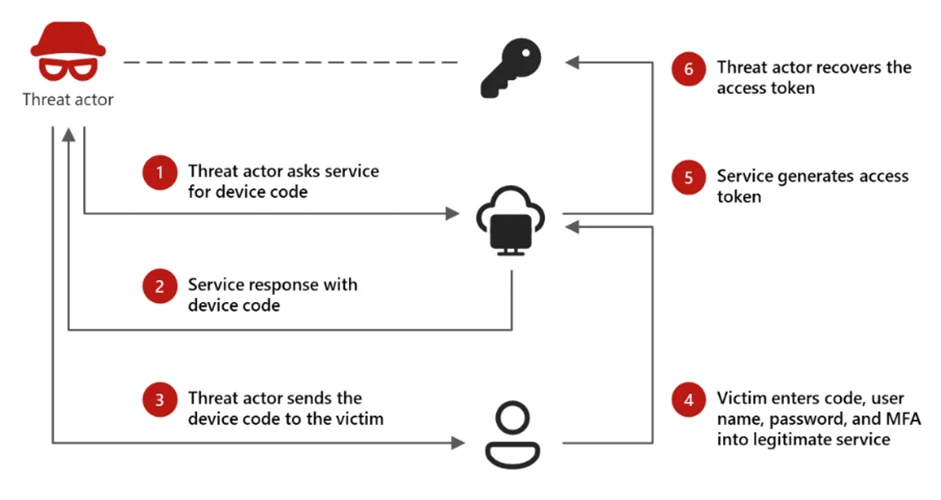
Device code authentication is a legitimate OAuth flow designed for devices with limited interfaces, such as smart TVs or printers, that cannot support a standard interactive login. In this model, a user is presented with a short code on the device they are trying to sign in from and is instructed to enter that code into a browser on a separate device to complete authentication.
While this flow is useful for these scenarios, it introduces a security tradeoff. Because authentication is completed on a separate device, the session initiating the request is not strongly bound to the user’s original context. Threat actors have abused this characteristic as a way to bypass more traditional MFA protections by decoupling authentication from the originating session.
Device code phishing occurs when threat actors insert themselves into this process. Instead of a legitimate device requesting access, the threat actor initiates the flow and provides the user with a code through a phishing lure. When the user enters the code, they unknowingly authorize the threat actor’s session, granting access to the account without exposing credentials.
Phase 1: Reconnaissance and target validation
The threat actor begins by verifying account validity using the GetCredentialType endpoint. By querying this specific Microsoft URL, the threat actor confirms whether a targeted email address exists and is active within the tenant. This reconnaissance phase is a critical precursor, typically occurring 10 to 15 days before the actual phishing attempt is launched.
The campaign uses a multi-stage delivery pipeline designed to bypass traditional email gateways and endpoint security. The attack begins when a user interacts with a malicious attachment or a direct URL embedded within a high-pressure lure (e.g., “Action Required: Password Expiration”).
To evade automated URL scanners and sandboxes, the threat actors do not link directly to the final phishing site. Instead, they use a series of redirects through compromised legitimate domains and high-reputation “Serverless” platforms. We observed heavy reliance on Vercel (*.vercel.app), Cloudflare Workers (*.workers.dev), and AWS Lambda to host the redirect logic. By using these domains, the phishing traffic “blends in” with legitimate enterprise cloud traffic, preventing simple domain-blocklist triggers.
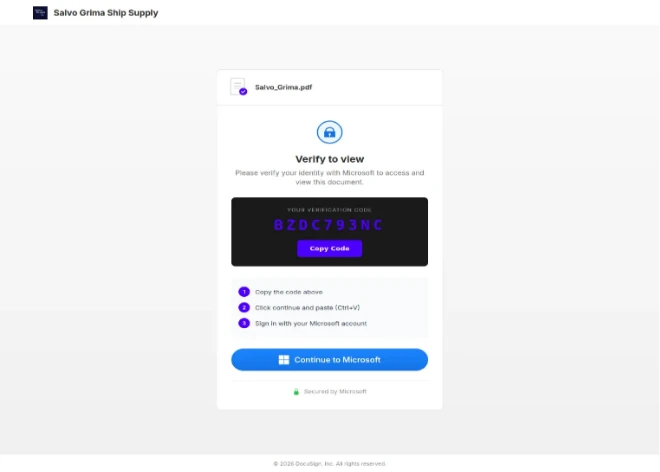
Once the targeted user is redirected to the final landing page, the user is presented with the credential theft interface. This is hosted as browser-in-the-browser (an exploitation technique commonly leveraged by the threat actor that simulates a legitimate browser window within a web page that loads the content threat actor has created) or displayed directly within the web-hosted “preview” of the document with a blurred view, “Verify identity” button that redirects the user to “Microsoft.com/devicelogin” and device code displayed.
Below is an example of the final landing page, where the redirect to DeviceLogin is rendered as browser-in-the-browser.
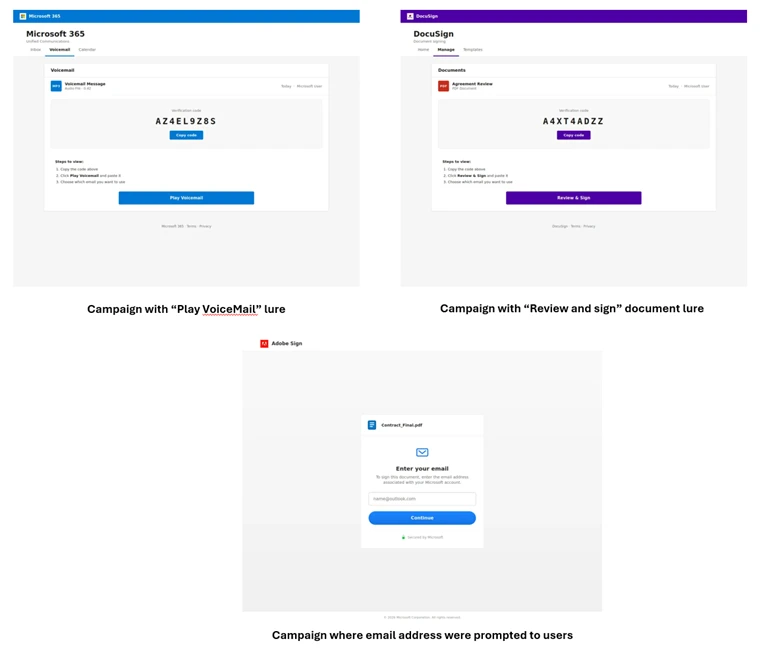
The campaign utilized diverse themes, including document access, electronic signing, and voicemail notifications. In specific instances, the threat actor prompted users for their email addresses to facilitate the generation of a malicious device code.
Unlike traditional phishing that asks for a password, this “Front-End” is designed to facilitate a handoff. The page is pre-loaded with hidden automation. The moment the “Continue to Microsoft” button is clicked, the authentication begins, preparing the victim for the “Device Code” prompt that follows in the next stage of the attack.
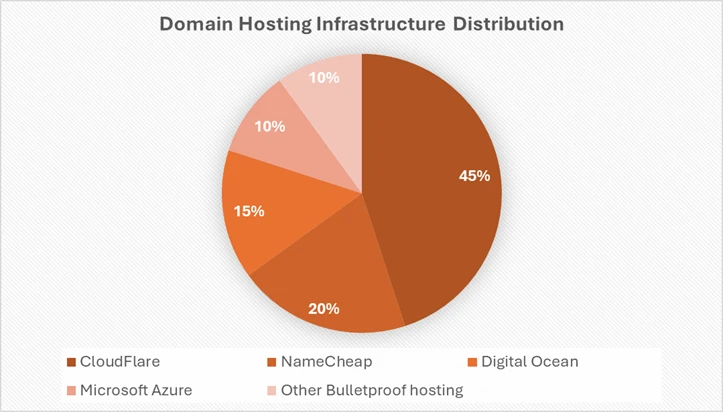
The threat actor used a combination of domain shadowing and brand-impersonating subdomains to bypass reputation filters. Several domains were designed to impersonate technical or administrative services (e.g., graph-microsoft[.]com, portal-azure[.]com, office365-login[.]com). Also, multiple randomized subdomains were observed (e.g., a7b2-c9d4.office-verify[.]net). This is a common tactic to ensure that if one URL is flagged, the entire domain isn’t necessarily blocked immediately. Below is a distribution of Domain hosting infrastructure abused by the threat actor:
Phase 2: Initial access
The threat actor distributes deceptive emails to the intended victims, utilizing a wide array of themes like invoices, RFPs, or shared files. These emails contain varied payloads, including direct URLs, PDF attachments, or HTML files. The goal is to entice the user into interacting with a link that will eventually lead them to a legitimate-looking but threat actor-controlled interface.
Phase 3: Dynamic device code generation
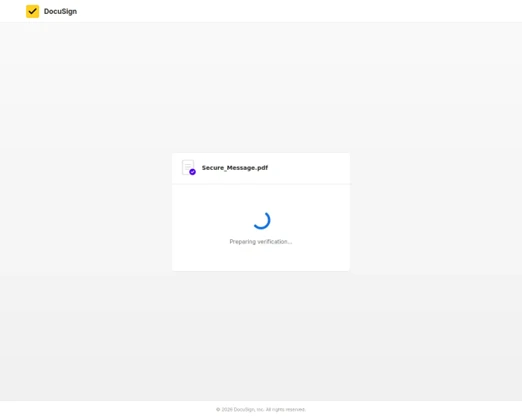
When a user clicks the malicious link, they are directed to a web page running a background automation script. This script interacts with the Microsoft identity provider in real-time to generate a live Device Code. This code is then displayed on the user’s screen along with a button that redirects them to the official microsoft.com/devicelogin portal.
The 15-Minute race: Static vs. dynamic
A pivotal element of this campaign’s success is dynamic device code generation, a technique specifically engineered to bypass the inherent time-based constraints of the OAuth 2.0 device authorization flow. A generated device code remains valid for only 15 minutes. (Ref: OAuth 2.0 device authorization grant). In older, static phishing attempts, the threat actor would include a pre-generated code within the email itself. This created a narrow window for success: the targeted user had to be phished, open the email, navigate through various redirects, and complete a multi-step authentication process all before the 15-minute timer lapsed. If the user opened the email even 20 minutes after it was sent, the attack would automatically fail due to the expired code.
Dynamic Generation effectively solves this for the threat actor. By shifting the code generation to the final stage of the redirect chain, the 15-minute countdown only begins the moment the victim clicks the phishing link and lands on the malicious page. This ensures the authentication code is always active when the user is prompted to enter it.
Generating the device code
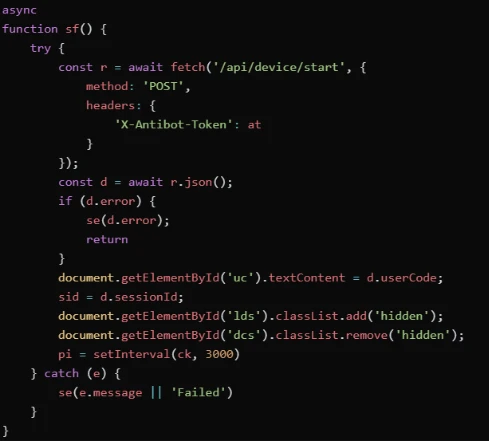
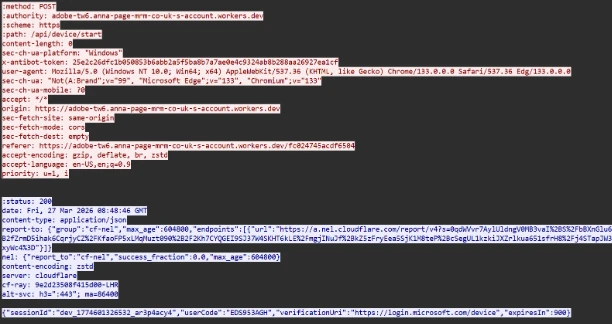
The moment the user is redirected to the final landing page, the script on the page initiates a POST request to the threat actor’s backend (/api/device/start/ or /start/). The threat actor’s server acts as a proxy. The request carries a custom HTTP header “X-Antibot-Token” with a 64-character hex value, and an empty body (content-length: 0)
It contacts Microsoft’s official device authorization endpoint on-demand and provides the user’s email address as hint. The server returns a JSON object containing Device Code (with a full 15-minute lifespan) and a hidden Session Identifier Code. Until this is generated, the landing page takes some time to load.
Phase 4: Exploitation and authentication
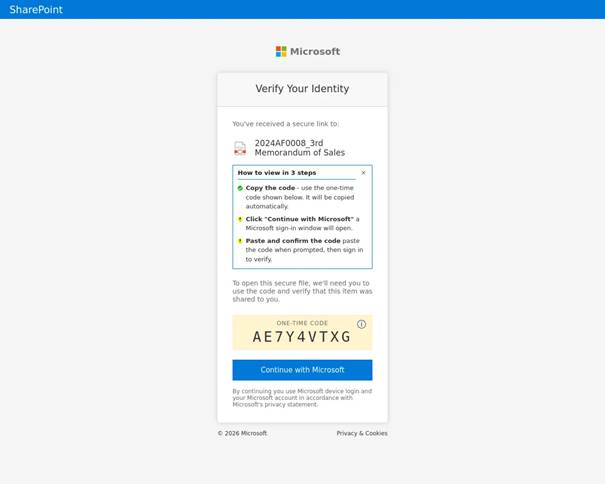
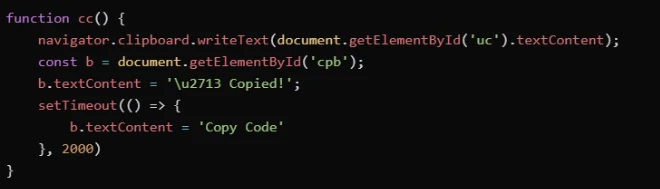
To minimize user effort and maximize the success rate, the threat actor’s script often automatically copies the generated device code to the user’s clipboard. Once the user reaches the official login page, they paste the code. If the user does not have an active session, they are prompted to provide their password and MFA. If they are already signed in, simply pasting the code and confirming the request instantly authenticates the threat actor’s session on the backend.
Clipboard manipulation
To reduce a few seconds in 15-minute window and to enable user to complete authentication faster, the script immediately executes a clipboard hijack. Using the navigator.clipboard.writeText API, the script pushes the recently generated Device Code onto the victim’s Windows clipboard. Below is a screenshot of a campaign where the codes were copied to the user’s clipboard from the browser.
Phase 5 – Session validation
Immediately following a successful compromise, the threat actor performs a validation check. This automated step ensures that the authentication token is valid and that the necessary level of access to the target environment has been successfully granted.
The polling
After presenting the code to the user and opening the legitimate microsoft.com/devicelogin URL, the script enters a “Polling” state via the checkStatus() function to monitor the 15-minute window in real-time. Every 3 to 5 seconds (setInterval), the script pings the threat actor’s /state endpoint. It sends the secret session identifier code to validate if the user has authenticated yet. While the targeted user is entering the code on the real Microsoft site, the loop returns a “pending” status.
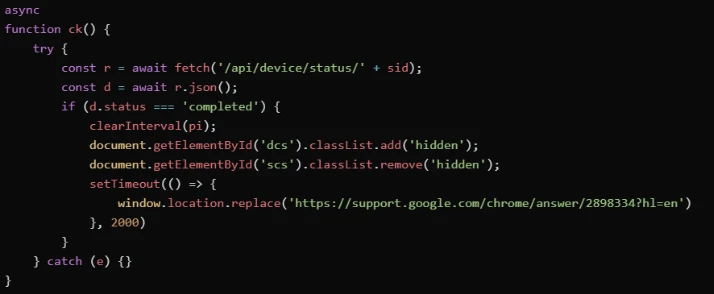
The moment the targeted user completes the MFA-backed login, the next poll returns a success status. The threat actor’s server now possesses a live Access Token for the targeted user’s account, bypassing MFA by design, due to the use of the alternative Device Code flow. The user is also redirected to a placeholder website (Docusign/Google/Microsoft).
Phase 6: Establish persistence and post exploitation
The final stage varies depending on the threat actor’s specific objectives. In some instances, within 10 minutes of the breach, threat actor’s registered new devices to generate a Primary Refresh Token (PRT) for long-term persistence. In other scenarios, they waited several hours before creating malicious inbox rules or exfiltrating sensitive email data to avoid immediate detection.
Post compromise
Following the compromise, attack progression was predominantly observed towards Device Registration and Graph Reconnaissance.
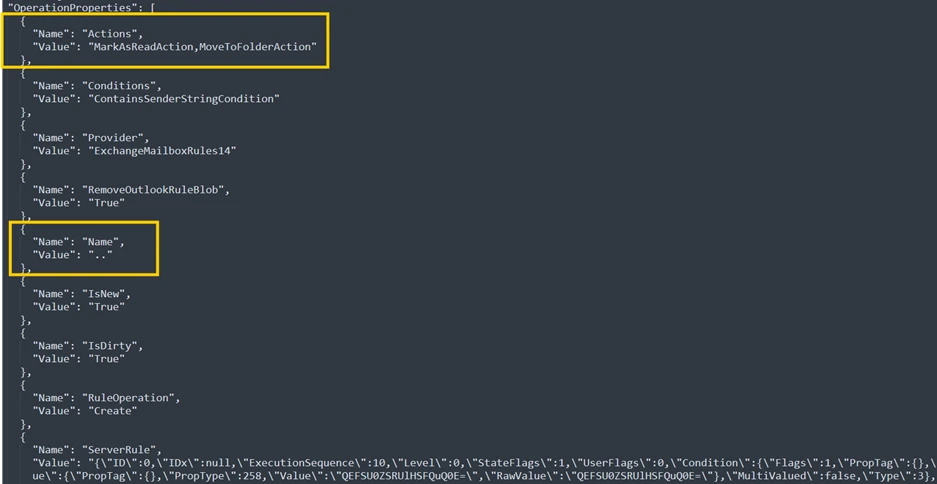
In a selected scenario, the attack progressed to email exfiltration and account persistence through Inbox rules created using Microsoft Office Application. This involved filtering the compromised users and selecting targets:
- Persona Identification: The threat actor reviewed and filtered for high-value personas—specifically those in financial, executive, or administrative roles—within the massive pool of compromised users.
- Accelerated Reconnaissance: Using Microsoft Graph reconnaissance, the threat actor programmatically mapped internal organizational structures and identify sensitive permissions the moment a token was secured.
- Targeted Financial Exfiltration: The most invasive activity was reserved for users with financial authority. For these specific profiles, the threat actors performed deep-dive reconnaissance into email communications, searching for high-value targets like wire transfer details, pending invoices, and executive correspondence.
Below is an example of an Inbox rule created by the threat actor using Microsoft Office Application.
Mitigation and protection guidance
To harden networks against the Device code phishing activity described above, defenders can implement the following:
- Only allow device code flow where necessary. Microsoft recommends blocking device code flow wherever possible. Where necessary, configure Microsoft Entra ID’s device code flow in your Conditional Access policies.
- Educate users about common phishing techniques. Sign-in prompts should clearly identify the application being authenticated to. As of 2021, Microsoft Azure interactions prompt the user to confirm (“Cancel” or “Continue”) that they are signing in to the app they expect, which is an option frequently missing from phishing sign-ins. Be cautious of any “[EXTERNAL]” messages containing suspicious links. Do not sign-in to resources provided by unfamiliar senders. For more tips and guidance – refer to Protect yourself from phishing | Microsoft Support.
- Configure Anti-phising policies. Anti-phishing policies protect against phishing attacks by detecting spoofed senders, impersonation attempts, and other deceptive email techniques.
- Configure Safelinks in Defender for Office 365. Safe Links scanning protects your organization from malicious links that are used in phishing and other attacks. Safe Links can also enable high confidence Device Code phishing alerts from Defender.
- If suspected device code phishing activity is identified, please follow the guidance : Responding to a Compromised Email Account – Microsoft Defender for Office 365 | Microsoft Learn. Additionally, revoke the user’s refresh tokens by calling revokeSign-inSessions. Consider setting a Conditional Access Policy to force re-authentication for users. (Observations from recent campaigns indicate that standard session revocation often only invalidates refresh tokens, leaving existing access tokens active for up to an hour. Given the hands-on nature of this threat actor, they frequently exploit this window of opportunity; consequently, we recommend temporarily disabling the compromised account to ensure immediate containment, despite the potential for brief business disruption).
- Implement a sign-in risk policy to automate response to risky sign-ins. A sign-in risk represents the probability that a given authentication request is not authorized by the identity owner. A sign-in risk-based policy can be implemented by adding a sign-in risk condition to Conditional Access policies that evaluates the risk level of a specific user or group. Based on the risk level (high/medium/low), a policy can be configured to block access or force multi-factor authentication.
- When a user is a high risk and Conditional access evaluation is enabled, the user’s access is revoked, and they are forced to re-authenticate.
- For regular activity monitoring, use Risky sign-in reports, which surface attempted and successful user access activities where the legitimate owner might not have performed the sign-in.
Microsoft recommends the following best practices to further help improve organizational defences against phishing and other credential theft attacks:
- Require multifactor authentication (MFA). Implementation of MFA remains an essential pillar in identity security and is highly effective at stopping a variety of threats.
- Leverage phishing-resistant authentication methods such as FIDO Tokens, or Microsoft Authenticator with passkey. Avoid telephony-based MFA methods to avoid risks associated with SIM-jacking.
- Block legacy authentication with Microsoft Entra by using Conditional Access. Legacy authentication protocols do not have the ability to enforce MFA, as legacy MFA (per-user MFA prompts) is susceptible to abuse.
- Centralize your organization’s identity management into a single platform. If your organization is a hybrid environment, integrate your on-premises directories with your cloud directories. If your organization is using a third-party for identity management, ensure this data is being logged in a SIEM or connected to Microsoft Entra to fully monitor for malicious identity access from a centralized location. The added benefits to centralizing all identity data is to facilitate implementation of Single Sign On (SSO) and provide users with a more seamless authentication process, as well as configure Entra ID’s machine learning models to operate on all identity data, thus learning the difference between legitimate access and malicious access quicker and easier. It is recommended to synchronize all user accounts except administrative and high privileged ones when doing this to maintain a boundary between the on-premises environment and the cloud environment, in case of a breach.
- Secure accounts with credential hygiene: practice the principle of least privilege and audit privileged account activity in your Entra ID environments to slow and stop the threat actor.
Microsoft Defender XDR detections
Microsoft Defender XDR customers can refer to the list of applicable detections below. Microsoft Defender XDR coordinates detection, prevention, investigation, and response across endpoints, identities, email, and apps to provide integrated protection against attacks like the threat discussed in this blog.
Customers with provisioned access can also use Microsoft Security Copilot in Microsoft Defender to investigate and respond to incidents, hunt for threats, and protect their organization with relevant threat intelligence.
Using Safe Links and Microsoft Entra ID protection raises high confidence Device Code phishing alerts from Defender.
| Tactic | Observed activity | Microsoft Defender coverage |
| Initial Access | Identification and blocking of spearphishing emails that use social engineering lures to direct users to threat actor-controlled pages that ultimately redirect to legitimate Microsoft device sign-in endpoints (e.g., microsoft.com/devicelogin). Detection relies on campaign-level signals, sender behavior, and message content rather than URL reputation alone, enabling coverage even when legitimate Microsoft authentication URLs are abused. | Microsoft Defender for Office 365 Predelivery protection for device code phishing emails. |
| Credential Access | Detects anomalous device code authentication using authentication patterns and token acquisition after successful device code auth. | Attack Disruption (Microsoft Defender for Identity): User account compromised by device code phishing Microsoft Defender For Identity Anomalous OAuth device code authentication activity |
| Initial Access / Credential Access | Detection of anomalous sign-in patterns consistent with device code authentication abuse, including atypical authentication flows and timing inconsistent with normal user behaviour. | Microsoft Defender XDR Suspicious Azure authentication through possible device code phishing. |
| Credential Access | The threat actor successfully abuses the OAuth device code authentication flow, causing the victim to authenticate the threat actor’s session and resulting in issuance of valid access and refresh tokens without password theft | Microsoft Defender XDR User account compromise via OAuth device code phishing. |
| Credential Access | Detects device code authentication after url click in an email from a non-prevalent sender | Microsoft Defender XDR Suspicious device code authentication following a URL click in an email from rare sender. |
| Defence Evasion | Post-authentication use of valid tokens from threat actor-controlled or known malicious infrastructure, indicating token replay or session hijacking rather than interactive user login. | Microsoft Defender XDR Malicious sign-in from an IP address associated with recognized threat actor infrastructure. Microsoft Entra ID Protection Activity from Anonymous IP address (RiskEventType: anonymizedIPAddress). |
| Defence Evasion / Credential Access | Authentication activity correlated with Microsoft threat intelligence indicating known malicious infrastructure, suspicious token usage, or threat actor associated sign-in patterns following device code abuse. | Microsoft Entra ID Protection Microsoft Entra threat intelligence (sign-in) (RiskEventType: investigationsThreatIntelligence). |
Microsoft Sentinel
Microsoft Sentinel customers can use the TI Mapping analytics (a series of analytics all prefixed with ‘TI map’) to automatically match the malicious indicators mentioned in this blog post with data in their workspace. Additionally, Microsoft Sentinel customers can use the following queries to detect phishing attempts and email exfiltration attempts via Graph API. These queries can help customers remain vigilant and safeguard their organization from phishing attacks:
- Campaign with suspicious keywords
- Determine Successfully Delivered Phishing Emails to Inbox/Junk folder.
- Successful Sign-in from Phishing Link
- Phishing link click observed in Network Traffic
- Suspicious URL clicked Anomaly of MailItemAccess by GraphAPI
- OAuth Apps accessing user mail via GraphAPI
- OAuth Apps reading mail both via GraphAPI and directly
- OAuth Apps reading mail via GraphAPI anomaly
Microsoft Security Copilot
Security Copilot customers can use the standalone experience to create their own prompts or run the following prebuilt promptbooks to automate incident response or investigation tasks related to this threat:
- Incident investigation
- Microsoft User analysis
- Threat actor profile
- Threat Intelligence 360 report based on MDTI article
- Vulnerability impact assessment
Note that some promptbooks require access to plugins for Microsoft products such as Microsoft Defender XDR or Microsoft Sentinel.
Threat intelligence reports
Microsoft customers can use the following reports in Microsoft products to get the most up-to-date information about the threat actor, malicious activity, and techniques discussed in this blog. These reports provide intelligence, protection information, and recommended actions to prevent, mitigate, or respond to associated threats found in customer environments.
Advanced hunting
Defender XDR customers can run the following queries to identify possible device code phishing related activity in their networks:
Validate errorCode 50199 followed by success in 5-minute time interval for the interested user, which suggests a pause to input the code from the phishing email.
EntraIdSigninEvents
    | where ErrorCode in (0, 50199)
    | summarize ErrorCodes = make_set(ErrorCode) by AccountUpn, CorrelationId, SessionId, bin(Timestamp, 1h)
    | where ErrorCodes has_all (0, 50199)
Validate Device code authentication from suspicious IP Ranges.
EntraIdSigninEvents
    | where Call has “Cmsi:cmsi”
    | where IPAddress has_any (“162.220.232.”, “162.220.234.”, “89.150.45.”, “185.81.113.”, “8.228.105.”)
Correlate any URL clicks with suspicious sign-ins that follow with user interrupt indicated by the error code 50199.
let suspiciousUserClicks = materialize(UrlClickEvents
    | extend AccountUpn = tolower(AccountUpn)
    | project ClickTime = Timestamp, ActionType, UrlChain, NetworkMessageId, Url, AccountUpn);
//Check for Risky Sign-In in the short time window
let interestedUsersUpn = suspiciousUserClicks
    | where isnotempty(AccountUpn)
    | distinct AccountUpn;
EntraIdSigninEvents
    | where ErrorCode == 0
    | where AccountUpn in~ (interestedUsersUpn)
    | where RiskLevelDuringSignin in (10, 50, 100)
    | extend AccountUpn = tolower(AccountUpn)
    | join kind=inner suspiciousUserClicks on AccountUpn
    | where (Timestamp - ClickTime) between (-2min .. 7min)
    | project Timestamp, ReportId, ClickTime, AccountUpn, RiskLevelDuringSignin, SessionId, IPAddress, Url
Monitor for suspicious Device Registration activities that follow the Device code phishing compromise.
CloudAppEvents
| where AccountDisplayName == "Device Registration Service"
| extend ApplicationId_ = tostring(ActivityObjects[0].ApplicationId)
| extend ServiceName_ = tostring(ActivityObjects[0].Name)
| extend DeviceName = tostring(parse_json(tostring(RawEventData.ModifiedProperties))[1].NewValue)
| extend DeviceId = tostring(parse_json(tostring(parse_json(tostring(RawEventData.ModifiedProperties))[6].NewValue))[0])
| extend DeviceObjectId_ = tostring(parse_json(tostring(RawEventData.ModifiedProperties))[0].NewValue)
| extend UserPrincipalName = tostring(RawEventData.ObjectId)
| project TimeGenerated, ServiceName_, DeviceName, DeviceId, DeviceObjectId_, UserPrincipalName
Surface suspicious inbox rule creation (using applications) that follow the Device code phishing compromise.
CloudAppEvents
| where ApplicationId == “20893” // Microsoft Exchange Online
| where ActionType in ("New-InboxRule","Set-InboxRule","Set-Mailbox","Set-TransportRule","New-TransportRule","Enable-InboxRule","UpdateInboxRules")
| where isnotempty(IPAddress)
| mv-expand ActivityObjects
| extend name = parse_json(ActivityObjects).Name
| extend value = parse_json(ActivityObjects).Value
| where name == "Name"
| extend RuleName = value
// we are extracting rule names that only contains special characters
| where RuleName matches regex "^[!@#$%^&*()_+={[}\\]|\\\\:;""'<,>.?/~` -]+$"
Surface suspicious email items accessed that follow the Device code phishing compromise.
CloudAppEvents
| where ApplicationId == “20893” // Microsoft Exchange Online
| where ActionType == “MailItemsAccessed”
| where isnotempty(IPAddress)
| where UncommonForUser has "ISP"
Indicators of compromise (IOC)
| The threat actor’s authentication infrastructure is built on well-known, trusted services like Railway.com (a popular Platform-as-a-Service (PaaS)), Cloudflare, and DigitalOcean. By using these platforms, these malicious scripts can blend in with benign Device code authentication. This approach was to ensure it is very difficult for security systems to block the attack without accidentally stopping legitimate business services at the same time. Furthermore, the threat actor compromised multiple legitimate domains to host their phishing pages. By leveraging the existing reputation of these hijacked sites, they bypass email filters and web reputation systems. Indicator | Type | Description |
| 162.220.232.0 (Railway.com) | IP Range | Threat actor infrastructure observed with sign-in |
| 162.220.234.0 (Railway.com) | IP Range | Threat actor infrastructure observed with sign-in |
| 89.150.45.0 (HZ Hosting) | IP Range | Threat actor infrastructure observed with sign-in |
| 185.81.113.0 (HZ Hosting) | IP Range | Threat actor infrastructure observed with sign-in |
References
- Storm-2372 conducts device code phishing campaign
- Microsoft Documentation – OAuth 2.0 device authorization grant flow
- Huntress – Riding the Rails: Threat Actors Abuse Railway.com PaaS as Microsoft 365 Token Attack Infrastructure
- Seqoia – New widespread EvilTokens kit: device code phishing as-a-service – Part 1
This research is provided by Microsoft Defender Security Research with contributions from Krithika Ramakrishnan, Ofir Mastor, Bharat Vaghela, Shivas Raina, Parasharan Raghavan, and other members of Microsoft Threat Intelligence.
Learn more
Review our documentation to learn more about our real-time protection capabilities and see how to enable them within your organization.
- Evaluate your AI readiness with our latest Zero Trust for AI workshop.
- Learn more about Protect your agents in real-time during runtime (Preview)
- Explore how to build and customize agents with Copilot Studio Agent Builder
- Microsoft 365 Copilot AI security documentation
- How Microsoft discovers and mitigates evolving attacks against AI guardrails
- Learn more about securing Copilot Studio agents with Microsoft Defender