Application modernization
Bring your existing apps and data into the cloud and meet evolving business needs more easily. Explore Power Platform tools and strategies that help align legacy systems with current business and technology standards.
Refine Results
Product
Topic
Publish date
-
Many times, you may want to make certain features or screens of your apps available only to the authorized people in your organization.
-
UX Patterns: Camera Shutter Button
The current camera control has an OnSelect event that is typically used to capture the image. -
SharePoint custom forms: Build separate forms to create, show or edit the list item.
Learn how to build separate form to create, show or edit the list item. -
Next in the Office Template series: Shoutouts
Today, we’re thrilled to unveil the newest addition to the Office Template series: Shoutouts. -
New Updates: Apps for Android and iOS, rules enhancements and additional icons.
New Updates: Apps for Android and iOS, rules enhancements and additional icons. -
Decoupling the browse gallery from the display / edit forms in PowerApps
Often times, the “start with your data” way of creating apps in PowerApps is a useful starting point when creating your first app. -
Opportunities for you to collaborate with the PowerApps Team!
In my last blog post I covered support options and the many ways to get help using PowerApps. -
Get Help Using PowerApps – Key Support Offerings!
It is a wonderful thing when PowerApps works as intended, and we’re all able to make and use awesome apps quickly and easily! Although this occurs most of the time, we know how frustrating it can be when you’re bottlenecked due to lack of information, product issues, and/or unclear error messages. -
Power Apps
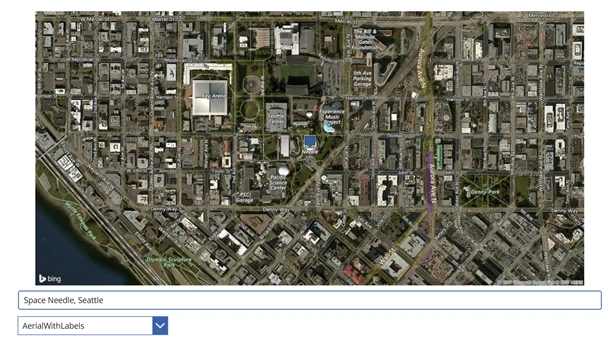
Displaying a Map using an Image Control in PowerApps and Bing Maps or Google Maps API
How to use the PowerApps Image Control and Static Maps API from Bing Maps and Google Maps to render a Map in your app. -
Excluding weekends and holidays in date differences in PowerApps
Calendars are often the glue that keep our busy lives in tact. -
Support for multi-valued choices in forms
PowerApps currently doesn’t support out of the box multi-valued fields – columns in a data source that can take zero or more of a predefined set of values. -
Supporting multi-valued “listboxes” in PowerApps
Is having multi-valued fields a requirement for your app? Acknowledging that the PowerApps listbox feature currently does not support multiple selections by default, Senior Software Design Engineer…