Summary Welcome to the Power Platform monthly feature update! We will use this blog to share news in Power Platform from the last month, so you can find a summary of product, community, and learning updates from Power Platform in one easy place. Now, let’s dive into what’s new in Power Platform:
Get started with the latest updates today!
Jump into Power Apps, Power Automate, and Power Pages to try the latest updates, you can use an existing environment or get started for free using the Developer plan.
Managed platform
Licensing capacity reporting
Licensing capacity reporting is now fully available in the Power Platform admin center (Licensing → Power Automate → Usage), giving admins a single place to see which users are over capacity and which flows are driving that usage. Export options, a consolidated licensing page, and additional improvements are on the way.
Power Platform inventory
Power Platform inventory is now generally available, giving tenant administrators a unified view of cloud flows, Copilot Studio agent flows, and Workflows agent workflows across every environment. Expansion with connectors, actions, and key usage data is on the way — making it even easier to spot your most active automations, enforce compliance, and prevent orphaned resources.
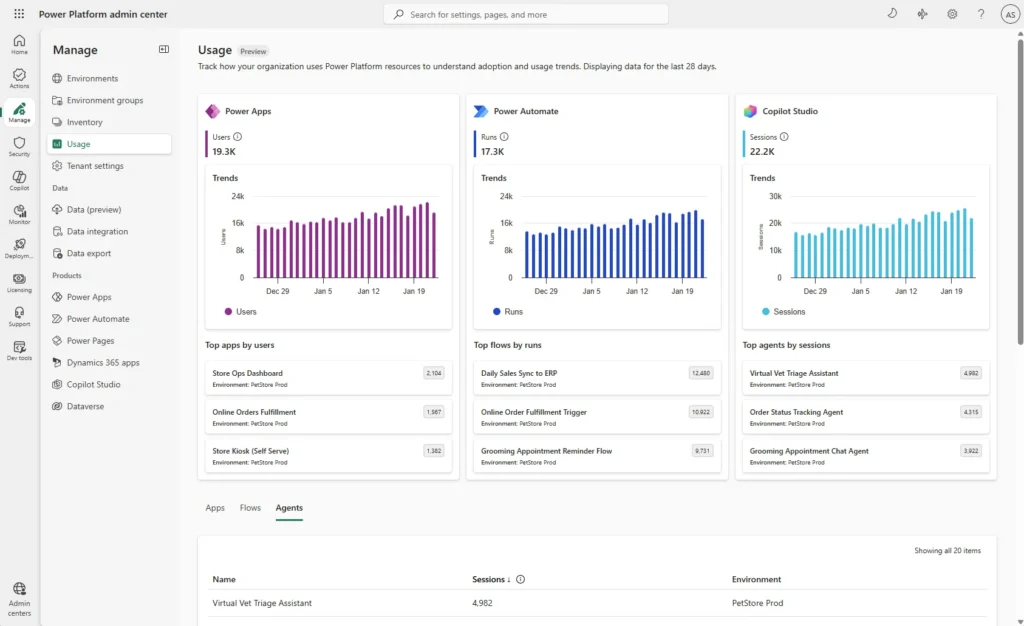
The new usage page
The new usage page is now in public preview with modern dashboards showing adoption trends and resource-level analytics for Power Apps, Power Automate, and Copilot Studio. For Power Automate, the page already shows flow run data so you can track execution patterns across your tenant.
Agentic apps
Bringing Microsoft 365 Copilot into model-driven apps
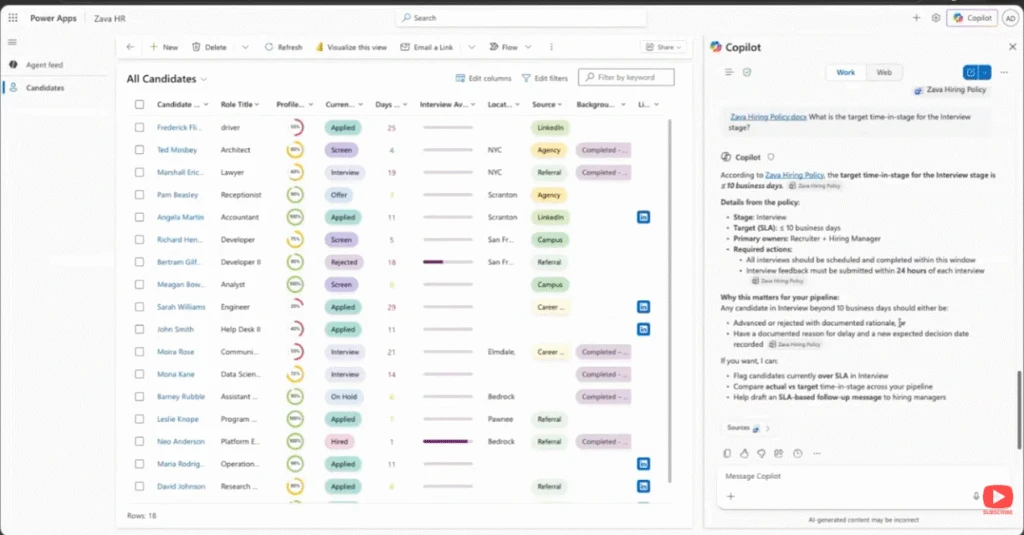
In this demo from the Microsoft 365 & Power Platform Community call, you see how Microsoft 365 Copilot integrates with model-driven Power Apps to answer questions about your app data, generate visualizations using code interpreter, and take action across Microsoft 365. You’ll see how Copilot uses app and data context to generate documents, create presentations, and even schedule meetings—all directly from your app
Turn app data into action with Microsoft 365 Copilot
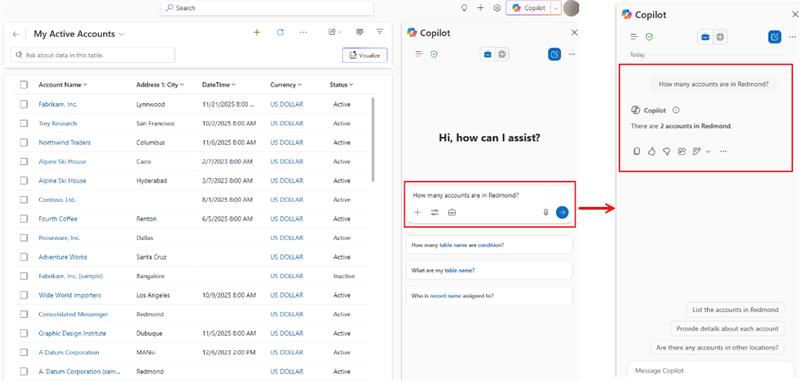
Previously, we walked through how to enable Microsoft 365 Copilot in model-driven apps. Now it’s time to put it to work where your business processes actually run. In the Copilot side pane, you can ask Copilot to summarize table data, visualize what’s active, see what’s pending, recap the history of a specific record, and reference related content surfaced through Work IQ. The result is a more natural transition from “what’s going on?” to “what should I do next?” without ever leaving the app.
Because this experience is powered by Microsoft 365 Copilot, you can also bring in the right agent at the right moment. You can @mention first‑party agents like Researcher and Analyst, or involve a custom agent your organization has made available. That agent collaboration helps turn insights into action, whether that means drafting a document, creating a PowerPoint, or taking next steps like scheduling a meeting. All of this stays grounded in your app context and chat history. Ready to get started? Begin with the admin and maker setup guidance, then explore how end users work in the pane, and finally learn how to tailor the experience with agents.
Building modern apps
New quality updates for modern controls in canvas apps
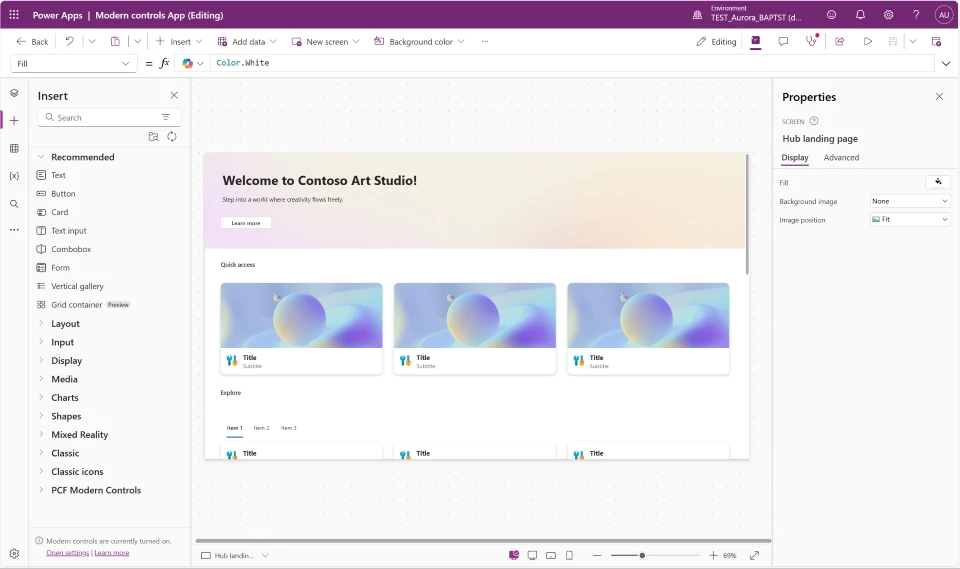
We’ve shipped quality updates across all nine modern controls in Power Apps canvas apps—Text, Number Input, Date Picker, Text Input, Tab List, Combo Box, Radio, Link, and Info Button. This is one of the most comprehensive control refreshes to date, addressing top maker feedback around consistency, reliability, and flexibility. Whether you’re building new apps or maintaining existing ones, these updates make modern controls noticeably better to work with.
The biggest improvements are in consistency, performance, and developer experience. Controls now share a unified property model with standardized names and typed enum values predefined value sets, which means better IntelliSense, fewer formula errors, and less guesswork. The OnChange behavior has been refined across controls to fire at the right moments—reducing unnecessary recalculations and making apps feel faster and more responsive. Mobile-optimized defaults are also now applied automatically when you add controls to a mobile layout.
Migration is guided every step of the way. When you open an app using a previous version of a modern control, you’ll see an in-product notification with a “learn more” link and an “update” button coming soon on all controls. Dedicated per-control migration guides walk you through every property rename and formula change needed—so you stay in control of when and how you upgrade.
AI powered development
vibe.PowerApps.com Walkthrough
This video explores the new vibe.powerapps.com preview, which enables developers to build full code Power Apps from a prompt using AI-driven plan, data, and app generation. You’ll see how the unified experience simplifies app creation, editing, and publishing without requiring VS Code or manual code authoring.
Power Automate
Object-centric process mining analyzes processes by following real interacting business objects
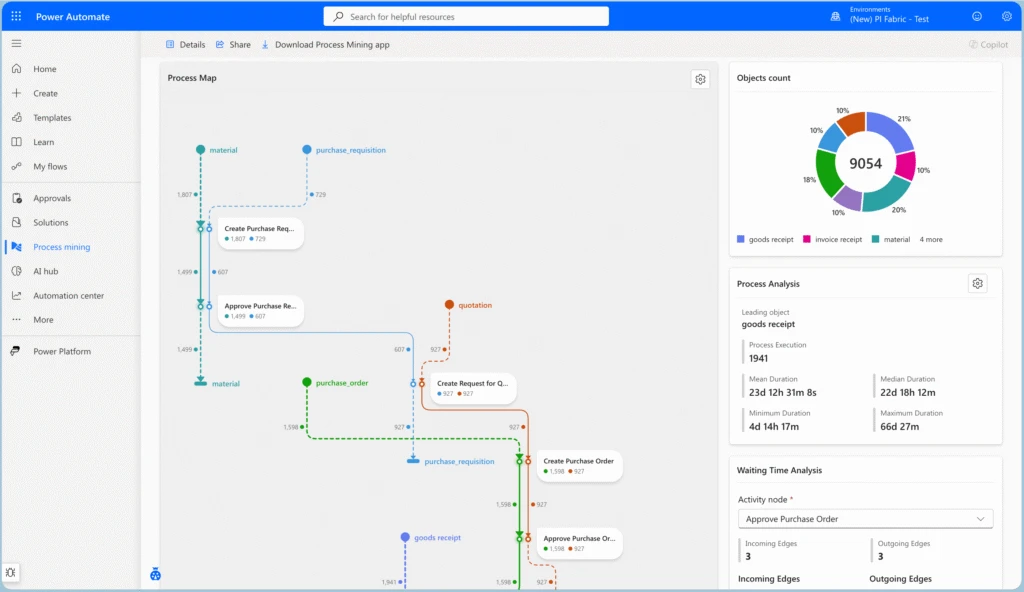
Object-Centric Process Mining (OCPM) is a new approach to process analysis in Power Automate Process Mining that models processes as they occur in real business environments. Unlike traditional case-centric process mining, which groups events under a single case notion (e.g., Order ID), OCPM allows a single event to belong to multiple objects and object types — such as orders, invoices, deliveries, and payments — preserving the full web of interactions and dependencies end-to-end.
This capability solves a fundamental limitation of case-centric mining: when events routinely touch several objects of different types simultaneously, forcing them into a single case can hide cross-object relationships, duplicate events, or distort metrics. OCPM keeps these relationships explicit, rendering object-centric process maps that show object lifecycles, activity nodes spanning multiple object types, and color-coded object-flow edges. This makes it straightforward to identify multi-object bottlenecks, verify compliance policies that span entities (e.g., “ship only after payment”), and analyze how different process flows converge and interact.
OCPM is ideal for scenarios where dependencies across object types drive outcomes — such as order-to-cash, procure-to-pay, or supply chain processes — while case-centric mining remains the right choice for tightly scoped, single-instance workflows.
Process intelligence experience: a customizable interface for process analysis
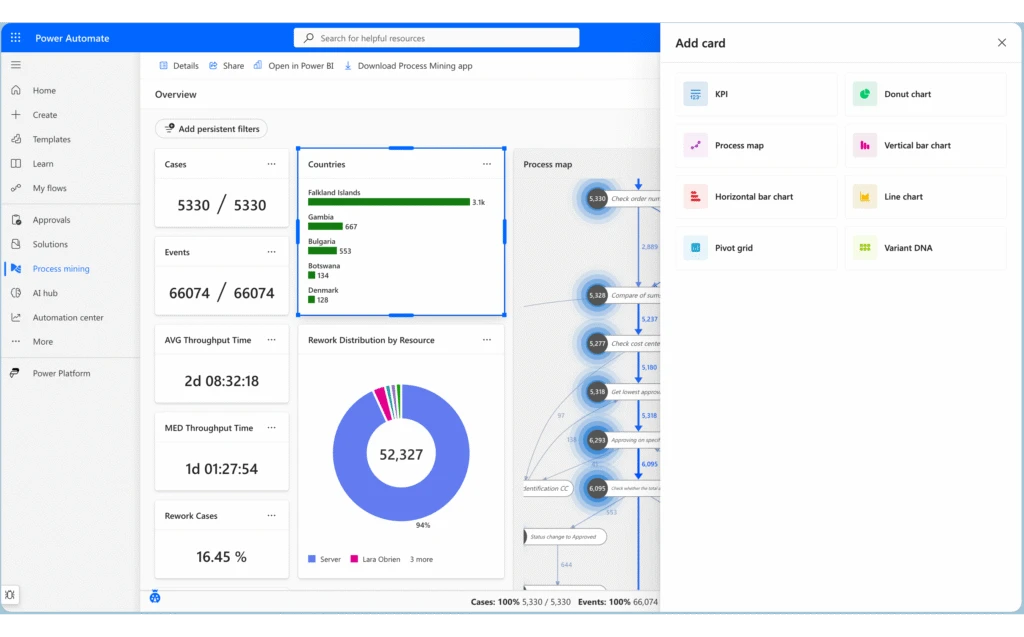
The process intelligence experience is the next-generation interface for process analysis in Power Automate Process Mining. It replaces the previous fixed process overview with a flexible, card-based dashboard system that adapts to your analysis needs. Users can create multiple tabs to organize different analytical perspectives, apply dynamic filters across all visualizations, and arrange, resize, and configure cards to build personalized analytical workspaces.
Key enhancements include the ability to group related metrics and visualizations together logically, switch between preconfigured analytical perspectives instantly, and share dashboard configurations with team members. Continuous data refresh ensures you’re always working with current information, while the customizable layouts give you complete control over what you see and how you see it — enabling tailored views for different stakeholders and use cases.
Power Pages
Infuse intelligent experiences into Power Pages sites with the new Agent API
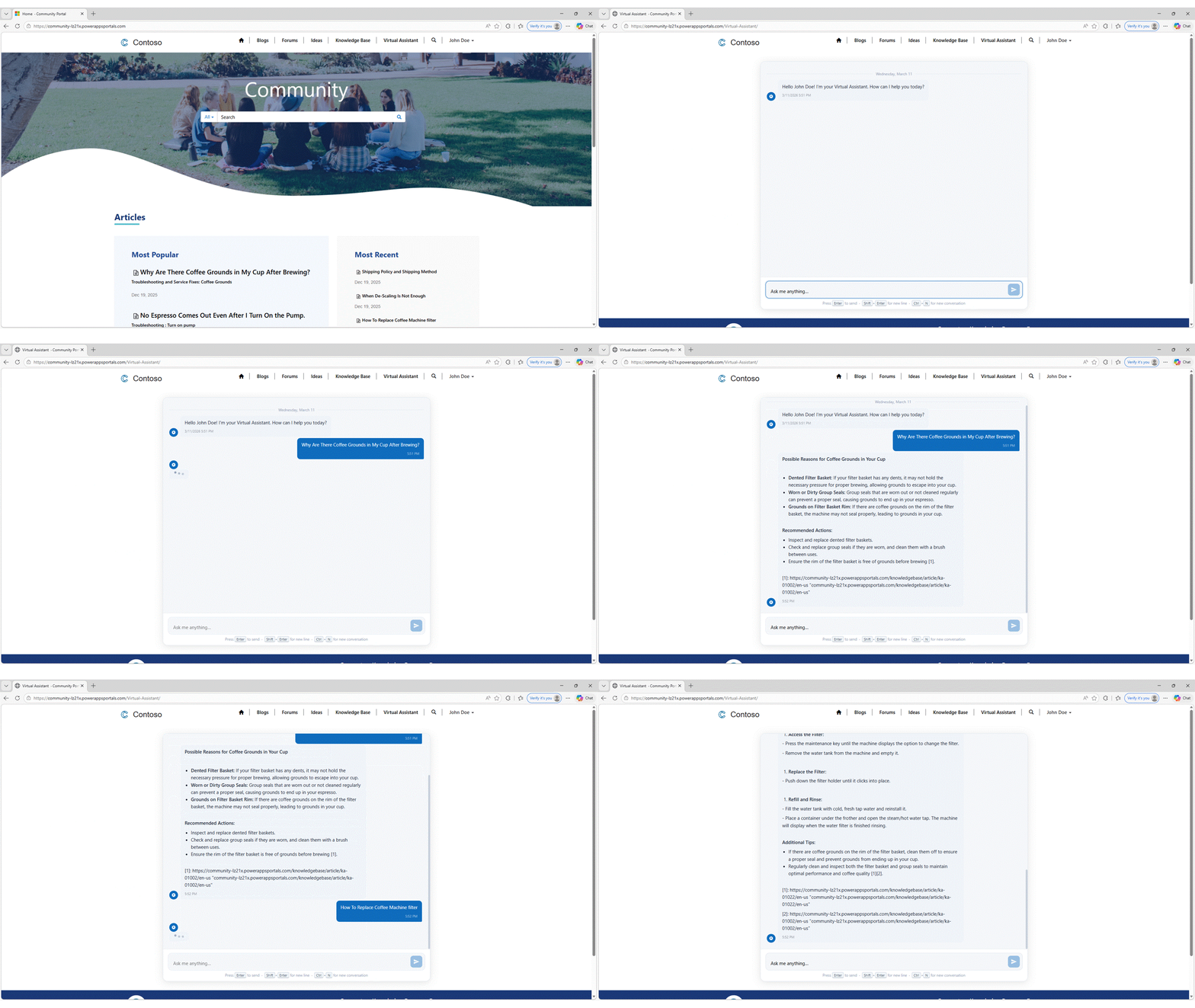
Agent API for Power Pages enables site creators to build custom chat and other user experiences and integrate these seamlessly with their custom-built Microsoft Copilot Studio agents. This enhancement gives organizations more flexibility for integrating intelligence into their web experiences.
Public preview: Build Power Pages sites with AI using agentic coding tools
We’re announcing the public preview of the Power Pages plugin for GitHub Copilot CLI and Claude Code. Describe the site you want in natural language and the plugin handles the rest — from project scaffolding and setup to Web API integrations, permissions, and site deployment.
The plugin is purpose-built for Power Pages. It understands table permissions, web roles, site settings, authentication configuration, and Web API patterns. Because it generates platform-aware code, you spend less time on manual configuration and more time building your site.
Learning updates
Training paths and labs
Updated training
- Add an AI model to process invoice forms – Online workshop
- Create your first desktop flow – Online workshop
- Create subflows and web automation with Power Automate for desktop – Online workshop
- Install required software for Power Automate: Automation – Online workshop
- Integrate with cloud flows – Online workshop
- Use Outlook email to trigger desktop flows and pass inputs – Online workshop
- Use input and output variables – Online workshop
- Integrate with Microsoft Teams to get approvals – Online workshop
- Build agents in Copilot Chat – Online workshop
- Build a conversational agent in Copilot Studio – Online workshop
- Use tools in Copilot Studio – Online workshop
- Make your agent autonomous in Copilot Studio – Online workshop
- Solution architect series: Explore Microsoft Copilot Studio
- Build effective agents with Microsoft Copilot Studio
- Use Azure AI Services for Language in a Microsoft Copilot Studio
- Guided Project – Create agents with Microsoft Copilot Studio
- Create an agent with Microsoft Copilot Studio and Dataverse for Teams
- Build an initial agent with Microsoft Copilot Studio
- Enhance Microsoft Copilot Studio agents
- Work with entities and variables in Microsoft Copilot Studio
- Set up a Microsoft Copilot Studio agent for voice
- Use Agent Flows in Copilot Studio
- Use Dataverse choice columns with formulas
- Create a Dataverse table for the machine ordering app – Online workshop
- Get started with Power Apps and SharePoint
- Get started with model-driven apps in Power Apps
- Integrate a Power Apps app with Power Automate – Online Workshop
- Create a machine ordering Power Apps canvas app – Online Workshop
- Create a model-driven Power Apps app for machine ordering – Online Workshop
Power Apps maker
New
- Use preview tools and upcoming features in Dataverse MCP server
- Create and edit generative pages with AI code generation tools (preview)
Updated
- Create an Azure Synapse Link for Dataverse with Azure Data Lake
- Add Microsoft 365 Copilot chat for app users in model-driven apps (preview)
- Configure a row summary for a model-driven app (preview)
- Create an Azure Synapse Link for Dataverse with your Azure Synapse Workspace
- Use managed identities for Azure with your Azure data lake storage
- Get preview features early with the Dataverse accelerator (preview)
- Get started with Power Apps
- Recent modern control updates in canvas apps
- Combo box modern control in canvas apps
- Date picker modern control in canvas apps
- Info button modern control in canvas apps
- Link modern control in canvas apps
- Number Input modern control in canvas apps
- Tab List modern control in canvas apps
- Text modern control in canvas apps
- Text Input modern control in canvas apps
- Radio modern control in canvas apps
- Overview of modern controls and theming in canvas apps
- Build apps through conversation with Copilot
- Create a canvas app with data from a list
- Create a blank canvas app from scratch
- Create a canvas app using Microsoft Dataverse
- Create a canvas app based on Excel data
- Complete guide to building canvas applications
- Use plans to create a business solution with Copilot
- Use plans to create AI-Powered business solutions with Copilot
- Collaborate on canvas apps in Microsoft Power Apps Studio
- Error handling in Power Apps
Power Automate
New
- Process intelligence experience overview (preview)
- Manage tabs in the process intelligence experience (preview)
- Customize layouts in the process intelligence experience (preview)
- Filtering overview in the process intelligence experience (preview)
- Filter by attribute values in the process intelligence experience (preview)
- Filter by timeframe in the process intelligence experience (preview)
- Filter by variant in the process intelligence experience (preview)
- Filter by edge in the process intelligence experience (preview)
- Visualization cards overview in the process intelligence experience (preview)
- Use KPI (key performance indicator) cards in the process intelligence experience (preview)
- Use process maps in the process intelligence experience (preview)
- Use variant DNA in the process intelligence experience (preview)
- Use horizontal bar charts in the process intelligence experience (preview )
- Use process maps in the process intelligence experience (preview)
- Use donut charts in the process intelligence experience (preview)
- Use line charts in the process intelligence experience (preview)
- Use statistical grids in the process intelligence experience (preview)
- Power Automate environment actions reference
- Run-only user role
- Understand callback registration for Dataverse triggers
Updated
- Send a message in Teams using Power Automate
- AI Builder actions reference
- Flow control actions reference
- Run desktop flows via URL or desktop shortcuts
- Variable data types
- Safe stop
- Prerequisites and limitations
- Version control in Power Automate for desktop (preview)
- Run a desktop flow in picture-in picture
- Use a flow to add a row in Dataverse
- Troubleshoot known issues with Microsoft Dataverse
- Use a flow to update a row in Dataverse
- Work with scoped variables in Power Automate for desktop
- Manage desktop flow connections
Power Platform administration
New
Updated
- Restore deleted Microsoft Dataverse table records (preview)
- Tutorial: Provision a new environment with an ERP-based template
- Move apps from the default environment (preview)
- Virtual Network support overview
- Set up virtual network support for Power Platform
- Important changes (deprecations) coming in Power Platform
- Opt in to early access updates
- Get Support in Power Platform
- Content security policy
- Discover what drives engagement in Power Platform by using the Usage page (preview)
- Geo-to-geo migrations
- Security roles and privileges for Dataverse
- Role-based security roles for Dataverse
- Allow external language models for generative responses
- Configure Dataverse search for your environment
- Power Platform inventory
- Manage Dataverse auditing
- General availability deployment
- Virtual Network support white paper
- Tenant-to-tenant migrations
Power Platform developer
New
- Power Platform management API Reference
- Microsoft Power Platform REST API reference
- Troubleshoot Microsoft Power Platform CLI
- How to: Connect your code app to Microsoft Copilot Studio agents
- Quickstart: Create a code app from scratch by using the new npm CLI (preview)
- pac model command reference
Updated
- Dataverse SDK for Python overview
- Dataverse SDK API Reference
- Microsoft Power Platform CLI Reference
- How to: Set up Azure App Insights for your code app
- Dataverse table/entity reference
- Dynamics 365 Enabled apps table/entity reference
- Dynamics 365 Field Service table/entity reference
- Dynamics 365 Sales table/entity reference
- Dynamics 365 Customer Service table/entity reference
- Dataverse Web API Reference
- How to: Connect your code app to data
Power Apps user and mobile
Updated
- Visualize data in a view with Copilot (preview)
- Configure files and images in offline canvas apps
- Install the Power Apps mobile app
- Modern, refreshed look for model-driven apps
- Find data in a view with AI (preview)
- Use Copilot’s form fill assistance feature in model-driven apps
- Use row summaries in model-driven apps
- Supervise agents in model-driven apps with agent feed
- Use Microsoft 365 Copilot chat in model-driven apps (preview)
- Timeline highlights with generative AI in Dynamics 365
Power Pages
New
Updated
- Access user and website details with server objects
- Power Pages server logic overview (preview)
- Add an agent from the set up workspace
- Configure Web Application Firewall for Power Pages
- Overview of the Security workspace
- Setup identity provider for MCP in Power Pages
- Configure redirect URI for MCP server access
- Setup and connect to MCP Server via Microsoft 365 Copilot
- Connect to Power Pages MCP server
- Configure site settings for MCP server in Power Pages
- Power Pages authentication white paper
- Use the Visual Studio Code extension
- Use solutions with Power Pages