Howdy folks,
Conditional access is one of athe fastest growing services in EMS and we are constantly getting feedback from customers about new capabilities they would like us to add to it. One of the most frequently requested is support for macOS. Customers want to have one consistent system for securing user accessing to Office 365 on all the platforms their employees are using.
So I’m excited to share that Azure Active Directory and Intune now support macOS platform for device-based conditional access! Administrators can now restrict access to Intune-managed macOS devices using device-based conditional access according to their organization’s security guidelines.
With the public preview of macOS device-based conditional access, you’ll be able to:
- Enroll and manage macOS devices using Intune
- Ensure macOS devices adhere to your organization’s compliance policies
- Restrict access to applications in Azure AD to only compliant macOS devices
Get started with macOS conditional access public preview in two simple steps:
Configure compliance requirements for macOS devices in Intune
Use the Intune service in Azure Portal to create a device compliance policy for macOS devices in a few easy clicks:
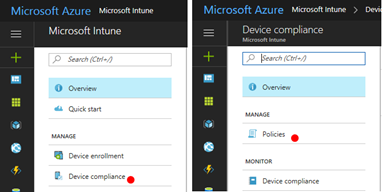
Configure compliance requirements for device health, properties, and system security per your organization’s requirements.
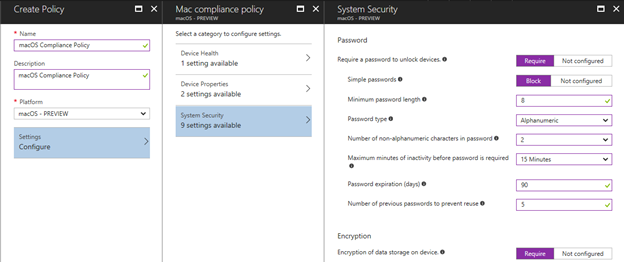
For more details, go to https://aka.ms/macoscompliancepolicy.
(Important Note: for Conditional Access on macOS to work, the device will need to have the Intune Company Portal app installed).
Restrict access to Azure AD applications for macOS devices
Create a targeted conditional access policy for macOS to protect the Azure AD Applications. Go to conditional access under Azure AD service in Azure portal to create a new policy for macOS platform.
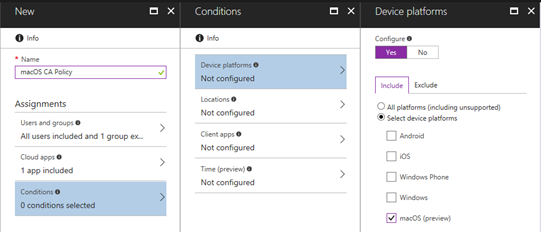
For more details on conditional access policies, go to Conditional Access in Azure Active Directory.
After you’ve taken these steps, macOS users covered in the policy will be able to access Azure AD connected applications only if their Mac conforms to your organization’s policies.
Supported OS versions, applications, and browsers
In the public preview, the following OS versions, applications, and browsers are supported on macOS:
Operating Systems
- macOS 10.11+
Applications
The following Office 2016 for macOS applications are supported:
- Outlook v15.34 and later
- Word v15.34 and later
- Excel v15.34 and later
- PowerPoint v15.34 and later
- OneNote v15.34 and later
Browsers
- Safari
Try it out today and let us know what you think! We look forward to hearing from you.
Best regards,
Alex Simons (Twitter: @Alex_A_Simons)
Director of Program Management
Microsoft Identity Division