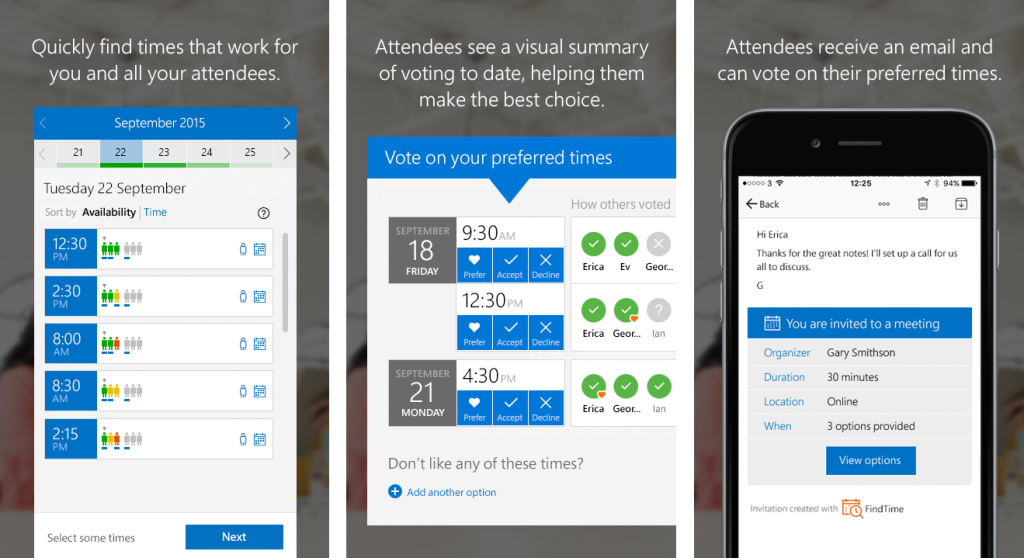
FindTime is an add-in for Outlook that helps you come to consensus on a meeting time across companies. Have you ever spent more time deciding when to meet than actually meeting? FindTime offers intelligent suggestions on what days and times work best for people within your organization. Propose your selected times to all attendees and allow everyone to vote. Once you reach consensus, FindTime sends out the meeting invite on your behalf, eliminating the time consuming back-and-forth usually required to find the best meeting time.
Install today at findtime.microsoft.com.
How FindTime helps plan your meetings
FindTime is an add-in for Outlook that helps you pinpoint times to meet by looking at available free/busy data for your attendees as well as creating a poll where attendees can vote on the times you suggest or suggest new times themselves!
Recipients can receive invites on any email provider and can access the FindTime voting website on any device. Organizers’ email accounts must be on Office 365 and can access the FindTime Outlook add-in in Outlook 2013, Outlook 2016 or Outlook on the web.* The Microsoft Garage turns fresh ideas into real projects. Find more great projects at garage.microsoft.com.
—Anne Legato, chief communicator on the Microsoft Garage team
*FindTime is best for Office 365 users with Outlook 2013, Outlook 2016 or Outlook on the web.