Data Loss Prevention (DLP) capabilities protect your data where it is stored, when it is moved, and when it is shared. We first announced last year our plans to bring DLP to SharePoint Online and OneDrive for Business, and today we are pleased to announce DLP will begin rolling out to OneDrive for Business and SharePoint Online starting this week. By extending DLP to OneDrive for Business and SharePoint Online, we are expanding upon the same protection you already have in Exchange, Outlook and Outlook on the web, offering broader protection of your data wherever it lives. In addition, Office 2016 also supports DLP in Excel, Word, PowerPoint and Outlook, scanning documents for defined sensitive information.
DLP in OneDrive for Business and SharePoint Online
During the private preview of DLP for OneDrive for Business and SharePoint Online, we listened and incorporated feedback. DLP will now be available in premier enterprise SKUs, making these critical Office 365 compliance/protection capabilities available for both end users and IT admins. This is another important milestone in our efforts to deliver information protection controls to IT, to protect sensitive information and prevent it from being inadvertently disclosed. At the same time, we’ve built in policy tips and end-user education to help employees make the right choices when working with sensitive data.
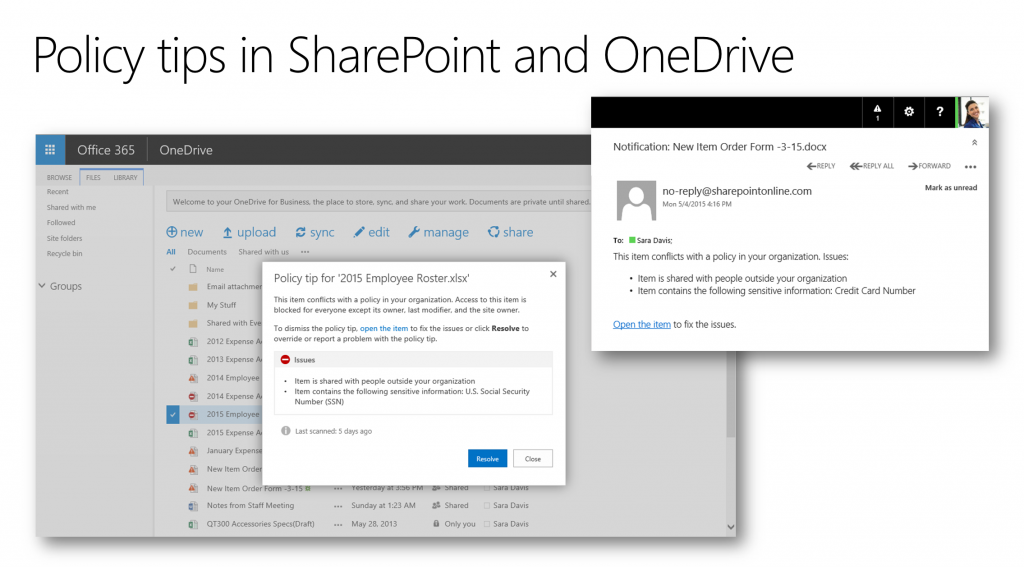
IT admins will see new controls in your Office 365 Compliance Center, allowing you to easily set up DLP policies for SharePoint Online and OneDrive for Business. As a further protection, we recently announced even more protection controls with policy tips integrated throughout Office desktop apps—from Outlook and now to Word, PowerPoint and Excel—providing consistent notification across all of their productivity applications. IT admins also can configure their policy tips so that users can interact with the pertinent policy, for example, providing a business justification to override the policy or reporting a false positive.
In the coming weeks and months, we will continue adding new features. Below is a brief overview of what’s available now and what’s coming next.
| Currently rolling out | Coming next |
| Create automated policies with any of the available built-in sensitive information types | Exceptions for locations and conditions in your policies |
| Detect external sharing and apply appropriate actions | Ability to encrypt content as an action |
| Scope DLP policies to specific SharePoint or OneDrive sites | Support for custom classifications and document fingerprinting |
| Policies based on document properties (metadata) | Shared by/by member of conditions |
| Block or restrict access to the sensitive content | |
| Customizable Policy tips and user notifications via policy tip and email | |
| Admin-facing Incident reports and reporting |
A comprehensive overview of information protection
To learn more about DLP in SharePoint and OneDrive for Business, watch today’s Office Mechanics show, in which Asaf Kashi, principal group program manager for Information Protection, provides a comprehensive overview of how DLP helps protect against data loss. Asaf explains how an enterprise IT infrastructure and the Microsoft cloud work holistically, enabling security and compliance without impacting end-user productivity. Microsoft then utilizes DLP to scan files in transit and at rest. Asaf also reviews how easy it is for IT admins to manage and audit their company policies through the Office 365 Compliance Center.
As sharing and collaboration evolve across applications and devices, our vision is to deliver DLP to all the places where you want to protect your data, with the goal of protecting information from when documents are initially created to when they are stored or shared. As DLP rolls out to your Office 365 Compliance Center in the coming weeks, we encourage you to try it out.