Skip to main content Pricing for individuals For families For single users For premium users For students Learn more Pricing for business For small business For schools For government Pricing for enterprise For enterprise For frontline workers For nonprofits For government Meet Copilot Copilot Chat AI Agents Daily Prompt Guide Plans and pricing Microsoft Teams Word Excel PowerPoint Outlook OneDrive SharePoint Planner See all apps and services Microsoft Office Windows 365 Microsoft Viva Microsoft Edge Microsoft Agent 365 Plans and pricing Learn to use Copilot Copilot learning center Cost savings Accounts and billing FAQ Setup and install Templates Training What's new Microsoft Frontier Program Microsoft 365 Roadmap Microsoft 365 Blog Small Business Resource Center Self-help resources Billing support Community Contact Microsoft Support Self-help resources Admin self-help Support plans Find a partner Contact Sales Community Self-help resources Educator Center Request support Contact Microsoft Support Community Become a partner Partner resources See all support Try for free

Try Microsoft 365 Copilot

Available on desktop and mobile devices

Genius Scan is a scanner in your pocket. We designed it to make it easy for individuals and small businesses to digitize their important documents. This convenient scanner app for iPhone, iPad, and Android now integrates with OneNote.

OneNote users have been looking for a better way to go paperless and Genius Scan is a great solution for that. On the other hand, a lot of Genius Scan users are looking for better ways to store and organize their documents. By working together, Genius Scan and OneNote open a whole new world of possibilities.

Using Genius Scan is simple:

Snap a picture of a document (contracts, business cards, whiteboards!). Genius Scan detects the frame of the document, crops it and enhances the colors to make it legible, like a real scanner would do.
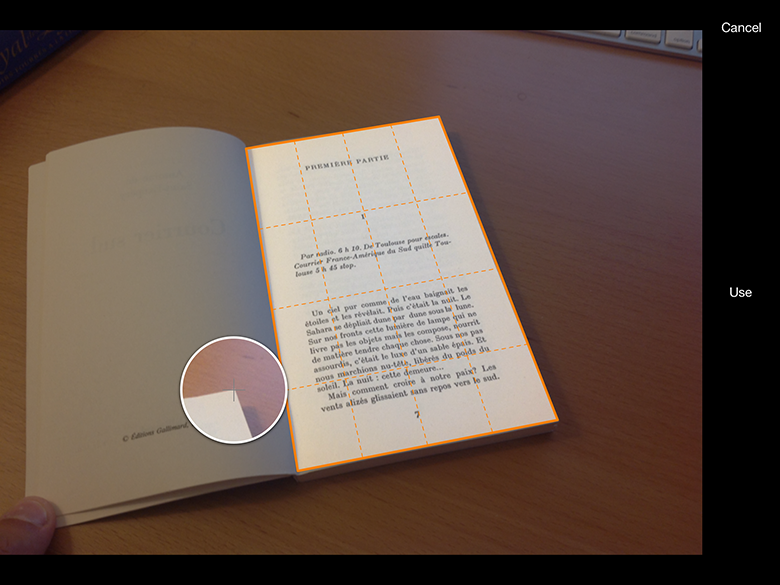
a book open with OneNote scan overlay

If desired, save your scan in a PDF document. You can add multiple pages.

Export your document to save it to the cloud, share it with colleagues and friends. With the OneNote integration, you are now able to save your documents to your OneNote notebook. The OneNote integration is available for both iOS and Android.
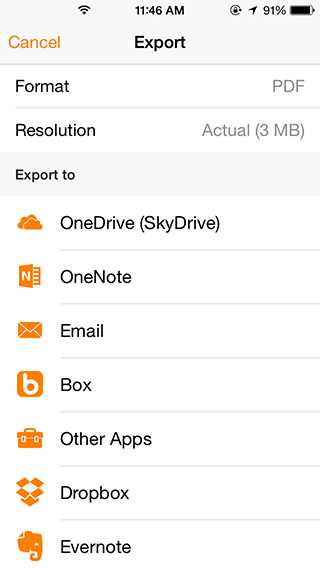
one-note-export-fixed

Tell us what you think at contact@thegrizzlylabs.com and follow us on Twitter @thegrizzlylabs, to get more updates.