SkyDrive recently announced a name change to OneDrive. We’re excited that OneNote and OneDrive now share a similar name since we also share a similar promise. OneDrive is the one place for all your most important stuff, including photos, videos, and documents, and OneNote is the one place for all your notes. Together, OneNote and OneDrive enable you to access your notes on all your devices.
To celebrate and begin our transition to OneDrive in our products, we’re releasing a small update to the OneNote Windows Store App for Windows 8.1 users.
Note: If you’re using Windows 8, please update to Windows 8.1 to get the best Windows, OneNote and OneDrive experience.
This OneNote update includes:
- Support for the OneDrive service.
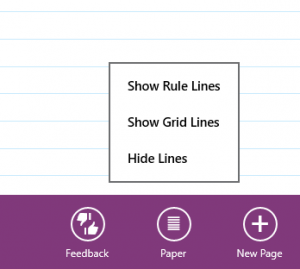
- Rule line heights have been increased to accommodate larger handwriting. To enable Rule Lines, bring up the page app bar (right-click the page, or swipe from the top or bottom of the screen), then select Paper. Now you can choose between Rule Lines or Grid Lines.
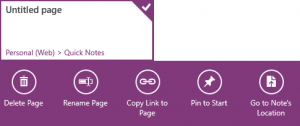
- Now you can easily go to a note’s location from Recent Notes. To do this, bring up the page preview app bar (right-click the page preview or swipe up), then select Go to Note’s Location.
- We also made accessibility improvements. Now it’s easier to navigate OneNote with a keyboard and to use Narrator to read your notes.
- A variety of bugs were fixed to improve the Share Charm experience and to make OneNote faster, more robust and use less hard drive space.
62 more languages added
OneNote Windows Store App is now available in the following 105 languages: Afrikaans, Albanian, Amharic, Arabic, Armenian, Assamese, Azerbaijani (Latin), Bangla (Bangladesh), Bangla (India), Basque, Belarusian, Bosnian (Latin), Bulgarian, Catalan, Central Kurdish (Arabic), Chinese Simplified, Chinese Traditional (Taiwan), Croatian, Czech, Danish, Dari, Dutch, English (United States), Estonian, Filipino, Finnish, French, Galician, Georgian, German, Greek, Gujarati, Hausa (Latin), Hebrew, Hindi, Hungarian, Icelandic, Igbo, Indonesian, Irish, isiXhosa, isiZulu, Italian, Japanese, Kannada, Kazakh, Khmer, K’iche’, Kinyarwanda, KiSwahili, Konkani, Korean, Kyrgyz, Latvian, Lithuanian, Luxembourgish, Macedonian, Malay, Malayalam, Maltese, Maori, Marathi, Mongolian (Cyrillic), Nepali, Norwegian (Bokmal), Norwegian (Nynorsk), Odia, Persian, Polish, Portuguese (Brazil), Portuguese (Portugal), Punjabi, Punjabi (Arabic), Quechua, Romanian, Russian, Scottish Gaelic, Serbian (Cyrillic, Bosnia and Herzegovina), Serbian (Cyrillic, Serbia), Serbian (Latin), Sesotho sa Leboa, Setswana (South Africa), Sindhi (Arabic), Sinhala, Slovak, Slovenian, Spanish, Swedish, Tajik (Cyrillic), Tamil (India), Tatar, Telugu, Thai, Tigrinya (Ethiopia), Turkish, Turkmen, Ukrainian, Urdu, Uyghur, Uzbek (Latin), Valencian, Vietnamese, Welsh, Wolof, and Yoruba.
Tell us what you think
We’re always interested in hearing from you. Please let us know what you think in the comments or directly through the app (swipe up from the bottom, then tap Feedback). Your feedback helps us to improve OneNote and determine what we deliver next.
———————
Download OneNote: onenote.com
Follow OneNote: twitter.com/msonenote
Like OneNote: facebook.com/OneNote