Skip to main content Pricing for individuals For families For single users For premium users For students Learn more Pricing for business For small business For schools For government Pricing for enterprise For enterprise For frontline workers For nonprofits For government Meet Copilot Copilot Chat AI Agents Daily Prompt Guide Plans and pricing Microsoft Teams Word Excel PowerPoint Outlook OneDrive SharePoint Planner See all apps and services Microsoft Office Windows 365 Microsoft Viva Microsoft Edge Microsoft Agent 365 Plans and pricing Learn to use Copilot Copilot learning center Cost savings Accounts and billing FAQ Setup and install Templates Training What's new Microsoft Frontier Program Microsoft 365 Roadmap Microsoft 365 Blog Small Business Resource Center Self-help resources Billing support Community Contact Microsoft Support Self-help resources Admin self-help Support plans Find a partner Contact Sales Community Self-help resources Educator Center Request support Contact Microsoft Support Community Become a partner Partner resources See all support Try for free

Try Microsoft 365 Copilot

Available on desktop and mobile devices

Many of our users expressed the need to be able to draw on the touch devices that do not ship with a pen. With this update to OneNote for Windows Store, now you can draw with your finger!
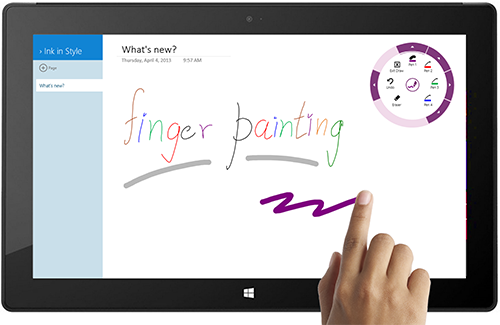
image of a hand doing Finger Painting on a tablet

Simply tap the screen, open the radial menu and select “Draw”.
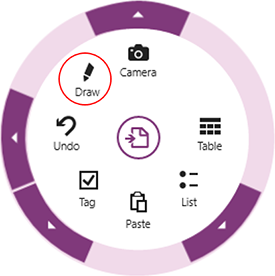
The "draw" thumbnail circled in red

From here you can get creative; choose pen colors, customize your thickness, and store these combinations as a ‘favorite’ pen.  Once you are done drawing, open the radial menu and select “Exit Draw”.
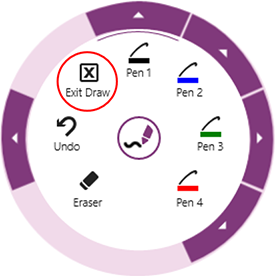
the "exit draw" thumbnail circled in red

Note: If your device does not have a touch screen, you can still use the feature with a mouse by following the same instructions above.

Inking with a pen still remains the preferred experience.  You can flip between pen and touch without much hassle and pan the page more easily.  If you are interested in doing a lot of inking or sketching we recommend that you get a device with a pen like a Surface Pro. 

To download this update, simply tap on the Store tile in Windows 8, and then tap or click Updates at the top right. If you haven’t installed the OneNote app from the Windows Store, you can download it here.

Keep the feedback coming–we are listening!