DESCRIPTION:
In Dynamics AX 2012 R3 the default behavior for CDXRealTimeService (RTS) calls are through HTTPS. The initialization of the Public or Self-Signed certificate can take >10 seconds and the process can be repeated during operation.
The typical scenario is that the Cashier in the Retail POINT of Sale, that request the RTS function example Returns, Inventory Lookup waits for the initialization. Depending on the customer’s situation, this might not be acceptable.
In the case the customer has a protected network environment, example through VPN, firewall ect, it should be safe to run the POS/RTS operation without the security check.
The performance improvement not doing the security check in RTS functions is up to 20 times.
In the following section, we describe how to disable security for WSHttpBinding.
Adding Binding support for Http:
IIS/Sites/CDXRealTimeService/”Bindings”
- Add http protocol on example port 85
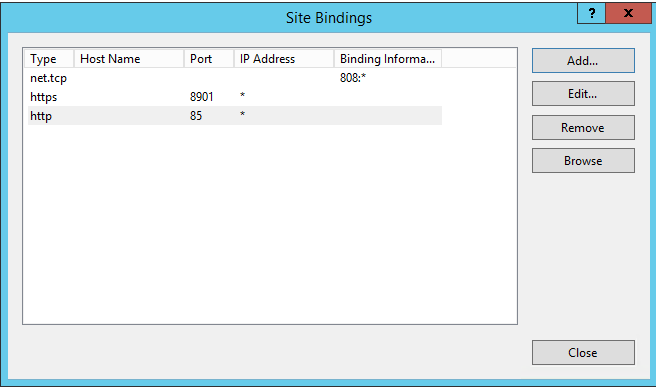
EDIT the table RetailTransactionServiceProfile
In the Dynamics AX Database from SQL Management Studio
- Change the CentralTableServerPort to 85
- Change the SECURITYOFF to 1
- Set Protocol to 1

- Run the 1070 job to replicate this to the Channel databases
Change the WEB.CONFIG
C:\Program Files (x86)\Microsoft Dynamics AX\60\CDX\Real-time Services\6.3\Web.config
In the Web.config file, it is possible to turn off the security.
Original
Changed
Change the POS.EXE.CONFIG
C:\Program Files (x86)\Microsoft Dynamics AX\60\Retail POS\ POS.EXE.CONFIG
In the Pos.Exe.Config file, it is possible to turn off the security.
Original
Changed
Author: Kim Truelsen
Date: 1/9/2015