Microsoft Dynamics Lifecycle Services has a new feature you’ll want to check out: Cloud powered support! Cloud powered support helps you manage support incidents.
How it works
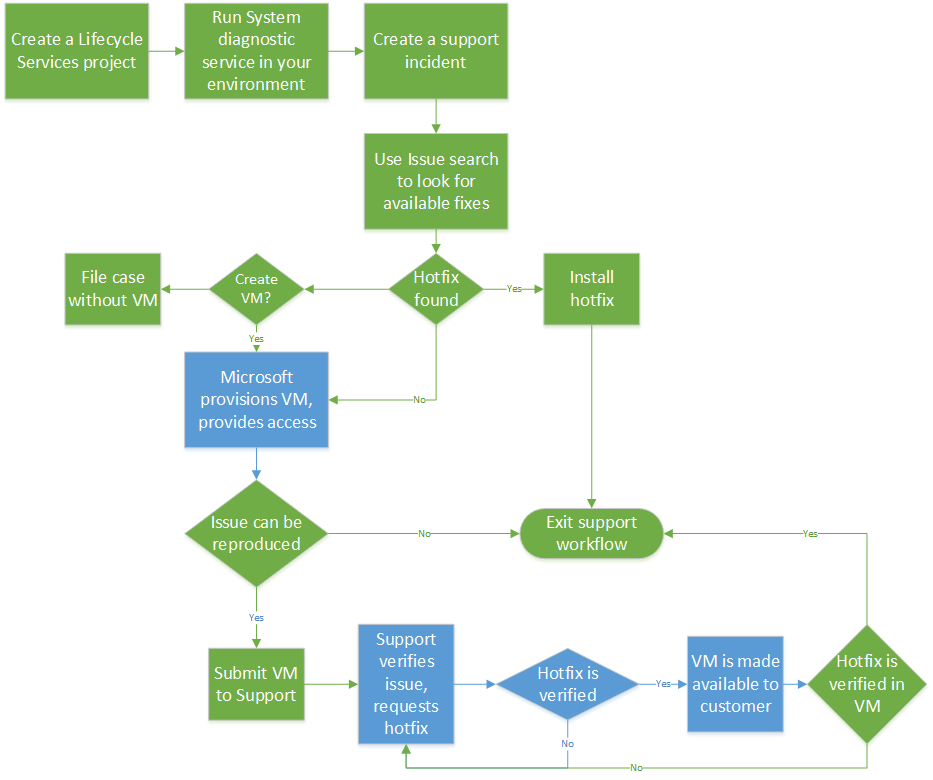
Cloud powered support lets you create a virtual machine (VM) in Microsoft Azure that has the same hotfixes installed as your local environment. You can reproduce and record the incident on the virtual machine, and then submit the VM to our support team. Our support team follows up by investigating the incident, testing a fix on the virtual machine, if a fix is found, and sending the VM and the fix back to you for verification.
Note: Virtual machines are only available for Microsoft Dynamics AX 2012 R2 and AX 2012 R3 environments.
The following flowchart illustrates the process of using Cloud powered support.
How to learn more
See the Cloud powered support (Lifecycle Services, LCS) article on TechNet.
![Avatar of Sally Erickson [MSFT]](https://secure.gravatar.com/avatar/b2d3bdbbbc47fddbf420513829a53dae17bac4cba643e593eb3a1da1ba4adb8d?s=212&d=mm&r=g)