Today’s post was written by Kirk Koenigsbauer, corporate vice president for the Office team.
We are excited to announce that the Cloud Storage Partner Program (CSPP) is now available for the Office apps on Android devices. Office on Windows desktops has long supported partner integrations that let you open and edit documents from a wide variety of storage locations. The CSPP, previously available for Office on iOS and Office Online, ensures that Office is the best way to get work done on all platforms, wherever your documents are stored.
It’s easy to add a cloud storage provider from the Add a place menu in the latest versions of Word, Excel and PowerPoint on Android. Then you can edit and share your documents stored with that provider as easily as you do with those stored on OneDrive. You can also launch Word, Excel or PowerPoint directly from the cloud storage provider’s app to edit your files, with changes automatically saved back to the cloud.
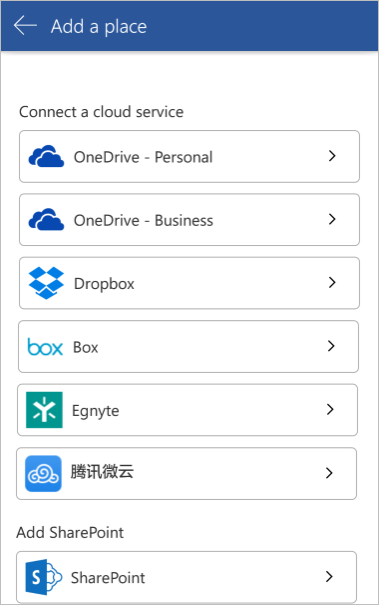
Now you can add cloud storage providers in Word, Excel and PowerPoint on Android devices.
Today, the list of available cloud storage options in Office for Android includes Dropbox, Box, Egnyte and 腾讯微云 (Tencent). We’ll add Citrix ShareFile, Edmodo and Learnium soon, and that list will continue to expand over time. Stay tuned for more.
—Kirk Koenigsbauer