Ask most of your friends how they’re doing, and they’ll probably tell you how hectic their lives are. You may feel that way too. Sometimes just thinking about balancing work and family can be exhausting. A lot of you use and love Excel at work. It makes tasks faster, it keeps you organized, and it adds insight into all that data that surrounds you.
Many of you may already be taking advantage of those same Excel benefits at home too. After all, as many of us know, sometimes keeping a handle on data at work is easier than managing our family budgets.
We’ve shared templates with you before on this blog, but today we want to highlight a really great family budget template.
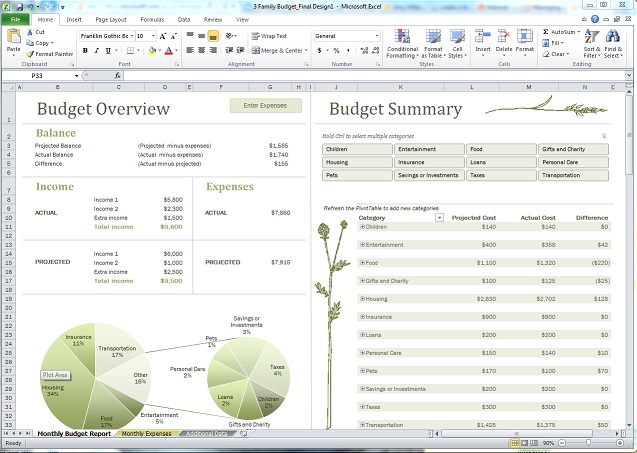
This template helps you track your family expenses by category and monitor your spending. One cool feature is that it quickly identifies where you need to cut back. That’s because it immediately calculates the difference between your actual spending and the targets you set at the beginning of each month.
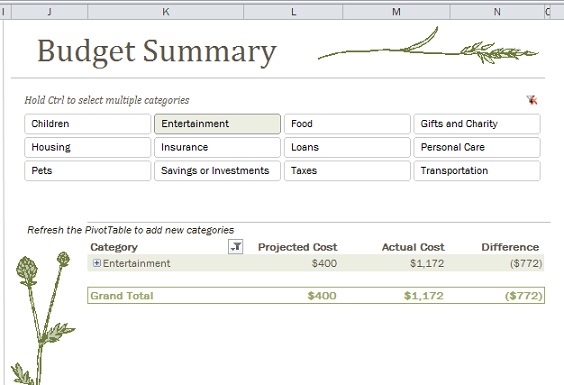
For example, below you can see the summary view of Entertainment expenses with the Projected and Actual Costs, and the difference clearly called out.
I also like how you can use this template to monitor your spending at a high level. When you need details, you can quickly drill down into each category to see the specific expenses. And entering a new expense is easy, too. Plus, the budget automatically updates with every new entry.
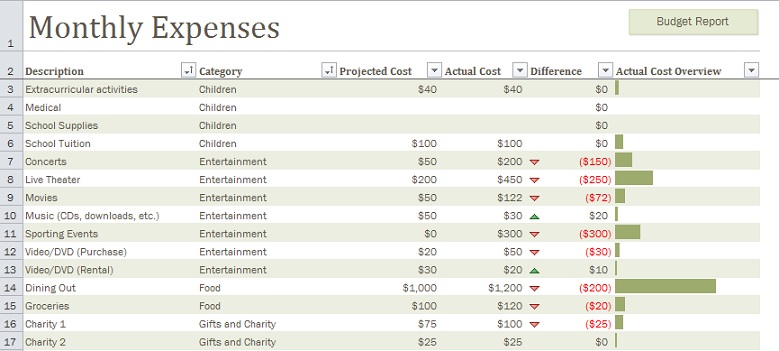
Here’s an example of the details around monthly expenses. You can quickly see where spending has gotten a bit out of hand in the Entertainment and Food categories.
If you need a little help with your family budget, and you already love Excel, check out this template. It not only makes it easier to stay on budget, but also helps make every penny and every minute count, so you can use your precious time at home to do things that are more fun, like playing Monopoly with your kids, going for a walk with your spouse, or even taking a nap (my ideal way to spend a Saturday afternoon).
–Amy Miller