
Log Analytics: Queries, how to find and run them in a Workbook – part 2
I hadn’t intended a Part 2 on this topic, but I also managed to add Tabs into the “FindMySyntax” Workbook for Azure Monitor Workbooks and Azure Resource Graph.
Please see part1: https://cm-edgetun.pages.dev/en-gb/industry/blog/cross-industry/2020/06/18/log-analytics-kql-saved-queries-how-to-find-and-run-them-in-a-workbook/
For future versions please look here: https://github.com/CliveW-MSFT/KQLpublic/tree/master/KQL/Workbooks/findMySynatx
Summary
So why do I have a Azure Monitor Workbook to find Workbooks, two main reasons:
- In Shared Workbooks, I can again search within the code for a keyword – highly useful for finding specific syntax. Shared Workbooks are those other people are granted access to view.
- You can filter by Time Modified – again useful if you have a lot of Workbooks to search through. This is also true for Private Workbooks (only the ones the author can see).
I have 100s of Workbooks from various projects, so a search by date is extremely useful. Unfortunately you cant do a keyword search within these, private workbooks.
Example:
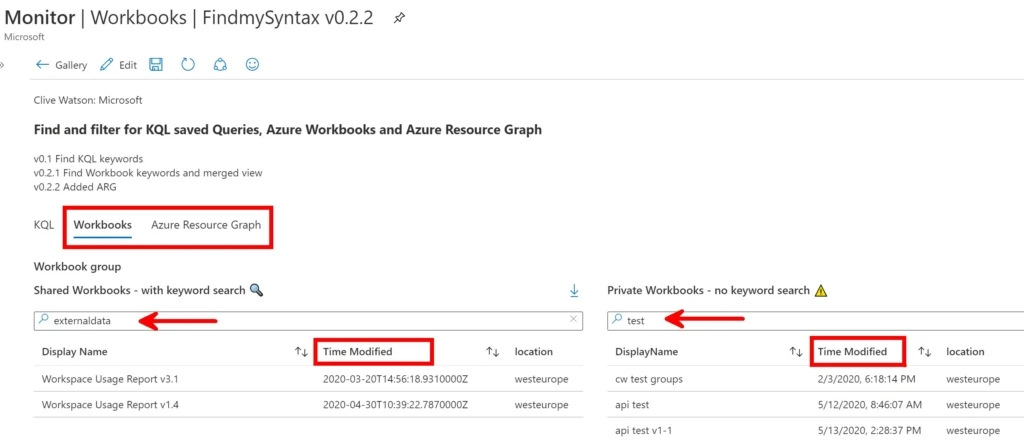
I also created a similar Tab for Azure Resource Graph saved queries (saved Queries only), again the main benefit is a Time and Keyword search.
Please see the latest file in my Github: https://github.com/CliveW-MSFT/KQLpublic/tree/master/KQL/Workbooks/findMySynatx
If you’d like to give it a try please read how to Import a Workbook from here: https://github.com/CliveW-MSFT/KQLpublic/blob/master/README.md
Special thanks to Gary Bushey for testing some of this, sorry Gary, but not all the bugs I’ve fixed yet!
Thanks Clive